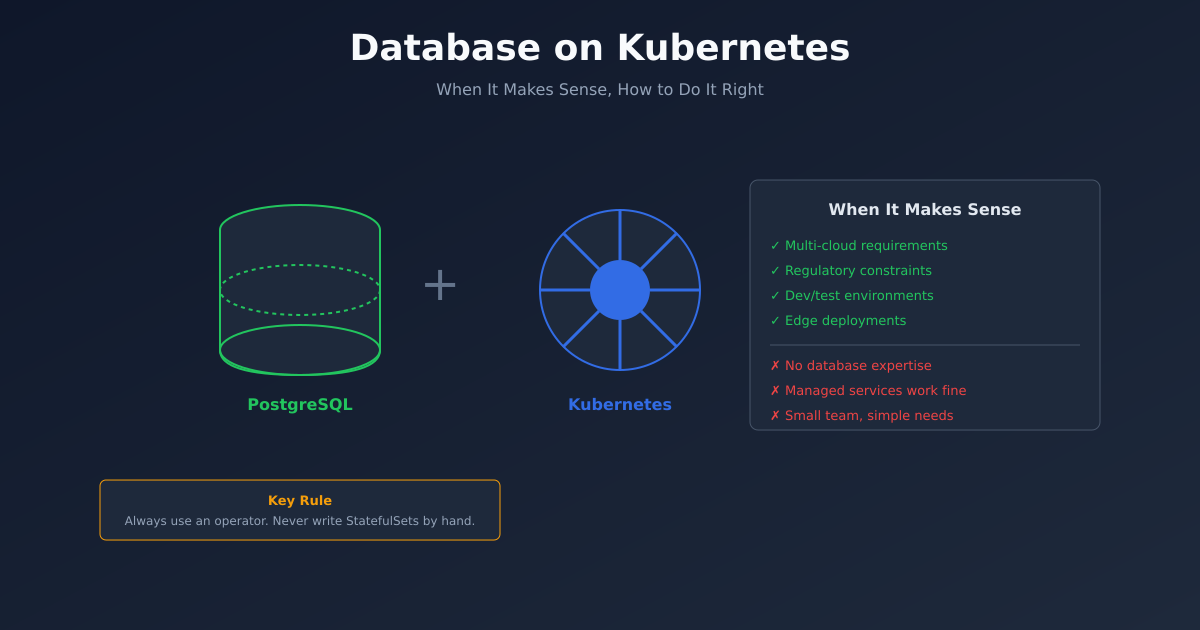
“Should we run our database on Kubernetes?” is one of the most debated questions in platform engineering.
The default advice is “don’t.” Use managed services. Let AWS or GCP handle the complexity. Kubernetes is for stateless workloads.
This advice is often right. But not always.
Here’s a framework for deciding, and a guide for doing it properly when the answer is yes.
Why People Say Don’t
The case against databases on Kubernetes is well-rehearsed:
Storage complexity. Kubernetes storage (PVCs, StorageClasses, CSI drivers) adds layers between your database and disk. More layers, more failure modes.
Stateful is hard. Kubernetes was designed for cattle, not pets. Databases are the ultimate pets - unique, irreplaceable, requiring careful handling.
Managed services exist. RDS, Cloud SQL, and Aurora handle backups, failover, and scaling. Why reinvent this?
Data loss risk. A misconfigured PVC deletion policy, an aggressive node drain, or a storage class with wrong reclaim settings can lose data.
These concerns are legitimate. If you can use a managed service, you probably should. Your DBA’s job is hard enough without adding Kubernetes to the mix.
When It Makes Sense
But there are scenarios where Kubernetes databases are the right choice:
Multi-cloud or hybrid requirements. Managed services lock you to a provider. If you need to run the same stack on AWS, GCP, and on-prem, Kubernetes provides consistency.
Regulatory constraints. Some regulations require data to stay in specific locations or on specific infrastructure. Managed services may not comply.
Cost at scale. RDS is expensive. At large scale, self-managed databases on Kubernetes can be significantly cheaper - if you have the expertise.
Development environments. Production databases belong in managed services. But spinning up dozens of ephemeral test databases? Kubernetes operators excel at this.
Edge deployments. Running at the edge, in retail stores, or in disconnected environments? No managed services available. Kubernetes provides a consistent platform.
Specific requirements. Need a database version or configuration that managed services don’t support? Self-managed might be your only option.
The Operator Pattern
If you’re going to run databases on Kubernetes, use an operator. Do not write StatefulSets by hand.
Operators encode database administration expertise in software. They handle:
- Cluster formation and discovery
- Failover and leader election
- Backup scheduling
- Point-in-time recovery
- Scaling and rebalancing
- Version upgrades
Good operators for common databases:
PostgreSQL: CloudNativePG, Zalando Postgres Operator, CrunchyData PGO
MySQL: Oracle MySQL Operator, Percona Operator
MongoDB: MongoDB Community Operator, Percona Operator
Redis: Spotahome Redis Operator, Redis Enterprise Operator
Cassandra: K8ssandra, DataStax Operator
These operators represent years of production experience. Use them.
Storage Configuration
Storage is where most Kubernetes database failures originate. Get this right.
Use fast storage. Databases need low-latency IOPS. Use SSD-backed storage classes. On AWS, gp3 minimum; io2 for high-performance workloads.
Provision adequate IOPS. Cloud storage IOPS are often tied to volume size. A 100GB gp3 volume maxes at 3,000 IOPS. Know your database’s requirements.
Set appropriate reclaim policies. The storage class’s reclaimPolicy determines what happens when a PVC is deleted. For databases, use Retain - you want to keep data even if the PVC object is accidentally deleted.
apiVersion: storage.k8s.io/v1
kind: StorageClass
metadata:
  name: database-storage
provisioner: ebs.csi.aws.com
parameters:
  type: gp3
  iops: "10000"
  throughput: "500"
reclaimPolicy: Retain
volumeBindingMode: WaitForFirstConsumer
allowVolumeExpansion: true
Enable volume expansion. Databases grow. You’ll need to expand storage eventually. Ensure your storage class allows it.
Test storage failure. Simulate disk failures, node failures, AZ failures. Know how your database behaves. Don’t learn this during an incident.
Backup Strategy
Kubernetes doesn’t back up your data. You need a backup strategy.
Operator-managed backups. Most operators support scheduled backups to object storage (S3, GCS). Use them.
apiVersion: postgresql.cnpg.io/v1
kind: Cluster
metadata:
  name: my-postgres
spec:
  backup:
    barmanObjectStore:
      destinationPath: s3://my-bucket/backups
      s3Credentials:
        accessKeyId:
          name: s3-creds
          key: ACCESS_KEY_ID
        secretAccessKey:
          name: s3-creds
          key: ACCESS_SECRET_KEY
    retentionPolicy: "30d"
Test restores regularly. A backup you haven’t tested isn’t a backup. Restore to a test cluster monthly.
Point-in-time recovery. For PostgreSQL, enable WAL archiving. For MySQL, enable binary logging. This lets you restore to any moment, not just the last backup.
Cross-region replication. For disaster recovery, replicate backups to another region. If your primary region fails, you need data accessible elsewhere.
High Availability
Databases need to survive failures. On Kubernetes, this means:
Multiple replicas. Run at least three replicas for quorum-based systems. Two replicas risk split-brain during network partitions.
Pod anti-affinity. Don’t schedule all replicas on the same node:
spec:
  affinity:
    podAntiAffinity:
      requiredDuringSchedulingIgnoredDuringExecution:
        - labelSelector:
            matchLabels:
              app: my-database
          topologyKey: kubernetes.io/hostname
Topology spread across zones. Spread replicas across availability zones:
spec:
  topologySpreadConstraints:
    - maxSkew: 1
      topologyKey: topology.kubernetes.io/zone
      whenUnsatisfiable: DoNotSchedule
      labelSelector:
        matchLabels:
          app: my-database
PodDisruptionBudgets. Prevent cluster operations from taking down too many replicas:
apiVersion: policy/v1
kind: PodDisruptionBudget
metadata:
  name: my-database-pdb
spec:
  minAvailable: 2
  selector:
    matchLabels:
      app: my-database
Monitoring
Database monitoring on Kubernetes combines database-specific and Kubernetes-generic metrics.
Database metrics. Connections, query latency, replication lag, lock contention. Most operators expose Prometheus metrics or can be scraped with exporters.
Storage metrics. IOPS utilisation, latency, throughput, available space. CSI drivers and cloud providers expose these.
Pod metrics. CPU, memory, restarts. Standard Kubernetes monitoring.
Key alerts:
- Replication lag exceeding threshold
- Storage usage above 80%
- Connection count approaching max
- Backup job failures
- Pod restarts
When Not To
Despite everything above, there are clear “don’t” scenarios:
You don’t have database expertise. Operating databases requires knowing databases. Kubernetes doesn’t change this. If you don’t have DBAs, use managed services.
Your team is small. The operational overhead of self-managed databases is significant. Small teams should optimise for simplicity.
Managed services meet your needs. If RDS does what you need at acceptable cost, use RDS. Don’t add complexity for its own sake.
Your workload isn’t Kubernetes-native. If the database is the only thing on Kubernetes, the overhead may not be worth it.
A Pragmatic Approach
Here’s what I recommend for most teams:
Production critical databases: Managed services. RDS, Cloud SQL, or similar. Let the cloud provider handle operations.
Development and test databases: Kubernetes with operators. Easy to spin up, easy to tear down, consistent with production schemas.
Specific use cases: Evaluate case by case. If you genuinely need self-managed databases, use operators, invest in storage, and monitor heavily.
Start with operators: If you’re experimenting, start with CloudNativePG for Postgres or a similar mature operator. Don’t build from scratch.
Databases on Kubernetes can work well. But they require more effort than managed services. Make that tradeoff consciously, not accidentally.