Kubernetes networking is where theory meets reality – and where most production incidents happen. DNS failures, service discovery issues, CNI misconfigurations, IP exhaustion. I’ve debugged them all.
This guide walks through Kubernetes networking from first principles: how packets actually move between containers, pods, nodes, and the outside world. We’ll cover the networking model, CNI plugins, kube-proxy modes, Services, Ingress, and Network Policies – with AWS/EKS context throughout.
The Kubernetes Networking Model
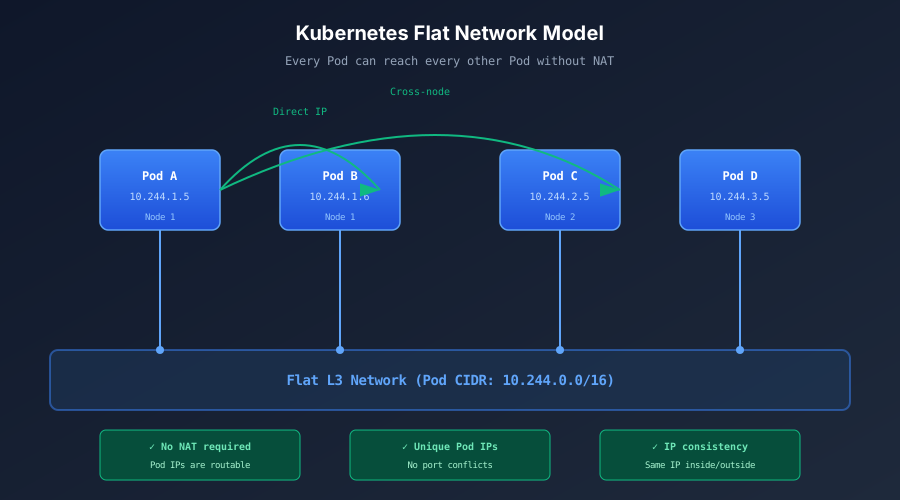
Kubernetes enforces three foundational networking principles:
- Pod-to-Pod Communication: Every Pod can communicate directly with any other Pod across nodes, without NAT
- Node-to-Pod Communication: Nodes can reach every Pod, and Pods can reach nodes, without NAT
- Pod IP Consistency: A Pod’s IP address is the same whether viewed from inside or outside the Pod
This creates a flat, routable L3 network where every Pod is a first-class network entity. No port translation. No NAT tables to debug. Applications communicate using standard IPs.
Why This Matters
The flat network model simplifies microservices communication dramatically. A Pod doesn’t need to know which node another Pod runs on – it just needs the IP address.
This design enables:
- Network policies at the Pod level (not port mappings)
- Simple service discovery via DNS
- Portable applications that don’t embed network topology
But Kubernetes doesn’t implement networking itself – it delegates to CNI plugins.
The Network Stack: From Container to Wire
Before diving into CNI plugins, let’s trace how a packet actually leaves a container.
Container → Pod: The Pause Container
Every Pod has a hidden “pause” container that holds the network namespace. Application containers join this namespace using --net=container.
┌─────────────────────────────────────────┐
│                  POD                    │
│  ┌─────────────┐    ┌─────────────┐    │
│  │  Container  │    │  Container  │    │
│  │    (app)    │    │  (sidecar)  │    │
│  └──────┬──────┘    └──────┬──────┘    │
│         │                  │           │
│         └────────┬─────────┘           │
│                  │                     │
│           ┌──────┴──────┐              │
│           │    pause    │              │
│           │  (network   │              │
│           │  namespace) │              │
│           └──────┬──────┘              │
│                  │                     │
│           eth0 (Pod IP)                │
└──────────────────┬──────────────────────┘
                   │
              veth pair
Containers within a Pod share:
- The same IP address
- The same port space
- Communication via
localhost
This is why containers in the same Pod can reach each other on 127.0.0.1 – they’re in the same network namespace.
Pod → Node: Virtual Ethernet Pairs
Pods connect to the node’s network namespace via veth pairs – virtual Ethernet cables with one end in the Pod and one end on the host.
┌─────────────────────────────────────────────────────────────┐
│                          NODE                               │
│                                                             │
│  ┌─────────────┐          ┌─────────────┐                  │
│  │    Pod A    │          │    Pod B    │                  │
│  │             │          │             │                  │
│  │    eth0     │          │    eth0     │                  │
│  └──────┬──────┘          └──────┬──────┘                  │
│         │ veth                   │ veth                    │
│         │                        │                         │
│  ┌──────┴────────────────────────┴──────┐                  │
│  │              cni0 bridge             │                  │
│  └──────────────────┬───────────────────┘                  │
│                     │                                       │
│              ┌──────┴──────┐                               │
│              │    eth0     │                               │
│              │ (node IP)   │                               │
│              └──────┬──────┘                               │
└─────────────────────┼───────────────────────────────────────┘
                      │
                Physical Network
Key components:
| Component | Location | Purpose |
|---|---|---|
eth0 (Pod) | Pod namespace | Pod’s network interface, holds Pod IP |
vethXXX | Host namespace | Host end of veth pair, connects to bridge |
cni0 | Host namespace | Virtual bridge connecting all Pods on node |
eth0 (Node) | Host namespace | Physical/virtual NIC to external network |
Same-Node Communication
When Pod A talks to Pod B on the same node:
- Packet exits Pod A via
eth0 - Travels through veth pair to
cni0bridge - Bridge forwards to Pod B’s veth pair
- Enters Pod B via
eth0
No routing required – it’s just a layer 2 switch operation.
Cross-Node Communication
When Pod A on Node 1 talks to Pod C on Node 2:
- Packet exits Pod A via
eth0 - Travels through veth pair to
cni0bridge - Bridge routes to node’s routing table
- Encapsulation (VXLAN, IPIP, etc.) wraps packet
- Travels over physical network to Node 2
- Decapsulation unwraps packet
- Routes to Pod C via Node 2’s
cni0bridge
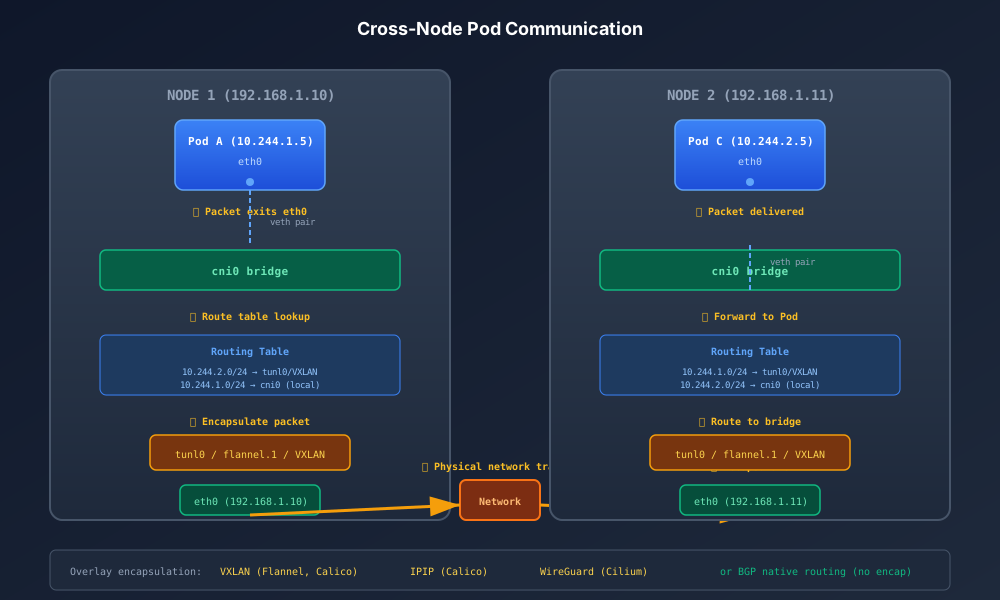
This encapsulation is the overlay network – making Pod IPs routable across nodes even when the underlying network doesn’t know about them.
CNI Plugins: The Network Implementation
The Container Network Interface (CNI) is the specification that defines how container runtimes configure networking. Kubernetes doesn’t care how networking works – it just calls CNI plugins.
How CNI Works
When kubelet creates a Pod:
- Container runtime creates network namespace
- Runtime calls CNI plugin with namespace details
- CNI plugin:
- Allocates IP address (IPAM)
- Creates veth pair
- Configures routes
- Sets up any overlay/encapsulation
- Runtime starts containers in namespace
Major CNI Plugins
AWS VPC CNI (EKS Default)
The VPC CNI is AWS’s native plugin for EKS. Instead of overlay networking, it assigns real VPC IP addresses to Pods.
How it works:
- Each node gets multiple ENIs (Elastic Network Interfaces)
- Each ENI has multiple secondary IPs
- Pods get secondary IPs directly from VPC subnet
Advantages:
- Native VPC networking – no encapsulation overhead
- Security groups can apply to Pods
- VPC Flow Logs capture Pod traffic
- Direct routing – better performance
Disadvantages:
- IP address exhaustion is real (limited IPs per instance type)
- Requires VPC CIDR planning
- Pod density limited by ENI/IP limits
# Check IP allocation on an EKS node
kubectl get node -o jsonpath='{.items[*].status.allocatable.pods}'

# View ENI attachments
aws ec2 describe-instances --instance-id i-xxx \
  --query 'Reservations[].Instances[].NetworkInterfaces'
IP Exhaustion Mitigation:
- Use prefix delegation (assign /28 prefixes instead of individual IPs)
- Use larger instance types (more ENIs, more IPs)
- Consider secondary CIDR ranges
- Or switch to overlay-based CNI
Calico
Calico is the most popular third-party CNI. It supports multiple modes:
BGP Mode (Native Routing):
- Uses BGP to advertise Pod CIDRs
- No encapsulation – best performance
- Requires BGP-capable network infrastructure
- Each node becomes a BGP peer
IPIP Mode:
- Encapsulates packets in IP-in-IP tunnels
- Works on any network
- Small performance overhead
VXLAN Mode:
- Encapsulates in VXLAN
- Works on any network
- Slightly higher overhead than IPIP
# Calico IPPool with VXLAN
apiVersion: crd.projectcalico.org/v1
kind: IPPool
metadata:
  name: default-pool
spec:
  cidr: 10.244.0.0/16
  encapsulation: VXLAN
  natOutgoing: true
  nodeSelector: all()
Calico’s killer feature: Network Policies. Native Kubernetes NetworkPolicy support plus Calico’s extended policies for more granular control.
Cilium
Cilium is the modern choice – built on eBPF (extended Berkeley Packet Filter), it operates at the kernel level without iptables.
Advantages:
- No iptables overhead – kernel-native packet processing
- Hubble for network observability
- Native support for L7 policies (HTTP, gRPC, Kafka)
- Better performance at scale
Architecture:
┌───────────────────────────────────────────┐
│                   Node                    │
│                                           │
│  ┌─────────────────────────────────────┐  │
│  │           Cilium Agent              │  │
│  │  (programs eBPF, manages policies)  │  │
│  └──────────────────┬──────────────────┘  │
│                     │                     │
│           ┌─────────┴─────────┐           │
│           │   eBPF Programs   │           │
│           │   (in kernel)     │           │
│           └─────────┬─────────┘           │
│                     │                     │
│  ┌─────────────┐    │    ┌─────────────┐  │
│  │    Pod A    │◄───┴───►│    Pod B    │  │
│  └─────────────┘         └─────────────┘  │
└───────────────────────────────────────────┘
On EKS:
# Replace VPC CNI with Cilium
helm repo add cilium https://helm.cilium.io/
helm install cilium cilium/cilium --version 1.14.0 \
  --namespace kube-system \
  --set eni.enabled=true \
  --set ipam.mode=eni \
  --set egressMasqueradeInterfaces=eth0 \
  --set routingMode=native
Flannel
The simplest CNI. Uses VXLAN overlay by default. Good for learning, but lacks NetworkPolicy support without Calico integration (Canal).
CNI Comparison
| Feature | VPC CNI | Calico | Cilium | Flannel |
|---|---|---|---|---|
| Overlay | No (native) | Optional | Optional | Yes |
| Performance | Excellent | Very Good | Excellent | Good |
| NetworkPolicy | Limited | Full + Extended | Full + L7 | No |
| Complexity | Low | Medium | Medium-High | Low |
| Observability | VPC Flow Logs | Limited | Hubble | Limited |
| EKS Integration | Native | Manual | Manual | Manual |
Services: Stable Endpoints for Pods
Pods are ephemeral – they come and go, IPs change. Services provide stable endpoints.
Service Types
ClusterIP (Default)
Internal-only virtual IP. Only reachable from within the cluster.
apiVersion: v1
kind: Service
metadata:
  name: backend
spec:
  type: ClusterIP
  selector:
    app: backend
  ports:
  - port: 80
    targetPort: 8080
How it works:
- Service gets a ClusterIP (e.g.,
10.100.0.100) - kube-proxy programs routing rules on every node
- Traffic to ClusterIP gets DNAT’d to a backend Pod IP
- Load balancing across healthy endpoints
NodePort
Exposes service on each node’s IP at a static port (30000-32767).
apiVersion: v1
kind: Service
metadata:
  name: frontend
spec:
  type: NodePort
  selector:
    app: frontend
  ports:
  - port: 80
    targetPort: 8080
    nodePort: 30080
Traffic flow: Node:30080 → kube-proxy → Pod:8080
LoadBalancer
Creates external load balancer (cloud-provider specific).
On EKS, this creates an AWS Classic Load Balancer or NLB:
apiVersion: v1
kind: Service
metadata:
  name: api
  annotations:
    service.beta.kubernetes.io/aws-load-balancer-type: "nlb"
    service.beta.kubernetes.io/aws-load-balancer-scheme: "internet-facing"
spec:
  type: LoadBalancer
  selector:
    app: api
  ports:
  - port: 443
    targetPort: 8443
AWS Load Balancer Controller is the modern way to manage ALBs/NLBs:
apiVersion: v1
kind: Service
metadata:
  name: api
  annotations:
    service.beta.kubernetes.io/aws-load-balancer-nlb-target-type: "ip"
    service.beta.kubernetes.io/aws-load-balancer-scheme: "internet-facing"
spec:
  type: LoadBalancer
  loadBalancerClass: service.k8s.aws/nlb
  selector:
    app: api
  ports:
  - port: 443
    targetPort: 8443
ExternalName
DNS CNAME to external service. No proxying.
apiVersion: v1
kind: Service
metadata:
  name: external-db
spec:
  type: ExternalName
  externalName: mydb.example.com
Service Discovery via DNS
CoreDNS runs in every cluster and provides DNS-based service discovery.
DNS naming:
<service>.<namespace>.svc.cluster.localExamples:
backend.default.svc.cluster.local→ ClusterIP ofbackendservice indefaultnamespacebackend.default→ Short form (works within cluster)backend→ Shortest form (works within same namespace)
Headless Services (no ClusterIP):
apiVersion: v1
kind: Service
metadata:
  name: stateful-app
spec:
  clusterIP: None  # Headless
  selector:
    app: stateful-app
DNS returns Pod IPs directly instead of a single ClusterIP. Used for StatefulSets where clients need to reach specific Pods.
kube-proxy: The Service Implementation
kube-proxy runs on every node and implements Services by programming network rules.
kube-proxy Modes
iptables Mode (Default)
Uses Linux iptables rules for packet filtering and NAT.
How it works:
- kube-proxy watches API server for Service/Endpoint changes
- Programs iptables rules:
KUBE-SERVICES→KUBE-SVC-xxx→KUBE-SEP-xxx - Kernel handles packet routing directly (no userspace proxy)
Rule chain:
PREROUTING
    └── KUBE-SERVICES
            └── KUBE-SVC-XXXXX (per service)
                    ├── KUBE-SEP-AAAA (50% probability)
                    └── KUBE-SEP-BBBB (50% probability)
View rules:
# List service rules
iptables -t nat -L KUBE-SERVICES -n -v

# Follow a specific service
iptables -t nat -L KUBE-SVC-XXXXXXX -n -v
Drawbacks:
- O(n) rule evaluation – scales poorly with many services
- Rules are sequential – first match wins
- Debugging is painful
IPVS Mode
Uses Linux Virtual Server for L4 load balancing.
Advantages over iptables:
- O(1) lookup – hash tables instead of sequential rules
- Better load balancing algorithms (round-robin, least connections, etc.)
- Designed for high-performance load balancing
- Scales to thousands of services
Enable on EKS:
# kube-proxy ConfigMap
apiVersion: v1
kind: ConfigMap
metadata:
  name: kube-proxy
  namespace: kube-system
data:
  config.conf: |
    mode: "ipvs"
    ipvs:
      scheduler: "rr"
# Restart kube-proxy
kubectl -n kube-system rollout restart daemonset kube-proxy
# Verify IPVS rules
ipvsadm -LnOutput:
IP Virtual Server version 1.2.1 (size=4096)
Prot LocalAddress:Port Scheduler Flags
  -> RemoteAddress:Port           Forward Weight ActiveConn InActConn
TCP  10.100.0.1:443 rr
  -> 10.0.1.10:443                Masq    1      0          0
TCP  10.100.0.10:53 rr
  -> 10.244.0.5:53                Masq    1      0          0
  -> 10.244.1.3:53                Masq    1      0          0
nftables Mode (Future)
The successor to iptables. Better performance than iptables, similar to IPVS. Still in development for kube-proxy.
eBPF (Cilium)
Cilium can replace kube-proxy entirely with eBPF-based service implementation:
# Cilium values for kube-proxy replacement
kubeProxyReplacement: true
k8sServiceHost: <API_SERVER_IP>
k8sServicePort: 443
Benefits: kernel-native packet processing, no iptables overhead, better observability via Hubble.
kube-proxy Mode Comparison
| Mode | Complexity | Performance | Scale | Status |
|---|---|---|---|---|
| iptables | High rules | O(n) | ~5000 services | Default |
| IPVS | Lower | O(1) | 10000+ services | GA |
| nftables | Lower | O(1) | 10000+ services | Beta |
| eBPF (Cilium) | Medium | O(1) | 10000+ services | Production |
Recommendation: For clusters with >1000 services, switch to IPVS or Cilium.
Ingress: HTTP/S Traffic Management
Ingress provides HTTP/S routing from outside the cluster to Services.
Ingress Resource
apiVersion: networking.k8s.io/v1
kind: Ingress
metadata:
  name: app-ingress
  annotations:
    kubernetes.io/ingress.class: "nginx"
spec:
  rules:
  - host: app.example.com
    http:
      paths:
      - path: /api
        pathType: Prefix
        backend:
          service:
            name: api-service
            port:
              number: 80
      - path: /
        pathType: Prefix
        backend:
          service:
            name: frontend-service
            port:
              number: 80
  tls:
  - hosts:
    - app.example.com
    secretName: app-tls
AWS Load Balancer Controller
The modern way to do Ingress on EKS – creates ALBs directly from Ingress resources.
apiVersion: networking.k8s.io/v1
kind: Ingress
metadata:
  name: app-ingress
  annotations:
    kubernetes.io/ingress.class: "alb"
    alb.ingress.kubernetes.io/scheme: internet-facing
    alb.ingress.kubernetes.io/target-type: ip
    alb.ingress.kubernetes.io/certificate-arn: arn:aws:acm:...
spec:
  rules:
  - host: app.example.com
    http:
      paths:
      - path: /
        pathType: Prefix
        backend:
          service:
            name: app-service
            port:
              number: 80
Target types:
instance: ALB routes to NodePort (extra hop)ip: ALB routes directly to Pod IPs (requires VPC CNI)
Gateway API (The Future)
Gateway API is the evolution of Ingress – more expressive, role-oriented, and extensible.
apiVersion: gateway.networking.k8s.io/v1
kind: Gateway
metadata:
  name: main-gateway
spec:
  gatewayClassName: aws-alb
  listeners:
  - name: https
    port: 443
    protocol: HTTPS
    tls:
      mode: Terminate
      certificateRefs:
      - name: app-cert
---
apiVersion: gateway.networking.k8s.io/v1
kind: HTTPRoute
metadata:
  name: app-route
spec:
  parentRefs:
  - name: main-gateway
  hostnames:
  - "app.example.com"
  rules:
  - matches:
    - path:
        type: PathPrefix
        value: /api
    backendRefs:
    - name: api-service
      port: 80
Network Policies: Firewall for Pods
By default, all Pods can communicate with all other Pods. Network Policies restrict this.
Default Deny
Start with deny-all, then whitelist:
apiVersion: networking.k8s.io/v1
kind: NetworkPolicy
metadata:
  name: default-deny-all
  namespace: production
spec:
  podSelector: {}  # Applies to all pods
  policyTypes:
  - Ingress
  - Egress
Allow Specific Traffic
apiVersion: networking.k8s.io/v1
kind: NetworkPolicy
metadata:
  name: allow-frontend-to-backend
  namespace: production
spec:
  podSelector:
    matchLabels:
      app: backend
  policyTypes:
  - Ingress
  ingress:
  - from:
    - podSelector:
        matchLabels:
          app: frontend
    ports:
    - protocol: TCP
      port: 8080
Allow External Egress
apiVersion: networking.k8s.io/v1
kind: NetworkPolicy
metadata:
  name: allow-external-egress
  namespace: production
spec:
  podSelector:
    matchLabels:
      app: backend
  policyTypes:
  - Egress
  egress:
  # Allow DNS
  - to:
    - namespaceSelector: {}
      podSelector:
        matchLabels:
          k8s-app: kube-dns
    ports:
    - protocol: UDP
      port: 53
  # Allow HTTPS to external
  - to:
    - ipBlock:
        cidr: 0.0.0.0/0
        except:
        - 10.0.0.0/8
        - 172.16.0.0/12
        - 192.168.0.0/16
    ports:
    - protocol: TCP
      port: 443
CNI Support Required
Important: Network Policies require CNI support. VPC CNI alone doesn’t support them – you need Calico or Cilium.
On EKS with VPC CNI + Calico for policies:
kubectl apply -f https://raw.githubusercontent.com/aws/amazon-vpc-cni-k8s/master/config/master/calico-operator.yaml
kubectl apply -f https://raw.githubusercontent.com/aws/amazon-vpc-cni-k8s/master/config/master/calico-crs.yaml
DNS Deep Dive
CoreDNS is the cluster DNS server.
How DNS Resolution Works
- Pod makes DNS query (e.g.,
backend.default) - Query goes to CoreDNS (ClusterIP
10.96.0.10, port 53) - CoreDNS looks up Service → returns ClusterIP
- Pod connects to ClusterIP
The ndots Problem
Default resolv.conf in Pods:
nameserver 10.96.0.10
search default.svc.cluster.local svc.cluster.local cluster.local
options ndots:5
ndots:5 means: if hostname has fewer than 5 dots, append search domains first.
Query for api.external.com:
api.external.com.default.svc.cluster.local→ NXDOMAINapi.external.com.svc.cluster.local→ NXDOMAINapi.external.com.cluster.local→ NXDOMAINapi.external.com→ Success
Four extra DNS queries for every external domain lookup!
Fix: Lower ndots or use FQDN with trailing dot:
spec:
  dnsConfig:
    options:
    - name: ndots
      value: "2"
Or in application code: api.external.com. (trailing dot = FQDN, skip search domains).
CoreDNS Scaling
CoreDNS can become a bottleneck. Signs:
- High DNS latency
- Increased 5xx from services
- CoreDNS Pod CPU saturation
Solutions:
- Scale CoreDNS replicas
- Enable NodeLocal DNSCache (runs DNS cache on every node)
- Tune
ndots
# Enable NodeLocal DNSCache on EKS
kubectl apply -f https://raw.githubusercontent.com/kubernetes/kubernetes/master/cluster/addons/dns/nodelocaldns/nodelocaldns.yaml
Troubleshooting
Essential Commands
# Pod networking
kubectl exec -it <pod> -- ip addr
kubectl exec -it <pod> -- ip route
kubectl exec -it <pod> -- cat /etc/resolv.conf

# DNS testing
kubectl exec -it <pod> -- nslookup <service>
kubectl exec -it <pod> -- dig <service>.default.svc.cluster.local

# Connectivity testing
kubectl exec -it <pod> -- curl -v <service>:<port>
kubectl exec -it <pod> -- nc -zv <service> <port>

# Node networking
kubectl get nodes -o wide
ssh <node> ip route
ssh <node> iptables -t nat -L KUBE-SERVICES -n

# Service/Endpoints
kubectl get svc,endpoints -n <namespace>
kubectl describe svc <service>

# kube-proxy
kubectl logs -n kube-system -l k8s-app=kube-proxy
kubectl get configmap -n kube-system kube-proxy -o yaml

# CNI
kubectl logs -n kube-system -l k8s-app=aws-node  # VPC CNI
kubectl logs -n kube-system -l k8s-app=calico-node
kubectl logs -n kube-system -l k8s-app=cilium
Common Issues
| Symptom | Likely Cause | Check |
|---|---|---|
| Pod can’t resolve DNS | CoreDNS down, NetworkPolicy blocking | kubectl get pods -n kube-system -l k8s-app=kube-dns |
| Pod can’t reach Service | kube-proxy misconfigured, endpoints missing | kubectl get endpoints <svc> |
| Cross-node Pod failure | CNI overlay broken, node routing | ip route, CNI logs |
| External traffic fails | LoadBalancer health check, security groups | AWS console, target group health |
| Slow DNS | ndots:5, CoreDNS overload | dig +trace, CoreDNS metrics |
Network Policy Debugging
# Check if policies exist
kubectl get networkpolicies -A

# Describe policy
kubectl describe networkpolicy <name>

# Test connectivity (deploy debug pod)
kubectl run debug --image=nicolaka/netshoot -it --rm -- bash
Summary
Kubernetes networking is layered:
- CNI Plugin: Creates Pod network, assigns IPs, handles routing
- kube-proxy: Implements Services via iptables/IPVS/eBPF
- CoreDNS: Provides service discovery via DNS
- Ingress/Gateway: Routes external HTTP/S traffic
- Network Policies: Controls Pod-to-Pod communication
For EKS specifically:
- VPC CNI is default – native VPC networking, watch for IP exhaustion
- AWS Load Balancer Controller for ALB/NLB integration
- Consider Cilium for eBPF benefits and better observability
- Calico or Cilium required for Network Policies
The networking model is elegant in design but complex in implementation. Understanding the layers – and where packets actually flow – is essential for debugging production issues.
More Kubernetes deep-dives at CoderCo. Connect on LinkedIn for infrastructure patterns and networking war stories.