
AWS Account Provisioning at Scale with Control Tower, Service Catalog, and Terraform
When you’re running a platform for hundreds of microservices, account sprawl is inevitable. Teams need isolated environments – dev, staging, prod – and you need guardrails, SSO access, networking, and baseline security in every single one.
Doing this manually doesn’t scale. At a previous company, I built an automated account vending machine that could spin up a fully configured AWS account in under 30 minutes: enrolled in Control Tower, SSO access configured, baseline IAM roles deployed, and ready for application workloads.
This post covers the architecture and Terraform implementation – how we used Control Tower Account Factory via Service Catalog, CloudFormation StackSets for cross-account role deployment, and a modular Terraform structure that made provisioning new accounts a single PR.
The Flow
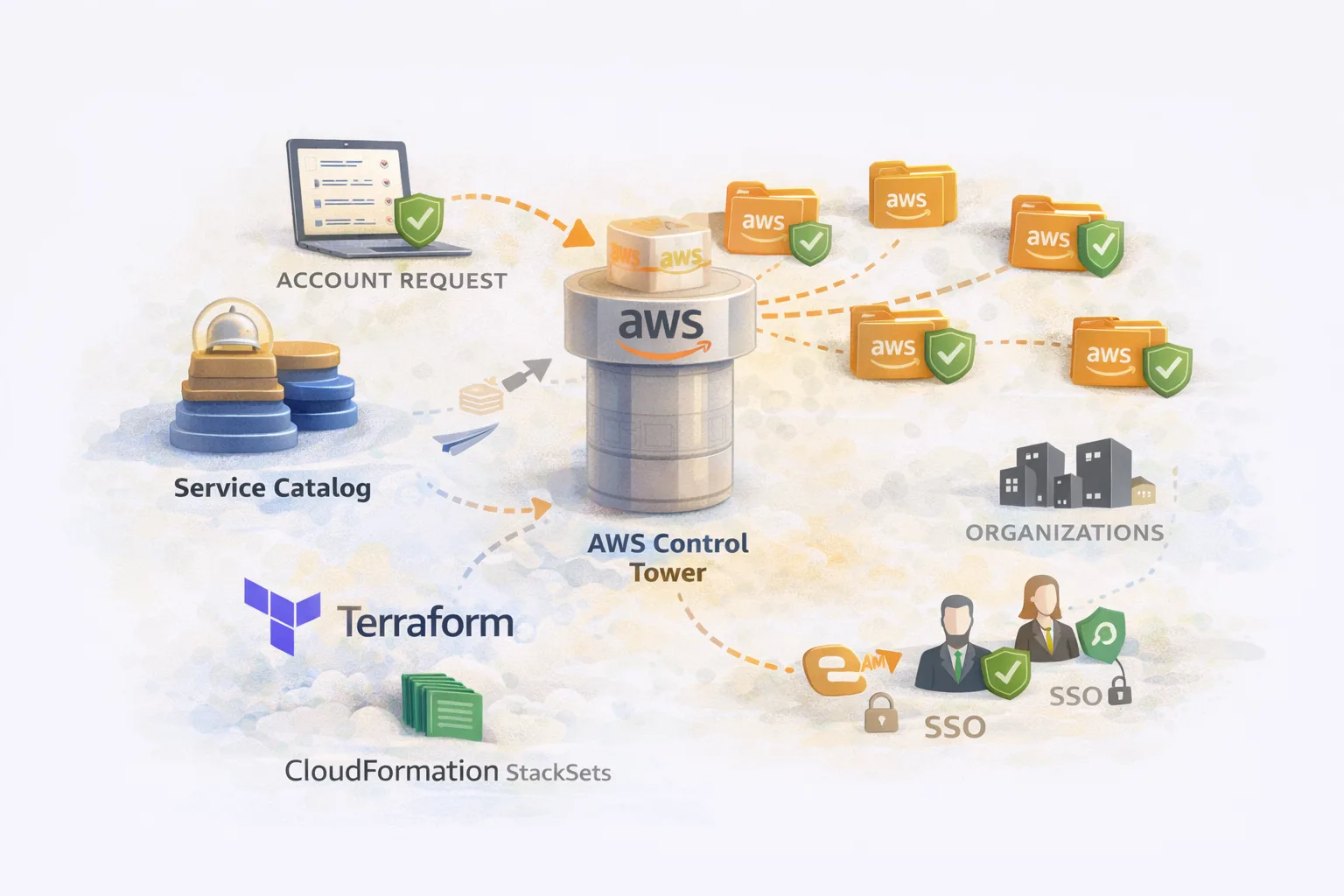
The provisioning flow:
- Developer requests account via PR to the account-provisioning repo
- Terraform provisions the account via Service Catalog (Control Tower Account Factory)
- Control Tower enrolls the account, applies guardrails, sets up CloudTrail/Config
- StackSet deploys baseline IAM roles to the new account
- SSO user created automatically with access to the account
- Account metadata written to S3 for billing/tagging systems
- CI/CD stack created with permissions to deploy to the new account
The entire process is GitOps-driven. No console clicks, no manual steps, full audit trail.
Prerequisites
Before implementing this, you need:
- AWS Organizations with a management (billing) account
- Control Tower enabled and configured
- Service Catalog with the Control Tower Account Factory product
- At least one registered OU (Organizational Unit) in Control Tower
- IAM Identity Center (SSO) configured
- A CI/CD platform with AWS integration (we used a Terraform automation platform)
Module Structure
account-provisioning/
├── modules/
│   ├── account/           # Creates AWS account via Service Catalog
│   │   ├── main.tf
│   │   ├── variables.tf
│   │   ├── outputs.tf
│   │   └── metadata.tf
│   └── stack/             # Creates CI/CD stack for the OU
│       ├── main.tf
│       ├── variables.tf
│       └── outputs.tf
└── ou/
    ├── stacks.tf          # CI/CD stack definitions per OU
    ├── platform/
    │   ├── my-service/
    │   │   └── main.tf    # Account definitions
    │   └── another-service/
    │       └── main.tf
    └── infrastructure/
        ├── dns/
        │   └── main.tf
        └── networking/
            └── main.tf
Each directory under ou/ corresponds to a registered Organizational Unit. Accounts are defined within their respective OU folders.
The Account Module
This is the core module that provisions accounts via Control Tower Account Factory.
modules/account/variables.tf
variable "name" {
  description = "Account name (must be unique across the organization)"
  type        = string
}

variable "email" {
  description = "Root email for the account (must be unique, use + addressing)"
  type        = string
}

variable "parent_ou_id" {
  description = "Parent OU ID for account lookups"
  type        = string
}

variable "ou_id" {
  description = "Target OU ID where the account will be placed"
  type        = string
}

variable "sso_user_firstname" {
  description = "First name for the SSO user"
  type        = string
}

variable "sso_user_lastname" {
  description = "Last name for the SSO user"
  type        = string
}

variable "alias" {
  description = "Account alias (defaults to name)"
  type        = string
  default     = null
}

variable "account_deployment_type" {
  description = "Deployment type for billing categorization"
  type        = string
  default     = null
}

variable "account_bill_type" {
  description = "Billing type (Prod/NonProd/Data)"
  type        = string
  default     = null
}
modules/account/main.tf
locals {
  # After account creation, look it up by name to get the account ID
  account_lookup = [
    for account in data.aws_organizations_organizational_unit_descendant_accounts.accounts.accounts :
    account if account.name == var.name
  ]
  account_id = length(local.account_lookup) > 0 ? local.account_lookup[0].id : null
}

# Look up all accounts in the parent OU to find our newly created account
data "aws_organizations_organizational_unit_descendant_accounts" "accounts" {
  depends_on = [aws_cloudformation_stack_set_instance.deploy_baseline_roles]
  parent_id  = var.parent_ou_id
}

# This is the magic - Service Catalog provisions the account via Control Tower
resource "aws_servicecatalog_provisioned_product" "account" {
  name                       = var.name
  product_name               = "AWS Control Tower Account Factory"
  provisioning_artifact_name = "AWS Control Tower Account Factory"

  provisioning_parameters {
    key   = "AccountName"
    value = var.name
  }

  provisioning_parameters {
    key   = "AccountEmail"
    value = var.email
  }

  provisioning_parameters {
    key   = "ManagedOrganizationalUnit"
    value = "Custom (${var.ou_id})"
  }

  provisioning_parameters {
    key   = "SSOUserEmail"
    value = var.email
  }

  provisioning_parameters {
    key   = "SSOUserFirstName"
    value = var.sso_user_firstname
  }

  provisioning_parameters {
    key   = "SSOUserLastName"
    value = var.sso_user_lastname
  }

  tags = {
    ManagedBy  = "Terraform"
    OwningTeam = "Platform"
  }

  # Account creation can take 20-30 minutes
  timeouts {
    create = "60m"
    update = "60m"
    delete = "60m"
  }
}

# Deploy baseline IAM roles to the new account via StackSet
resource "aws_cloudformation_stack_set_instance" "deploy_baseline_roles" {
  stack_set_name = "BaselineIAMRoles"  # Pre-created StackSet

  deployment_targets {
    organizational_unit_ids = [var.parent_ou_id]
  }

  retain_stack = false
  region       = "eu-west-1"

  depends_on = [
    aws_servicecatalog_provisioned_product.account
  ]
}
Key Points About the Account Module
Service Catalog provisioning: The aws_servicecatalog_provisioned_product resource triggers Control Tower Account Factory. This:
- Creates the AWS account
- Enrolls it in Control Tower
- Applies mandatory guardrails (SCPs)
- Sets up CloudTrail and AWS Config
- Creates the SSO user
The OU parameter format: Note "Custom (${var.ou_id})" – this is the exact format Control Tower expects. The “Custom” prefix indicates it’s a custom OU rather than a foundational one.
StackSet deployment: After the account exists, we deploy baseline IAM roles via a pre-existing CloudFormation StackSet. This runs automatically across all accounts in the OU.
Account ID lookup: We can’t get the account ID directly from Service Catalog, so we look it up after creation using the Organizations API.
modules/account/outputs.tf
output "account_id" {
  description = "The AWS account ID"
  value       = local.account_id
}

output "account_name" {
  description = "The account name"
  value       = var.name
}

output "deploy_role_arn" {
  description = "ARN of the deployment role in the new account"
  value       = local.account_id != null ? "arn:aws:iam::${local.account_id}:role/DeployRole" : null
}
modules/account/metadata.tf
We write account metadata to S3 for billing systems and asset management:
locals {
  # Infer deployment type from account name
  account_deployment_type = can(regex("data", var.name)) ? "Data" : "Containers"

  # Infer billing type from account name
  account_bill_type = can(regex("data", var.name)) ? "Data" : (
    can(regex("-prod", var.name)) ? "Prod" : "NonProd"
  )

  # Look up parent OU name for metadata
  parent_ou_name = [
    for ou in data.aws_organizations_organizational_units.root.children :
    ou.name if ou.id == var.parent_ou_id
  ][0]
}

data "aws_organizations_organization" "org" {}

data "aws_organizations_organizational_units" "root" {
  parent_id = data.aws_organizations_organization.org.roots[0].id
}

resource "aws_s3_object" "account_metadata" {
  count = local.account_id != null ? 1 : 0

  bucket = "platform-account-metadata"  # Pre-existing bucket
  key    = "accounts/${var.name}-${local.account_id}.json"
  acl    = "private"

  content = jsonencode({
    account_id              = local.account_id
    account_name            = var.name
    alias                   = coalesce(var.alias, var.name)
    account_deployment_type = coalesce(var.account_deployment_type, local.account_deployment_type)
    account_bill_type       = coalesce(var.account_bill_type, local.account_bill_type)
    parent_ou_id            = var.parent_ou_id
    parent_ou_name          = local.parent_ou_name
    created_at              = timestamp()
  })

  lifecycle {
    ignore_changes = [content]  # Don't update timestamp on every apply
  }
}
This metadata feeds into:
- Cost allocation and showback
- Asset inventory
- Compliance reporting
- Automated tagging
The Stack Module
Each OU needs a CI/CD stack that can provision accounts within it:
modules/stack/main.tf
variable "name" {
  description = "Stack name"
  type        = string
}

variable "repository" {
  description = "Git repository name"
  type        = string
}

variable "path" {
  description = "Path within repository"
  type        = string
}

variable "deploy_role_arn" {
  description = "IAM role ARN for deployments"
  type        = string
}

# Create the CI/CD stack (example using a generic Terraform automation platform)
resource "cicd_stack" "this" {
  name = var.name

  vcs_config {
    branch     = "main"
    repository = var.repository
    path       = var.path
  }

  # Administrative stacks can create other stacks
  administrative = true

  labels = ["folder:platform/accounts"]
}

# Configure AWS credentials for the stack
resource "cicd_aws_integration" "this" {
  name     = var.name
  role_arn = var.deploy_role_arn

  # Account creation takes time, extend session duration
  session_duration_seconds = 3600
}

resource "cicd_aws_integration_attachment" "this" {
  stack_id       = cicd_stack.this.id
  integration_id = cicd_aws_integration.this.id
  read           = true
  write          = true
}

# Pass the role ARN as a Terraform variable
resource "cicd_environment_variable" "deploy_role" {
  stack_id = cicd_stack.this.id
  name     = "TF_VAR_deploy_role_arn"
  value    = var.deploy_role_arn
}

# Attach standard policies
resource "cicd_policy_attachment" "standard_plan" {
  policy_id = "standard-plan-policy"
  stack_id  = cicd_stack.this.id
}

resource "cicd_policy_attachment" "git_push_trigger" {
  policy_id = "git-push-trigger"
  stack_id  = cicd_stack.this.id
}

output "stack_id" {
  value = cicd_stack.this.id
}
ou/stacks.tf
Define a stack for each OU:
module "platform_ou" {
  source = "../modules/stack"

  name            = "platform-ou"
  repository      = "account-provisioning"
  path            = "ou/platform"
  deploy_role_arn = "arn:aws:iam::123456789012:role/AccountProvisioningRole"
}

module "infrastructure_ou" {
  source = "../modules/stack"

  name            = "infrastructure-ou"
  repository      = "account-provisioning"
  path            = "ou/infrastructure"
  deploy_role_arn = "arn:aws:iam::123456789012:role/AccountProvisioningRole"
}

module "sandbox_ou" {
  source = "../modules/stack"

  name            = "sandbox-ou"
  repository      = "account-provisioning"
  path            = "ou/sandbox"
  deploy_role_arn = "arn:aws:iam::123456789012:role/AccountProvisioningRole"
}
Creating Accounts
With the modules in place, creating an account is a simple Terraform definition.
Single Account
# ou/infrastructure/dns/main.tf
locals {
  account_name = "dns"
  parent_ou_id = "ou-xxxx-yyyyyyyy"  # Infrastructure OU
  prod_ou      = "ou-xxxx-prodprod"
  nonprod_ou   = "ou-xxxx-nonprodx"
}

module "dns_prod" {
  source = "../../../modules/account"

  name = "${local.account_name}-prod"

  parent_ou_id       = local.parent_ou_id
  ou_id              = local.prod_ou
  email              = "aws-accounts+infra-${local.account_name}-prod@example.com"
  sso_user_firstname = local.account_name
  sso_user_lastname  = "prod"
}

module "dns_nonprod" {
  source = "../../../modules/account"

  name = "${local.account_name}-nonprod"

  parent_ou_id       = local.parent_ou_id
  ou_id              = local.nonprod_ou
  email              = "aws-accounts+infra-${local.account_name}-nonprod@example.com"
  sso_user_firstname = local.account_name
  sso_user_lastname  = "nonprod"
}
Multiple Environments Pattern
For services that need the full environment set:
# ou/platform/my-service/main.tf
locals {
  service_name = "order-service"
  parent_ou_id = "ou-xxxx-platform"

  environments = {
    dev     = "ou-xxxx-devdevde"
    staging = "ou-xxxx-staging"
    prod    = "ou-xxxx-prodprod"
  }
}

module "accounts" {
  source   = "../../../modules/account"
  for_each = local.environments

  name = "${local.service_name}-${each.key}"

  parent_ou_id       = local.parent_ou_id
  ou_id              = each.value
  email              = "aws-accounts+platform-${local.service_name}-${each.key}@example.com"
  sso_user_firstname = local.service_name
  sso_user_lastname  = each.key
}

output "account_ids" {
  value = { for k, v in module.accounts : k => v.account_id }
}
The Baseline IAM StackSet
Before accounts can be provisioned, you need a StackSet that deploys baseline roles:
# baseline-iam-roles.yaml
AWSTemplateFormatVersion: '2010-09-09'
Description: Baseline IAM roles for all accounts

Resources:
  DeployRole:
    Type: AWS::IAM::Role
    Properties:
      RoleName: DeployRole
      AssumeRolePolicyDocument:
        Version: '2012-10-17'
        Statement:
          - Effect: Allow
            Principal:
              AWS: arn:aws:iam::123456789012:root  # Management account
            Action: sts:AssumeRole
            Condition:
              StringEquals:
                sts:ExternalId: !Ref ExternalId
      ManagedPolicyArns:
        - arn:aws:iam::aws:policy/AdministratorAccess
      Tags:
        - Key: ManagedBy
          Value: StackSet

  ReadOnlyRole:
    Type: AWS::IAM::Role
    Properties:
      RoleName: ReadOnlyRole
      AssumeRolePolicyDocument:
        Version: '2012-10-17'
        Statement:
          - Effect: Allow
            Principal:
              AWS: arn:aws:iam::123456789012:root
            Action: sts:AssumeRole
      ManagedPolicyArns:
        - arn:aws:iam::aws:policy/ReadOnlyAccess

Parameters:
  ExternalId:
    Type: String
    Default: "platform-deploy-external-id"
    Description: External ID for assume role

Outputs:
  DeployRoleArn:
    Value: !GetAtt DeployRole.Arn
    Export:
      Name: DeployRoleArn
Create the StackSet in the management account:
aws cloudformation create-stack-set \
  --stack-set-name BaselineIAMRoles \
  --template-body file://baseline-iam-roles.yaml \
  --permission-model SERVICE_MANAGED \
  --auto-deployment Enabled=true,RetainStacksOnAccountRemoval=false \
  --capabilities CAPABILITY_NAMED_IAM
Account Deletion
Deleting accounts requires careful sequencing:
1. Remove from Terraform
Delete the account module from the Terraform code and apply. This removes the Service Catalog provisioned product, which unenrolls the account from Control Tower but doesn’t delete it.
2. Move to Suspended OU
aws organizations move-account \
  --account-id 123456789012 \
  --source-parent-id ou-xxxx-current \
  --destination-parent-id ou-xxxx-suspended
3. Close the Account
Requires admin access in the management account:
aws organizations close-account --account-id 1234567890124. Verify Suspension
aws organizations describe-account --account-id 123456789012 \
  --query 'Account.Status'
# Returns: "SUSPENDED"
The account remains in suspended state for 90 days before permanent deletion.
5. Clean Up SSO Assignments
Remove any SSO permission set assignments for the deleted account from your SSO configuration.
Gotchas and Lessons Learned
1. OUs Must Be Registered in Control Tower
Terraform-created OUs are not automatically registered with Control Tower. You must register them manually in the Control Tower console first, then reference them in Terraform.
2. Email Addresses Must Be Unique
AWS requires unique email addresses for each account. Use + addressing:
aws-accounts+service-prod@example.comaws-accounts+service-dev@example.com
All emails route to the same mailbox but are unique to AWS.
3. Account Creation Takes Time
Service Catalog account provisioning typically takes 20-30 minutes. Set appropriate timeouts:
timeouts {
  create = "60m"
  update = "60m"
}
4. Account ID Lookup Timing
The account ID isn’t available until after creation completes. Use depends_on to sequence the lookup:
data "aws_organizations_organizational_unit_descendant_accounts" "accounts" {
  depends_on = [aws_servicecatalog_provisioned_product.account]
  parent_id  = var.parent_ou_id
}
5. StackSet Deployment is Eventually Consistent
New accounts may not immediately receive StackSet deployments. The StackSet targets the OU, and AWS eventually detects new accounts. Allow a few minutes after account creation.
6. Protect Account Emails with OPA/Sentinel
Once an account exists, changing its email is dangerous (it changes root access). Use policy-as-code to prevent email modifications:
# OPA policy to prevent account email changes
deny[msg] {
  input.resource_changes[_].type == "aws_servicecatalog_provisioned_product"
  input.resource_changes[_].change.actions[_] == "update"

  before := input.resource_changes[_].change.before.provisioning_parameters
  after := input.resource_changes[_].change.after.provisioning_parameters

  email_before := [p.value | p := before[_]; p.key == "AccountEmail"][0]
  email_after := [p.value | p := after[_]; p.key == "AccountEmail"][0]

  email_before != email_after

  msg := "Account email cannot be changed after creation"
}
7. Set Up Alerts for Root Login
Even with SSO, the root user still exists. Set up CloudWatch alerts for root login attempts:
resource "aws_cloudwatch_metric_alarm" "root_login" {
  alarm_name          = "root-account-login-${var.name}"
  comparison_operator = "GreaterThanThreshold"
  evaluation_periods  = 1
  metric_name         = "RootAccountUsage"
  namespace           = "CloudTrailMetrics"
  period              = 300
  statistic           = "Sum"
  threshold           = 0
  alarm_description   = "Root account login detected"
  alarm_actions       = [aws_sns_topic.security_alerts.arn]
}
The End-to-End Flow
- Developer submits PR adding account definition to
ou/platform/my-service/main.tf - CI runs
terraform planshowing new account resources - PR approved and merged
- CI runs
terraform apply:- Service Catalog triggers Account Factory
- Account created and enrolled in Control Tower
- StackSet deploys baseline IAM roles
- SSO user created (invitation email sent)
- Account metadata written to S3
- Developer receives SSO invitation and can access the new account
- Downstream pipelines can now deploy to the account using the provisioned IAM role
Total time: ~30 minutes from PR merge to usable account.
Summary
Building an account vending machine with Control Tower and Terraform gives you:
- Self-service provisioning – developers request accounts via PR
- Consistent configuration – every account gets baseline roles, guardrails, SSO
- Audit trail – Git history shows who created what and when
- Scalable – same process whether you have 10 or 1,000 accounts
- Compliant – Control Tower guardrails enforced automatically
The upfront investment in building this pays off quickly when you’re managing accounts at scale.
Building an account vending machine or have questions about multi-account strategy? Find me on LinkedIn.