eBPF is one of those technologies that sounds intimidating until you understand what it actually does. Then it sounds even more intimidating because you realise how powerful it is.
Most people encounter eBPF through Cilium - the container networking solution that uses eBPF for high-performance networking and security. But eBPF is much bigger than Cilium. It’s fundamentally changing how we build observability tools, security systems, and performance analysis utilities.
Let me break down what eBPF is, why it matters, and how you can start using it beyond just installing Cilium.

What eBPF Actually Is
eBPF stands for extended Berkeley Packet Filter. The name is historical - it started as a packet filtering mechanism but has evolved far beyond that.
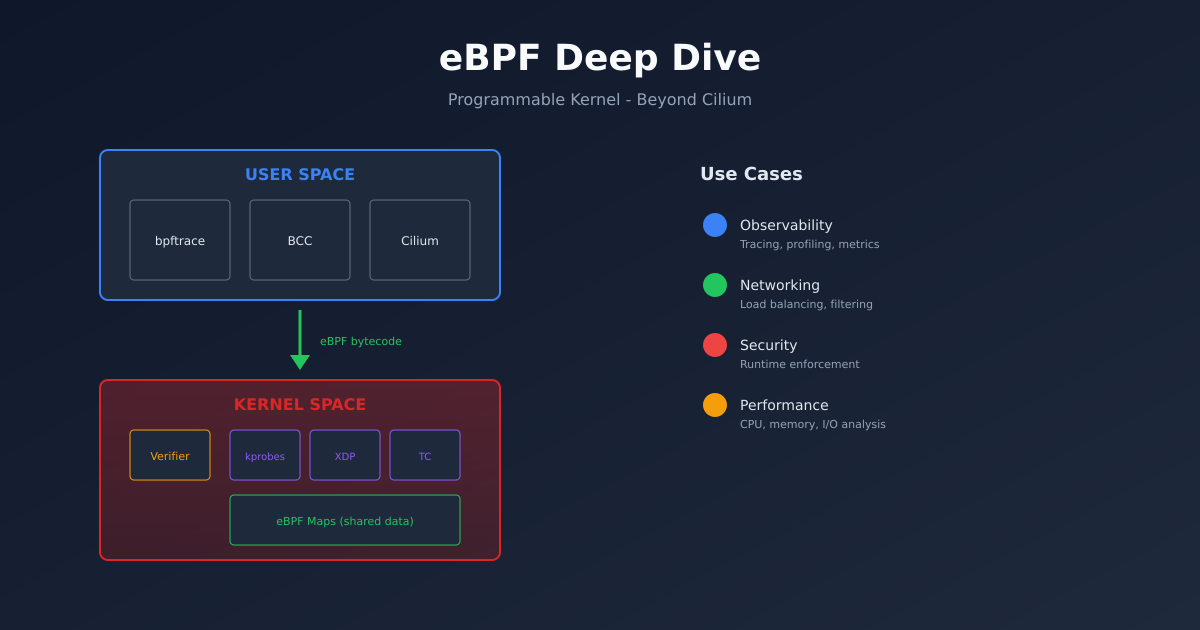
At its core, eBPF lets you run sandboxed programs inside the Linux kernel without modifying kernel source code or loading kernel modules. These programs attach to various hook points in the kernel and execute when those hooks are triggered.
Think of it like this: traditionally, if you wanted to add functionality to the kernel, you had two options. Write a kernel module (dangerous, can crash the system) or get your code merged into the mainline kernel (slow, requires approval). eBPF offers a third option: write a small program that the kernel verifies for safety before running.
The verifier is key. It checks that your eBPF program:
- Terminates (no infinite loops)
- Doesn’t access memory it shouldn’t
- Doesn’t crash the kernel
- Uses only allowed helper functions
If verification passes, your code runs at kernel speed with kernel-level access. If it fails, nothing runs. This safety model is why eBPF has been adopted so quickly.
Why This Matters
Traditional approaches to observability and security have limitations.
Observability: Tools like strace, tcpdump, and traditional profilers add overhead. They copy data between kernel and user space, which is slow. eBPF programs run in the kernel, filtering and aggregating data before it ever reaches user space.
Security: Traditional firewalls operate at the network layer. eBPF can make decisions based on process identity, container labels, or any other context available in the kernel. You can block a specific process from making certain syscalls, not just filter packets.
Networking: Traditional networking stacks are generic. eBPF lets you build custom network functions that run at wire speed. Cilium uses this for container networking, but the same principles apply to load balancing, traffic shaping, and protocol parsing.
eBPF Program Types
eBPF programs attach to different hook points depending on what you’re trying to do.
Tracing programs attach to kernel functions (kprobes), user functions (uprobes), or tracepoints. Use these for observability.
Networking programs attach to network interfaces (XDP), traffic control (tc), or socket operations. Use these for packet processing.
Security programs attach to LSM hooks (Linux Security Modules) or seccomp. Use these for access control.
Cgroup programs attach to cgroup events for resource control and network filtering at the container level.
Each program type has different capabilities and restrictions. XDP programs can process packets before the kernel’s network stack even sees them (extremely fast), but they can’t access filesystem information. Tracing programs can see anything in the kernel, but they can’t modify packet data.
Practical Example: Tracing System Calls
Let’s start with something practical. We’ll write a program that traces every time a process opens a file.
First, you need the tools. On Ubuntu:
sudo apt install bpftrace bpfcc-tools linux-headers-$(uname -r)Now let’s use bpftrace, which is like awk for eBPF:
sudo bpftrace -e 'tracepoint:syscalls:sys_enter_openat { printf("%s opened %s\n", comm, str(args->filename)); }'This one-liner:
- Attaches to the openat syscall tracepoint
- Prints the process name (comm) and filename for every open
Run it in one terminal, then open a file in another. You’ll see output like:
cat opened /etc/passwd
vim opened /home/user/.vimrc
code opened /usr/share/code/resources/app/package.json
This is already useful for debugging “what files is this process touching?” questions.
More Useful bpftrace Examples
Trace TCP connections with destination:
sudo bpftrace -e 'kprobe:tcp_connect { printf("%s connecting to %s\n", comm, ntop(((struct sock *)arg0)->__sk_common.skc_daddr)); }'Find slow disk I/O:
sudo bpftrace -e 'tracepoint:block:block_rq_complete { @usecs = hist((nsecs - @start[args->dev, args->sector]) / 1000); } tracepoint:block:block_rq_issue { @start[args->dev, args->sector] = nsecs; }'Count syscalls by process:
sudo bpftrace -e 'tracepoint:raw_syscalls:sys_enter { @[comm] = count(); }'These examples show the power of being able to ask arbitrary questions about system behaviour without installing agents or modifying applications.
BCC Tools
bpftrace is great for ad-hoc queries. For more permanent tooling, look at BCC (BPF Compiler Collection).
BCC provides pre-built tools that cover common use cases:
# Who's using the most CPU?
sudo /usr/share/bcc/tools/cpudist

# What files are being opened?
sudo /usr/share/bcc/tools/opensnoop

# What DNS queries are happening?
sudo /usr/share/bcc/tools/gethostlatency

# Network connections
sudo /usr/share/bcc/tools/tcpconnect

# Disk I/O by process
sudo /usr/share/bcc/tools/biotop
These tools are production-ready. Many companies run them continuously for monitoring.
Beyond Observability: Security
eBPF enables security models that weren’t previously possible.
Falco uses eBPF to detect suspicious behaviour at runtime. It watches syscalls and triggers alerts based on rules:
- rule: Unexpected outbound connection
  condition: >
    outbound and container and
    not (k8s.ns.name = "kube-system")
  output: Unexpected outbound connection (command=%proc.cmdline connection=%fd.name)
Tetragon (from Cilium/Isovalent) provides eBPF-based security observability and enforcement. It can not just detect but prevent malicious behaviour in real-time.
Seccomp-BPF lets you filter syscalls per process. Docker and Kubernetes use this to restrict what containers can do.
The advantage of eBPF for security is context. Traditional security tools see network packets or process executions in isolation. eBPF sees everything together - this network packet came from this process, which was spawned by this parent, running in this container, owned by this user.
Networking with XDP
XDP (eXpress Data Path) is where eBPF gets really fast. XDP programs run before the kernel network stack, processing packets at near line rate.
Use cases:
- DDoS mitigation: Drop malicious packets before they consume resources
- Load balancing: Facebook’s Katran handles millions of packets per second
- Packet filtering: More flexible than traditional iptables
Here’s a simple XDP program that drops all UDP packets (don’t run this in production):
#include <linux/bpf.h>
#include <linux/if_ether.h>
#include <linux/ip.h>
#include <linux/udp.h>

SEC("xdp")
int drop_udp(struct xdp_md *ctx) {
    void *data = (void *)(long)ctx->data;
    void *data_end = (void *)(long)ctx->data_end;

    struct ethhdr *eth = data;
    if ((void *)(eth + 1) > data_end)
        return XDP_PASS;

    if (eth->h_proto != htons(ETH_P_IP))
        return XDP_PASS;

    struct iphdr *ip = (void *)(eth + 1);
    if ((void *)(ip + 1) > data_end)
        return XDP_PASS;

    if (ip->protocol == IPPROTO_UDP)
        return XDP_DROP;

    return XDP_PASS;
}
The bounds checking ((void *)(eth + 1) > data_end) is required by the verifier to prove memory safety.
How Cilium Uses eBPF
Now that you understand eBPF, Cilium makes more sense.
Cilium replaces kube-proxy with eBPF. Instead of iptables rules (which scale poorly), Cilium installs eBPF programs that handle service load balancing directly.
Cilium’s network policies are enforced with eBPF too. When you create a NetworkPolicy, Cilium compiles it into eBPF bytecode and attaches it to the relevant network interfaces.
The result is faster networking (no iptables overhead) and better observability (Hubble shows you every connection).
Getting Started with Development
If you want to write your own eBPF programs, here’s the learning path:
Start with bpftrace. It’s the easiest way to experiment. Read Brendan Gregg’s book “BPF Performance Tools.”
Move to BCC. Write Python scripts that use BCC to load and interact with eBPF programs. BCC handles the compilation and loading.
Graduate to libbpf and CO-RE. For production tools, use libbpf with CO-RE (Compile Once, Run Everywhere). This creates portable eBPF programs that work across kernel versions.
Try frameworks. Projects like Aya (Rust) and libbpf-go make eBPF development more accessible.
The Future
eBPF is expanding rapidly. Recent developments:
- eBPF on Windows: Microsoft is bringing eBPF to Windows
- Signed eBPF programs: For secure distribution of eBPF code
- More program types: The kernel keeps adding new hook points
- Better tooling: IDEs, debuggers, and profilers for eBPF development
The trend is clear: eBPF is becoming the standard way to extend kernel functionality. If you work with Linux systems, understanding eBPF isn’t optional anymore - it’s essential.
Practical Next Steps
If you’re running Kubernetes, you’re probably already using eBPF through Cilium or similar tools. Start by understanding what those tools do under the hood.
For hands-on learning:
- Install bpftrace and run the examples above
- Read through the BCC tools source code - they’re well commented
- Try Brendan Gregg’s tutorials at brendangregg.com
- Experiment with Cilium’s Hubble to see eBPF-powered observability
eBPF isn’t just for kernel developers anymore. It’s a practical tool for anyone who needs deep visibility into Linux systems.