I recently wrote up how I build a multi-account AWS setup with Control Tower. The reply that kept coming back was some flavour of the same question: what does this look like on Google Cloud?
So here it is. This is the GCP landing zone I actually build for clients, including the parts that bit me the first time. If you have done the AWS version, a lot of the thinking carries over. The primitives are different enough that copying the AWS mental model one-to-one will quietly hurt you.
Here is the thing nobody tells you up front. A brand-new GCP organisation is not an empty field waiting for your foundation. Since May 2024, Google pre-applies a set of secure-by-default org policies to every new organisation: service account key creation is blocked and default networks are never created, among several other defaults. Your org arrives already partly hardened.
That creates a trap I have watched two separate teams walk into. If your Terraform imports and manages those policies, a later terraform destroy on the org stage strips them out, Google’s own defaults included, and the organisation ends up less locked down than the day it was created. Service account keys can be minted across every project again, and nobody notices until an auditor does. Hold that thought, it comes back later.

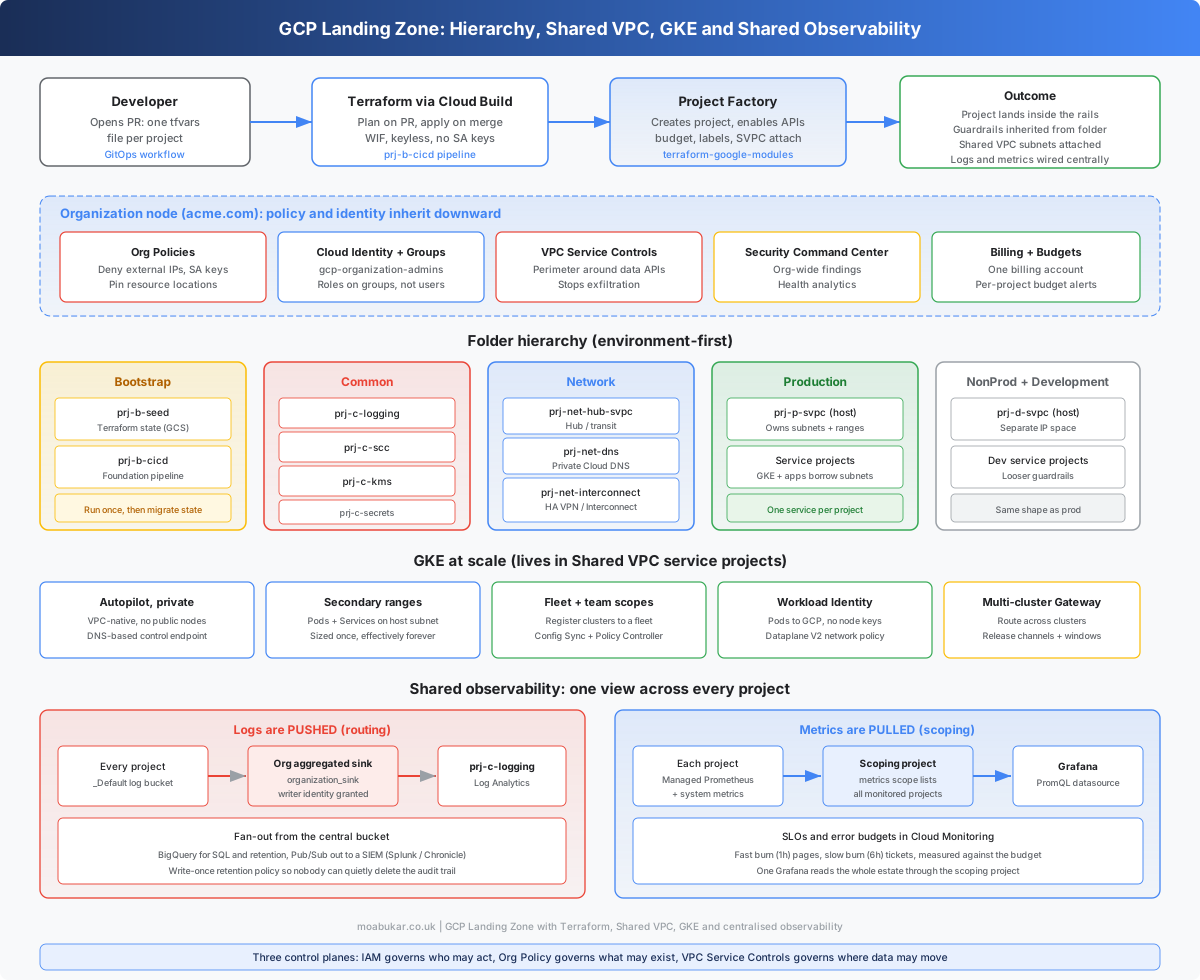
I keep the whole thing straight in my head as three control planes. Keeping them separate saves a lot of pain:
- IAM governs who may act.
- Org Policy governs what may exist.
- VPC Service Controls governs where data may move.
Nearly every landing-zone decision slots into one of those three, and the failures usually come from confusing them. A common one is reaching for IAM to stop data leaving, when the job belongs to VPC Service Controls.
The shape of it
Before the detail, here is what we are actually building:
- A resource hierarchy of Organization, folders and projects, with policy inherited top-down
- A staged Terraform foundation that bootstraps itself, then runs keyless from Cloud Build
- Shared VPC so one network team owns the wiring and app teams borrow subnets
- Org-policy guardrails plus group-based IAM, so the rails are inherited rather than remembered
- GKE running as Shared VPC service projects, managed as a fleet rather than a pile of one-off clusters
- One observability plane: logs routed to a central project, metrics scoped into a single view
Why a landing zone at all
A landing zone is the pre-wired tenancy. The hierarchy, identity, networking, guardrails and observability are stamped out before a single workload arrives, so application teams self-serve inside rails instead of each reinventing the base layer badly.
The real value sits in the decisions you cannot cheaply reverse. There are three of them: the folder hierarchy axis, the IP plan and the identity model. Everything else layers on top and can be refactored later without much drama. Get those three wrong and you are re-homing projects and re-carving subnets at 2am a year from now.
I will say this early because it governs the rest: resist the urge to make it clever. The best landing zone is the boring one that a tired engineer can reason about during an incident.
The resource hierarchy
GCP gives you three grouping levels. The Organization is the root, tied to your Cloud Identity or Workspace domain. Folders nest inside it for grouping and policy inheritance. Projects sit at the leaves and hold the actual resources. IAM bindings and org policies set higher up flow downward, which is the whole point.
One thing that trips up people coming from AWS: the billing account lives outside the hierarchy. It is a separate root object that projects link to, and roles/billing.admin is granted on the billing account itself, separately from org or folder IAM. Wire budgets to it on day one.
The single near-irreversible choice is the top-level folder axis. Pick exactly one. Google documents a few: environment-first, region or subsidiary based and team or product accountability. It warns explicitly against mixing them. I almost always go environment-first, which is also what the official blueprint does:
Organization (acme.com)
├── fldr-bootstrap          # the seed + CI projects that build everything else
├── fldr-common             # org-wide shared services
│   ├── prj-c-logging        # central log sink destination
│   ├── prj-c-scc            # Security Command Center
│   ├── prj-c-kms            # org KMS keyrings
│   └── prj-c-secrets        # shared Secret Manager
├── fldr-network            # the network team's world
│   ├── prj-net-hub-svpc     # hub / transit
│   ├── prj-net-dns          # private Cloud DNS
│   └── prj-net-interconnect # HA VPN / Interconnect
├── fldr-production
│   ├── prj-p-svpc           # Shared VPC host for prod
│   └── prj-p-payments ...   # service projects, one service each
├── fldr-nonproduction
└── fldr-development
Warning: Most GCP resources cannot move between projects, and when you move a project to a different folder it loses the IAM it inherited from the old parent. Only policies attached directly to the project travel with it. Decide the axis before you create projects, not after.
Lesson: if someone asks for a team-first layout on top of an environment-first org six months in, the honest answer is that it means rebuilding, not reshuffling. Spend the argument up front.
Bootstrapping and the chicken-and-egg problem
The foundation is staged, and the stages are strictly ordered. I use the Cloud Foundation Toolkit layout, which breaks down like this:
gcp-foundation/
├── 0-bootstrap/        # seed + cicd projects. Run once, locally, then hand off.
├── 1-org/              # org policies, folders, central logging, billing export
├── 2-environments/     # per-environment scaffolding
├── 3-networks-svpc/    # Shared VPC hosts, subnets, firewall, DNS
├── 4-projects/         # the project factory. App teams self-serve here.
└── 5-app-infra/        # workload infra per project (GKE, buckets and so on)
Each stage reads the previous stage’s remote state from a GCS bucket. That dependency is what enforces the order in practice, so you genuinely cannot run 3-networks-svpc before 0-bootstrap has produced the outputs it reads.
Which brings us to the bootstrap paradox, the GCP cousin of the AWS OIDC chicken-and-egg problem. To run Terraform against the org you need a project for the state bucket and a service account for the pipeline. Both of those are things Terraform is supposed to create. So the first apply of 0-bootstrap runs locally, with your own highly privileged human credentials, against a local state file. It creates two projects:
prj-b-seed, which holds the Terraform state bucketprj-b-cicd, which holds the Cloud Build pipeline and its service accounts
Then you migrate the local state into the GCS bucket it just made, and hand control to the pipeline’s service accounts through Workload Identity Federation. After that first run, no human touches the foundation directly. Every change goes through a pull request.
Your bootstrap identity needs real power at the org level before any of this works. Grant your human (or the bootstrap SA) these roles on the Organization:
roles/resourcemanager.organizationAdmin
roles/orgpolicy.policyAdmin
roles/resourcemanager.folderCreator
roles/resourcemanager.projectCreator
roles/billing.admin
roles/securitycenter.admin
Once the foundation runs, day-two scaling lives in the project factory (terraform-google-modules/project-factory). A new project becomes a thin tfvars or YAML file: enabled APIs, a budget, labels and a Shared VPC attachment, all baked in. That is how app teams self-serve without touching the org machinery.
module "payments_prod" {
  source  = "terraform-google-modules/project-factory/google"
  version = "~> 17.0"

  name            = "prj-p-payments"
  org_id          = var.org_id
  folder_id       = var.prod_folder_id
  billing_account = var.billing_account

  # Attach straight onto the prod Shared VPC as a service project
  shared_vpc         = var.prod_host_project_id
  shared_vpc_subnets = [var.payments_subnet_self_link]

  activate_apis = [
    "container.googleapis.com",
    "monitoring.googleapis.com",
    "logging.googleapis.com",
  ]

  budget_amount = 2000
  labels = {
    team        = "payments"
    environment = "production"
  }
}
CFT or Fabric, pick your temperament
Google ships two blessed stacks for this, and documents the choice itself. The prescriptive one is the enterprise foundations blueprint, implemented as terraform-example-foundation. The modular one is Cloud Foundation Fabric and its FAST stages.
My rule of thumb: reach for the blueprint when you want an audited, opinionated baseline to fork and own, and you are happy to live inside its decisions. Reach for Fabric or FAST when you have a platform team that wants composable modules and cleaner customisation, and the appetite to maintain it.
Warning: FAST stage names are a moving target. The big rename landed exactly at v44.0.0. The current release (v60.0.0) uses
0-org-setup,1-vpcsc,2-networking,2-project-factory,2-securityand3-secops-dev. The old0-bootstrapand1-resmanare gone from v44 onward. If you follow a blog from 2023, pin the version it was written against or nothing will line up.
Networking and Shared VPC
Shared VPC is the model to internalise, because almost every confusing GKE error traces back to it. One host project owns the VPCs, subnets, routes and firewall rules. Service projects are where the teams and the clusters actually live, and they borrow subnets from the host. The network team controls the wiring; everyone else consumes it.
resource "google_compute_shared_vpc_host_project" "host" {
  project = var.prod_host_project_id
}

resource "google_compute_shared_vpc_service_project" "payments" {
  host_project    = google_compute_shared_vpc_host_project.host.project
  service_project = var.payments_project_id
}
The two IAM grants that unblock GKE
This is the one that cost me an afternoon the first time. To create a GKE cluster in a service project on a Shared VPC, two service agents need access to the host network, and the second grant is the one everybody forgets:
# 1. networkUser on the SUBNET (not the project) for the GKE node agent
#    and the Google APIs service agent.
resource "google_compute_subnetwork_iam_member" "gke_network_user" {
  for_each = toset([
    "serviceAccount:service-${var.gke_project_number}@container-engine-robot.iam.gserviceaccount.com",
    "serviceAccount:${var.gke_project_number}@cloudservices.gserviceaccount.com",
  ])
  project    = var.host_project_id
  region     = "europe-west2"
  subnetwork = google_compute_subnetwork.gke.name
  role       = "roles/compute.networkUser"
  member     = each.value
}

# 2. The forgotten one. The GKE service agent needs hostServiceAgentUser
#    at the HOST project, or cluster creation fails with a vague error.
resource "google_project_iam_member" "gke_host_agent" {
  project = var.host_project_id
  role    = "roles/container.hostServiceAgentUser"
  member  = "serviceAccount:service-${var.gke_project_number}@container-engine-robot.iam.gserviceaccount.com"
}
Grant networkUser per subnet, never on the whole host project. Granting it project-wide hands every service project visibility into every subnet, which defeats half the reason you chose Shared VPC.
IP planning is the thing you cannot undo
GKE clusters are VPC-native (--enable-ip-alias), which means pods and services come out of secondary ranges on the host subnet. You size those ranges once, and in practice they are permanent. Changing a cluster’s pod range later means rebuilding the cluster.
resource "google_compute_subnetwork" "gke" {
  name          = "gke-prod-euw2"
  project       = var.host_project_id
  region        = "europe-west2"
  network       = google_compute_network.svpc.id
  ip_cidr_range = "10.8.0.0/20"           # nodes

  secondary_ip_range {
    range_name    = "pods"
    ip_cidr_range = "10.16.0.0/14"        # big on purpose, pods burn IPs fast
  }
  secondary_ip_range {
    range_name    = "services"
    ip_cidr_range = "10.20.0.0/20"        # cluster services
  }

  private_ip_google_access = true
  log_config {
    aggregation_interval = "INTERVAL_10_MIN"
    flow_sampling        = 0.5             # sample, flow logs get expensive
    metadata             = "INCLUDE_ALL_METADATA"
  }
}
Pre-carve RFC1918 space per environment and region before you build anything. Pod ranges are the part people under-size: do the max-pods-per-node maths and then add headroom. Keep the plan in one source of truth, and reserve a /16 for the servicenetworking range that managed services (Cloud SQL, Memorystore) peer into.
Topology: start simple
On the current blueprint the two topology options are 3-networks-svpc and 3-networks-hub-and-spoke, and they are mutually exclusive. A Shared VPC per environment is simpler and enough for most clients. Hub-and-spoke earns its keep when you need shared transit or inline appliance inspection across a many-VPC estate. Network Connectivity Center VPC spokes are worth a look there, because they give a full mesh and remove the old non-transitive-peering pain that used to force network appliances into the path.
Reaching Google APIs privately
Private nodes still need to reach Google APIs, and you do that without a single external IP. There are two virtual IPs to know:
restricted.googleapis.com   199.36.153.4/30   # only VPC-SC-supported APIs
private.googleapis.com       199.36.153.8/30   # broader API set
You add a static route to the VIP with a next hop of default-internet-gateway, plus a private Cloud DNS zone for googleapis.com pointing at it. The route looks wrong the first time you see it, because the traffic never actually touches the internet; it rides Google’s backbone. Leave it alone, it is meant to look like that. The direction of travel is Private Service Connect for Google APIs (--target-google-apis-bundle of all-apis or vpc-sc), which I now prefer on new builds.
Firewall in layers
I run firewalls at two levels. Hierarchical firewall policies at the org or folder level hold the guardrails everyone inherits. Per-VPC network firewall policies hold the app-specific rules. The guardrail layer is usually a default-deny on egress plus a short allow-list:
# Allow Identity-Aware Proxy for SSH / TCP forwarding
source range 35.235.240.0/20

# Allow Google health checks (load balancers)
source ranges 130.211.0.0/22 and 35.191.0.0/16
Evaluation runs org, then folder, then network, and a rule can hand off with goto_next. The footgun is writing an over-broad deny at the org level that silently kills traffic three folders down. Test guardrail rules against one folder before you push them to the root.
For hybrid, I ladder it to the SLA. HA VPN with two interfaces buys 99.99%, a single interface 99.9%. When the bandwidth or the SLA outgrows VPN, you graduate to Partner then Dedicated Interconnect at 10, 100 or 400 Gbps.
Guardrails: IAM and org policy
Roles go on groups, never on people
Every role binding in the foundation targets a Google Group synced from Cloud Identity. The blueprint seeds a standard set:
gcp-organization-admins
gcp-security-admins
gcp-network-admins
gcp-billing-admins
gcp-developers
Terraform owns the bindings, Cloud Identity owns the membership. When someone leaves, HR removes them from the directory and their access evaporates everywhere at once. Nobody is grepping Terraform for a person’s email at offboarding time.
The org-policy baseline
This is the day-one guardrail set I apply at the org node. Everything inherits down unless a folder deliberately relaxes it:
CONSTRAINT                                       TYPE      WHAT IT STOPS
==========                                       ====      =============
compute.vmExternalIpAccess                       list      Public IPs on VMs
compute.skipDefaultNetworkCreation               boolean   The default network
iam.disableServiceAccountKeyCreation             boolean   Downloadable SA keys
iam.disableServiceAccountKeyUpload               boolean   Uploading external keys
iam.allowedPolicyMemberDomains                   list      Sharing outside the org
storage.uniformBucketLevelAccess                 boolean   Legacy per-object ACLs
sql.restrictPublicIp                             boolean   Public Cloud SQL
compute.requireOsLogin                           boolean   SSH key sprawl
gcp.resourceLocations                            list      Resources outside the EU
gcp.restrictNonCmekServices                      list      Google-managed-key only
compute.restrictVpcPeering                       list      Peering to stranger VPCs
compute.disableSerialPortAccess                  boolean   Serial-console backdoors
In Terraform a boolean constraint is a couple of lines, and a list constraint carries values:
resource "google_org_policy_policy" "disable_sa_keys" {
  name   = "organizations/${var.org_id}/policies/iam.disableServiceAccountKeyCreation"
  parent = "organizations/${var.org_id}"
  spec {
    rules { enforce = "TRUE" }
  }
}

resource "google_org_policy_policy" "resource_locations" {
  name   = "organizations/${var.org_id}/policies/gcp.resourceLocations"
  parent = "organizations/${var.org_id}"
  spec {
    rules {
      values {
        allowed_values = ["in:eu-locations"]
      }
    }
  }
}
Warning: Org policies lock you out as happily as they lock out attackers. An over-broad
gcp.resourceLocationshas stopped my own pipeline from creating a global resource that only lives inus. Roll new constraints out with adry_run_specfirst, watch the violations land in Cloud Logging for a few days, then promote them to an enforcedspec. Never enforce a brand-new constraint blind across prod.
One note for 2026: iam.disableServiceAccountKeyCreation and its upload sibling are now considered legacy, with Google steering people toward the managed equivalents such as iam.managed.disableServiceAccountKeyCreation. The legacy IDs still work, so there is no fire drill, but new builds should prefer the managed ones and lean on Workload Identity Federation so there are no keys to disable in the first place.
Keyless CI
Speaking of which, the pipeline authenticates to GCP with no stored secret at all. Workload Identity Federation lets Cloud Build, GitHub Actions or GitLab mint short-lived tokens against a pool. The IAM member for a GitHub repo looks like this:
principalSet://iam.googleapis.com/projects/PROJECT_NUMBER/locations/global/workloadIdentityPools/POOL_ID/attribute.repository/OWNER/REPONo JSON key in a secret store, so nothing to rotate and nothing to leak.
Security Command Center
Turn on Security Command Center at the org level so findings aggregate in prj-c-scc. The Standard tier gives you Security Health Analytics for misconfiguration findings, which covers a lot of the baseline. The Premium and Enterprise tiers add threat detection and attack-path analysis, and that is a budget conversation rather than a technical one.
GKE at scale
GKE is where a landing zone stops being a diagram and starts carrying traffic. A few decisions matter more than the rest.
Autopilot by default. I reach for Autopilot unless there is a concrete reason not to, such as GPU and TPU workloads or DaemonSets that need to reach into the node. You stop managing node pools, and Dataplane V2 is on by default. The flat cluster management fee is roughly $0.10 per cluster per hour (about $72 a month) on top of the pod resources you actually request, which on Autopilot bill at roughly $0.00822 per vCPU-hour.
Private clusters, DNS-based endpoint. Private nodes with no public IPs, plus the newer DNS-based control plane endpoint instead of the old dance of maintaining authorised-network CIDR lists.
resource "google_container_cluster" "prod" {
  name     = "prod-euw2"
  project  = var.gke_project_id            # a Shared VPC service project
  location = "europe-west2"

  enable_autopilot = true

  network    = "projects/${var.host_project_id}/global/networks/svpc"
  subnetwork = "projects/${var.host_project_id}/regions/europe-west2/subnetworks/gke-prod-euw2"

  ip_allocation_policy {
    cluster_secondary_range_name  = "pods"
    services_secondary_range_name = "services"
  }

  private_cluster_config {
    enable_private_nodes    = true
    enable_private_endpoint = true
  }

  workload_identity_config {
    workload_pool = "${var.gke_project_id}.svc.id.goog"
  }

  release_channel {
    channel = "REGULAR"
  }
}
Workload Identity for pods. The same keyless idea as the CI pipeline, pushed down to the pod. A Kubernetes service account impersonates a Google service account with no node key anywhere:
gcloud iam service-accounts add-iam-policy-binding \
  payments-gsa@${PROJECT_ID}.iam.gserviceaccount.com \
  --role roles/iam.workloadIdentityUser \
  --member "serviceAccount:${PROJECT_ID}.svc.id.goog[payments/payments-ksa]"
Manage clusters as a fleet, not as pets. Once you have more than a couple of clusters, register them to a fleet and stop treating each one as a snowflake. The fleet gives you team scopes for multi-tenancy, and it is how you turn on Config Sync and Policy Controller to push a single set of KRM policies and guardrails across every cluster at once.
# Register a cluster into the fleet
gcloud container fleet memberships register prod-euw2 \
  --gke-cluster europe-west2/prod-euw2 \
  --enable-workload-identity

# Config Sync + Policy Controller across the whole fleet
gcloud container fleet config-management enable
Multi-cluster traffic. When a service spans clusters or regions, the multi-cluster Gateway (the gke-l7-global-external-managed-mc GatewayClass) routes across them. It needs multiclusterservicediscovery.googleapis.com, multiclusteringress.googleapis.com and trafficdirector.googleapis.com enabled on the fleet host project.
Upgrades on your terms. Put every cluster on a release channel (I run REGULAR for most, STABLE for the nervous workloads) and then own the timing with maintenance windows and exclusions. The exclusion is the important half: freeze upgrades over your trading peak or Black Friday so Google does not helpfully roll a node pool mid-event.
One GKE networking fact worth pinning down, because it has changed: the default GKE-managed Services (ClusterIP) range is 34.118.224.0/20. That default applies to Autopilot from version 1.27 and to Standard clusters only from 1.29. If you run older Standard clusters, you are still supplying the services range yourself.
Do you need GKE Enterprise?
Short answer, usually not for the landing zone itself. Standard GKE with a fleet and Config Sync covers the multi-cluster, config-as-code story for most teams. GKE Enterprise (the product formerly wearing the Anthos name) earns its licence when you have multi-cloud or on-prem clusters to pull under one control plane, or you want the service mesh and advanced policy tooling as a managed bundle. Buy it for a requirement you can name, not because it is on the pricing page.
Shared observability
This is the part teams bolt on last and regret most, so I wire it into the foundation. The mental model that makes GCP observability click is that the two signals move in opposite directions:
LOGS are PUSHED               METRICS are PULLED
(you route them)              (you scope them)

every project                 every project
    │ _Default sink               ▲ Managed Prometheus
    ▼                             │
org aggregated sink           scoping project
    │ writer identity             │ metrics scope lists
    ▼                             │ all monitored projects
prj-c-logging                     │
  Log Analytics               Grafana + Cloud Monitoring
  BigQuery  ──▶ SQL + retention    one view of the whole estate
  Pub/Sub   ──▶ SIEM
Logs: route everything to one project
An aggregated sink at the org level, with include_children, routes logs from every project into a dedicated logging project. The gotcha is the writer identity. The sink writes as a Google-managed service account, and until you grant that identity permission on the destination, every log quietly drops on the floor with no error.
resource "google_logging_organization_sink" "audit" {
  name             = "org-audit-to-central"
  org_id           = var.org_id
  include_children = true
  destination      = "logging.googleapis.com/projects/${var.logging_project_id}/locations/global/buckets/org-audit"
  filter           = "logName:\"cloudaudit.googleapis.com\""
}

# Grant the sink's writer identity on the destination, or nothing lands.
resource "google_project_iam_member" "sink_writer" {
  project = var.logging_project_id
  role    = "roles/logging.bucketWriter"
  member  = google_logging_organization_sink.audit.writer_identity
}
From the central bucket you fan out. Log Analytics gives you SQL over the log bucket directly. A BigQuery export handles long retention and ad-hoc analysis. A Pub/Sub export feeds a SIEM such as Splunk or Google SecOps. Put a locked retention policy on the audit bucket so nobody, including an admin, can quietly delete the trail.
Metrics: one scope to see them all
Cloud Monitoring works the other way. A scoping project holds a metrics scope that lists every project you want to see, and anyone with access to the scoping project sees the whole estate through one pane.
resource "google_monitoring_monitored_project" "observed" {
  for_each      = toset(var.all_monitored_project_ids)
  metrics_scope = "locations/global/metricsScopes/${var.scoping_project_id}"
  name          = each.value
}
For the actual metrics, I lean on Google Cloud Managed Service for Prometheus. Turn on managed collection (--enable-managed-prometheus, and on Autopilot it is already on), and your workloads’ Prometheus metrics flow into Cloud Monitoring with no self-managed Prometheus server to babysit. You query them with PromQL through the Prometheus-compatible endpoint:
https://monitoring.googleapis.com/v1/projects/PROJECT_ID/location/global/prometheus/Point a single Grafana instance at that endpoint, scoped through the scoping project, and one dashboard reads metrics across every cluster and every project in the org. For the clusters themselves, the --monitoring flag controls which control-plane and workload components report in (SYSTEM, API_SERVER, SCHEDULER, CONTROLLER_MANAGER and the workload component list). Watch kube-state-metrics cardinality, because it is the usual reason a Managed Prometheus bill surprises someone.
If you are standardising on OpenTelemetry, as I argued for in this post, Cloud Monitoring and Cloud Trace both ingest OTLP, so the collector pattern drops straight in rather than fighting the platform.
SLOs and error budgets
A dashboard tells you what happened. An SLO with an error budget tells you whether to care. I define service-level objectives in Cloud Monitoring and alert on burn rate rather than raw thresholds:
resource "google_monitoring_slo" "payments_availability" {
  service             = google_monitoring_custom_service.payments.service_id
  slo_id              = "payments-availability"
  display_name        = "Payments API availability"
  goal                = 0.999        # three nines
  rolling_period_days = 28

  request_based_sli {
    good_total_ratio {
      good_service_filter  = "metric.label.response_code!~\"5..\""
      total_service_filter = "metric.type=\"prometheus.googleapis.com/http_requests_total/counter\""
    }
  }
}
A fast-burn alert on a one-hour window pages a human. A slow-burn alert on a longer window opens a ticket. The budget decides whether a wobble is an incident or a Monday-morning note, which is the whole point of measuring it.
Gotchas I have actually hit
Every one of these cost me real time, so you do not have to spend yours.
The secure-by-default destroy trap. Back to the opening. A fresh org arrives hardened by Google. If Terraform manages those policies and a destroy ever runs on the org stage, you strip the defaults too. Keep the baseline policies in a stage with deletion protection, and treat destroy on 1-org as a break-glass action, not a tidy-up.
Org policies that lock you out. The dry_run_spec exists for a reason. I have enforced a location constraint and then watched my own pipeline fail with FAILED_PRECONDITION because a global resource wanted to land in us. Dry-run, read the violation logs, then enforce.
The forgotten Shared VPC grant. roles/compute.networkUser on the subnet is the obvious one. roles/container.hostServiceAgentUser on the host project is the one that leaves you staring at a vague cluster-create failure for an hour.
The folder axis you regret. Choosing environment-first and then being asked for team-first later is a rebuild, because moving a project drops its inherited IAM. Have the argument before you create projects.
Project quota. A new org has a modest default project quota and a project-creation rate limit. If you are vending dozens of projects through the factory, request the increase early so the rollout does not stall halfway.
FAST version drift. The stage names changed at v44.0.0. Pin the version any tutorial was written against before you copy its directory layout.
Flow-log and metric cost. VPC Flow Logs at full sampling and high-cardinality custom metrics are the two line items that quietly balloon. Sample flow logs, and keep an eye on label cardinality.
What you end up with
Start to finish, a client goes from a handful of hand-clicked projects with shared owners and no guardrails, to something like this:
- An Organization with inherited org-policy guardrails and group-based IAM, so access is a directory change rather than a Terraform hunt
- A Terraform foundation that bootstrapped itself once and now runs keyless from CI, every change arriving by pull request
- Shared VPC with a sane IP plan, where the network team owns the wiring and app teams self-serve service projects through the factory
- GKE running private and keyless, managed as a fleet, with upgrades on their schedule rather than Google’s
- One logging project holding the whole audit trail, and one Grafana reading metrics across every project through a single scope
A new service becomes a pull request with a tfvars file, and about half an hour later the team has a project inside the rails with networking, guardrails, logging and metrics already wired. No tickets and no console archaeology, with a full audit trail in Git.
Key takeaways
Three decisions are expensive to reverse: the folder axis, the IP plan and the identity model. Spend your design time there and let the rest be refactorable.
Guardrails should be inherited, not remembered. Org policy at the org node and roles on groups mean the rails apply whether or not the engineer who built the project is still around.
Keyless everywhere. Workload Identity Federation for CI and Workload Identity for pods, with managed constraints instead of disabling keys you should never have minted. If there is no key, there is nothing to leak or rotate.
Treat clusters as a fleet, not as pets. The moment you have more than two, fleet management and Config Sync stop being nice-to-haves.
Wire observability into the foundation. Logs pushed to one project and metrics pulled into one scope, with SLOs to tell you whether a wobble is worth a page. Bolting it on later means instrumenting an estate that is already on fire.
A landing zone is not the project you build once. It is the set of decisions you cannot cheaply unmake, so make the hierarchy, the IP plan and the identity model deliberately and let everything else layer on top.
Building a GCP foundation, or migrating off a pile of hand-made projects? Happy to compare notes on LinkedIn.