If you’ve ever managed Terraform at scale - multiple teams, multiple environments, multiple AWS accounts - you know the pain. GitHub Actions runners with static IAM keys stored in secrets. A pile of bash scripts stitching together terraform plan and terraform apply. PRs where nobody actually reviews the plan output because it’s buried in a CI log. No guardrails, no approval gates, no shared modules.
I recently built out a complete Spacelift setup for a client - from zero to a fully automated, policy-driven, multi-team Terraform platform. This post covers everything: the architecture decisions, the Terraform code, the OPA policies in Rego, the private module registry, and the lessons learned along the way.
This isn’t a surface-level overview. It’s what we actually built, including the parts that didn’t go smoothly.
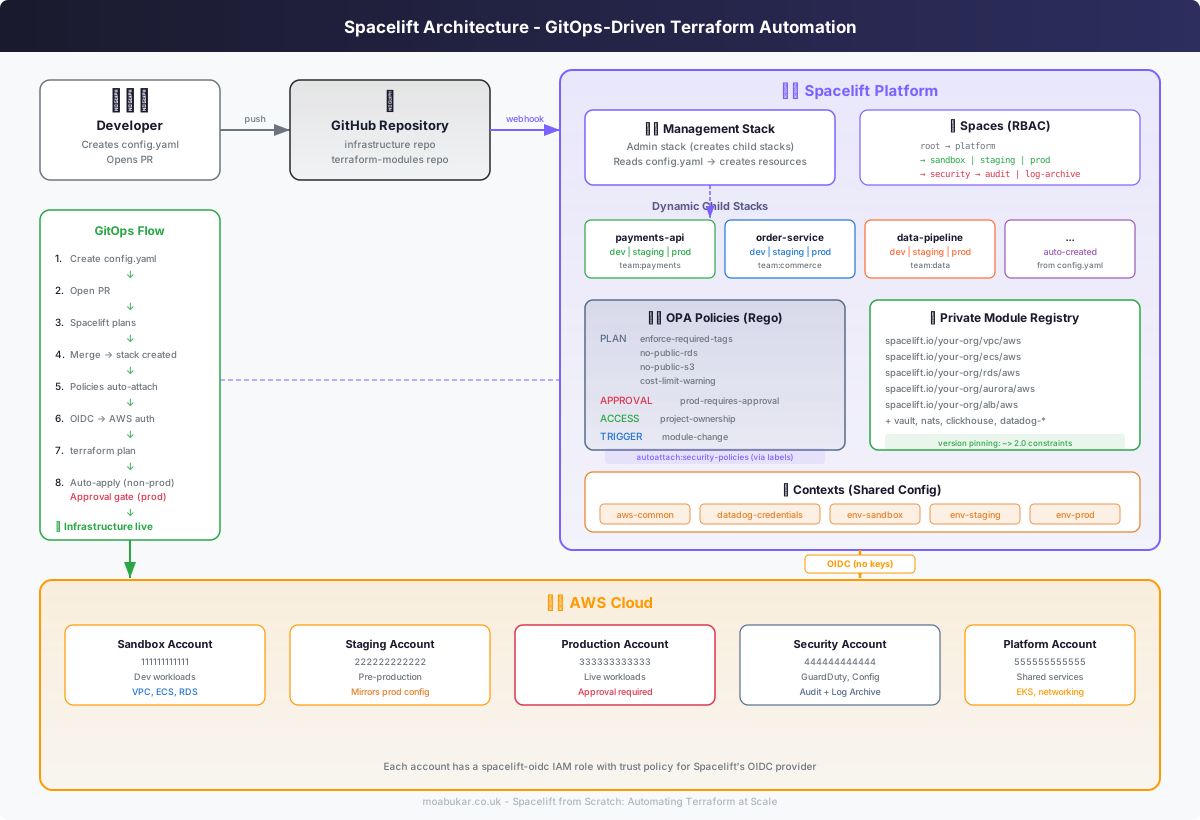
Why Spacelift?
Before Spacelift, the client’s Terraform workflow was the classic setup: GitHub Actions running terraform plan on PRs and terraform apply on merge. It worked for two engineers managing three environments. It stopped working when the team grew to fifteen engineers across four teams managing thirty-plus environments across multiple AWS accounts.
The problems were predictable:
No RBAC. Every engineer could apply to every environment. The payments team could accidentally destroy the data team’s staging infrastructure. There was nothing preventing it except “don’t do that.”
Static credentials everywhere. AWS access keys and secret keys stored in GitHub Actions secrets. Rotated manually. Shared across workflows. A security audit waiting to happen.
No policy enforcement. No way to enforce tagging standards, prevent public S3 buckets, or require approval for production changes. Everything was trust-based.
No visibility. Understanding which Terraform state files existed, what was drifting, and who changed what required digging through GitHub commit history and AWS CloudTrail logs.
Why Not Terraform Cloud?
Terraform Cloud (now HCP Terraform) is the obvious alternative. We evaluated it. The dealbreakers were:
- No hierarchical RBAC. TFC has workspaces and teams, but not the nested spaces model Spacelift offers. We needed platform team > environment > team scoping.
- OPA is bolted on, not native. Spacelift treats OPA as a first-class citizen. Policies auto-attach via labels. TFC’s Sentinel is powerful but uses a proprietary language.
- No admin stacks. In Spacelift, you can have a stack that creates other stacks. This is the cornerstone of dynamic infrastructure - you drop a config file and a stack appears. TFC doesn’t have this concept natively.
- Private module registry flexibility. Spacelift’s module registry integrates with its spaces and policies. TFC’s registry is decent but lacks the triggering behaviour we wanted.
Why Not Just GitHub Actions?
GitHub Actions is a CI/CD tool. It can run Terraform, but it doesn’t understand Terraform. It doesn’t know about state, drift, dependencies between stacks, or the difference between a plan that adds a tag and one that destroys a database.
Spacelift is purpose-built for infrastructure as code. It understands plans, resources, costs, and change impact. That matters when you’re managing real infrastructure at scale.
Core Concepts
Before diving into the implementation, let’s establish the vocabulary. Spacelift has a handful of concepts that everything else builds on.
Stacks
A stack is an isolated unit of Terraform execution. Think of it like a container for a Terraform run. Each stack has:
- Its own state (managed by Spacelift or an external backend)
- A source code pointer (a Git repo + branch + project root)
- Environment variables and mounted files
- A run history with full plan/apply logs
- Labels that determine which policies, contexts, and integrations attach
One stack typically maps to one environment of one service. So payments-api-dev, payments-api-staging, and payments-api-prod would be three separate stacks, all pointing to the same Terraform code but with different variable files and different spaces.
Spaces
Spaces are Spacelift’s hierarchical RBAC model. Think of them like folders in a file system - they nest, and permissions inherit downward.
Every Spacelift resource (stack, policy, context, module) lives in a space. Users and teams get access at the space level, and that access flows down to child spaces.
This is one of Spacelift’s killer features. In Terraform Cloud, you manage access per-workspace. In Spacelift, you put staging stacks in the staging space and give the staging team access to that space. Done.
Contexts
Contexts are bundles of environment variables and mounted files that can be attached to stacks. They’re like shared configuration bags.
For example, an aws-common context might set AWS_DEFAULT_REGION=eu-west-1 and TF_LOG=ERROR. A datadog-credentials context might inject API keys. Contexts attach to stacks either manually or via label-based auto-attach.
Policies
Policies are OPA (Open Policy Agent) rules written in Rego. They control everything from what resources are allowed in a plan to who can approve a run to which stacks trigger when a module changes.
Spacelift has several policy types:
- PLAN - evaluate after terraform plan, can deny/warn
- APPROVAL - control who approves runs and when approval is required
- ACCESS - control who can read/write which stacks
- TRIGGER - determine which stacks to trigger when another stack finishes
- PUSH - control which Git pushes trigger runs
- NOTIFICATION - control notification routing
The key insight: policies auto-attach to stacks via labels. You label a stack with security:all and every policy that auto-attaches on security:all applies. No manual wiring.
Modules
Spacelift has a private Terraform module registry. You publish modules from Git repos, version them, and consume them from stacks using source = "spacelift.io/your-org/module-name/provider".
The registry supports version constraints, automatic dependency triggering (when a module updates, stacks using it can auto-trigger), and the same spaces/RBAC model as everything else.
Initial Setup - The Bootstrap Problem
Setting up Spacelift has a chicken-and-egg problem: you need a stack to manage Spacelift resources, but Spacelift resources include stacks. Where do you start?
The answer is a management stack (sometimes called an admin stack). You create it manually in the Spacelift UI, and it manages everything else via the Spacelift Terraform provider.
Step 1: Create the Management Stack
In the Spacelift UI:
- Create a new stack called
spacelift-management - Point it to your infrastructure repo (e.g.,
your-org/infrastructure) - Set the project root to
spacelift/management - Mark it as an administrative stack (this gives it permission to manage other Spacelift resources)
- Set the branch to
main
Step 2: AWS OIDC Integration
The first thing the management stack does is set up AWS authentication. Spacelift supports OIDC natively - no static credentials needed.
# spacelift/management/aws-integration.tf

resource "spacelift_aws_integration" "main" {
  name = "aws-main"

  # The IAM role Spacelift will assume via OIDC
  role_arn                       = "arn:aws:iam::123456789012:role/spacelift-oidc"
  duration_seconds               = 3600
  generate_credentials_in_worker = false
  space_id                       = "root"

  labels = ["autoattach:aws"]
}
On the AWS side, you need a trust policy that allows Spacelift’s OIDC provider to assume the role:
{
  "Version": "2012-10-17",
  "Statement": [
    {
      "Effect": "Allow",
      "Principal": {
        "Federated": "arn:aws:iam::123456789012:oidc-provider/oidc.spacelift.io"
      },
      "Action": "sts:AssumeRoleWithWebIdentity",
      "Condition": {
        "StringEquals": {
          "oidc.spacelift.io:aud": "your-org.app.spacelift.io"
        }
      }
    }
  ]
}
This means zero static credentials. Spacelift obtains temporary AWS credentials via OIDC for every run. The credentials expire after an hour. No rotation needed.
Step 3: Provider Configuration
The management stack uses both the Spacelift provider (to manage Spacelift resources) and the AWS provider (for the OIDC integration):
# spacelift/management/providers.tf

terraform {
  required_providers {
    spacelift = {
      source  = "spacelift-io/spacelift"
      version = "~> 1.0"
    }
    aws = {
      source  = "hashicorp/aws"
      version = "~> 5.0"
    }
  }
}

provider "spacelift" {}

provider "aws" {
  region = "eu-west-1"

  default_tags {
    tags = {
      ManagedBy   = "spacelift"
      Environment = "management"
      Project     = "spacelift"
    }
  }
}
The Spacelift provider authenticates automatically when running inside a Spacelift stack - no API keys needed. It’s one of those nice touches where the platform helps itself.
Spaces Hierarchy
The spaces hierarchy is the backbone of the entire RBAC model. We designed it to mirror the company’s organisational structure:
root
├── platform
├── sandbox
├── staging
├── prod
└── security
    ├── audit
    └── log-archive
The logic:
- platform - for the platform engineering team’s own infrastructure (EKS clusters, networking, shared services)
- sandbox - development environments, relaxed policies, fast iteration
- staging - pre-production, stricter policies, mirrors prod
- prod - production, strictest policies, approval required
- security - security account infrastructure, restricted access
- audit - CloudTrail, Config, GuardDuty aggregation
- log-archive - centralised logging, long-term retention
Here’s the Terraform code:
# spacelift/management/spaces.tf

resource "spacelift_space" "platform" {
  name             = "platform"
  parent_space_id  = "root"
  description      = "Platform engineering team infrastructure"
  inherit_entities = true
}

resource "spacelift_space" "sandbox" {
  name             = "sandbox"
  parent_space_id  = "root"
  description      = "Sandbox/development environments"
  inherit_entities = true
}

resource "spacelift_space" "staging" {
  name             = "staging"
  parent_space_id  = "root"
  description      = "Staging environments"
  inherit_entities = true
}

resource "spacelift_space" "prod" {
  name             = "prod"
  parent_space_id  = "root"
  description      = "Production environments"
  inherit_entities = true
}

resource "spacelift_space" "security" {
  name             = "security"
  parent_space_id  = "root"
  description      = "Security accounts infrastructure"
  inherit_entities = true
}

resource "spacelift_space" "audit" {
  name             = "audit"
  parent_space_id  = spacelift_space.security.id
  description      = "Audit account - CloudTrail, Config, GuardDuty"
  inherit_entities = true
}

resource "spacelift_space" "log_archive" {
  name             = "log-archive"
  parent_space_id  = spacelift_space.security.id
  description      = "Log archive account - centralised logging"
  inherit_entities = true
}
The inherit_entities = true flag is important. It means policies, contexts, and integrations attached to a parent space are automatically available in child spaces. So an AWS integration attached at root is available to every space below it.
This cuts down on duplication massively. You define your AWS OIDC integration once at root, and every stack in every space can use it.
Dynamic Stack Generation
This is where things get interesting. Instead of manually creating a Spacelift stack for every service-environment combination, we built a system where dropping a YAML config file into a directory automatically creates the stack.
The Config File
Each service-environment combination has a config.yaml file:
# environments/payments-api-dev/config.yaml
team: payments
project: payments-api
environment: dev
aws_account_id: "111111111111"
terraform_version: "1.7.0"
project_root: "projects/payments-api/dev"
auto_deploy: true
labels:
  - "team:payments"
  - "env:dev"
  - "service:payments-api"
# environments/payments-api-prod/config.yaml
team: payments
project: payments-api
environment: prod
aws_account_id: "333333333333"
terraform_version: "1.7.0"
project_root: "projects/payments-api/prod"
auto_deploy: false
labels:
- "team:payments"
- "env:prod"
- "service:payments-api"Reading Config Files Dynamically
The management stack reads all these config files and creates stacks from them:
# spacelift/management/stacks.tf

locals {
  # Find all config.yaml files in the environments directory
  config_files = fileset(path.root, "../../environments/*/config.yaml")

  # Parse each config file
  configs = {
    for f in local.config_files :
    dirname(f) => yamldecode(file("${path.root}/${f}"))
  }

  # Map environments to spaces
  space_map = {
    dev     = spacelift_space.sandbox.id
    sandbox = spacelift_space.sandbox.id
    staging = spacelift_space.staging.id
    prod    = spacelift_space.prod.id
  }
}
The Stack Module
We wrapped stack creation in a reusable module:
# modules/spacelift-stack/main.tf

variable "name" {
  type        = string
  description = "Stack name"
}

variable "repository" {
  type        = string
  description = "GitHub repository"
  default     = "infrastructure"
}

variable "branch" {
  type        = string
  description = "Git branch"
  default     = "main"
}

variable "project_root" {
  type        = string
  description = "Root directory for Terraform code"
}

variable "space_id" {
  type        = string
  description = "Spacelift space ID"
}

variable "terraform_version" {
  type        = string
  description = "Terraform version"
  default     = "1.7.0"
}

variable "auto_deploy" {
  type        = bool
  description = "Auto-deploy on merge"
  default     = false
}

variable "labels" {
  type        = list(string)
  description = "Stack labels for policy/context auto-attach"
  default     = []
}

variable "aws_integration_id" {
  type        = string
  description = "AWS integration ID"
}

variable "description" {
  type        = string
  description = "Stack description"
  default     = ""
}

resource "spacelift_stack" "this" {
  name        = var.name
  description = var.description

  repository   = var.repository
  branch       = var.branch
  project_root = var.project_root

  space_id          = var.space_id
  terraform_version = var.terraform_version
  autodeploy        = var.auto_deploy

  labels = concat(var.labels, [
    "autoattach:security-policies",
    "autoattach:aws",
  ])

  # Enable local plan preview
  enable_local_preview = true

  # GitHub integration
  github_enterprise {
    namespace = "your-org"
  }
}

# Attach AWS integration
resource "spacelift_aws_integration_attachment" "this" {
  integration_id = var.aws_integration_id
  stack_id       = spacelift_stack.this.id
  read           = true
  write          = true
}
Wiring It Together
Back in the management stack, we iterate over the configs to create stacks:
# spacelift/management/stacks.tf (continued)

module "stacks" {
  source   = "../../modules/spacelift-stack"
  for_each = local.configs

  name               = "${each.value.project}-${each.value.environment}"
  project_root       = each.value.project_root
  space_id           = lookup(local.space_map, each.value.environment, spacelift_space.sandbox.id)
  terraform_version  = each.value.terraform_version
  auto_deploy        = each.value.auto_deploy
  aws_integration_id = spacelift_aws_integration.main.id
  description        = "Stack for ${each.value.project} in ${each.value.environment} (team: ${each.value.team})"

  labels = concat(
    each.value.labels,
    [
      "team:${each.value.team}",
      "env:${each.value.environment}",
      "project:${each.value.project}",
    ]
  )
}
The beauty of this approach: a developer adds a config.yaml file, opens a PR, and on merge the management stack runs and creates the new stack automatically. No tickets, no manual clicks in the UI.
The auto_deploy field is key. For sandbox and staging, it’s true - merge and it applies. For production, it’s false - merge triggers a plan, but apply requires manual approval (enforced by OPA policy, which we’ll get to).
OPA Policies in Rego
This is the meat of the Spacelift setup. OPA policies written in Rego give you fine-grained control over what can and can’t happen in your infrastructure. We wrote seven policies. Let me walk through each one.
1. Enforce Required Tags (PLAN Policy)
Every resource must have standard tags. No exceptions (well, a few exceptions - more on that).
# policies/plan/enforce-required-tags.rego

package spacelift

# Required tags that every taggable resource must have
required_tags := {
  "Organisation",
  "Project",
  "Environment",
  "Team",
  "CostCentre",
  "ManagedBy",
}

# Providers that don't use standard map-based tags
# These use list-style tags or have incompatible tag formats
excluded_providers := {
  "datadog",
  "pagerduty",
  "cloudflare",
  "helm",
  "kubernetes",
  "kubectl",
  "vault",
  "mongodbatlas",
}

# Check if a resource's provider is in the excluded list
is_excluded_provider(resource) {
  provider := split(resource.type, "_")[0]
  excluded_providers[provider]
}

# Resources that are being created or updated and have tag support
taggable_resources[resource] {
  resource := input.terraform.resource_changes[_]
  resource.change.actions[_] == "create"
  not is_excluded_provider(resource)
  resource.change.after.tags != null
}

taggable_resources[resource] {
  resource := input.terraform.resource_changes[_]
  resource.change.actions[_] == "update"
  not is_excluded_provider(resource)
  resource.change.after.tags != null
}

# Find missing tags for a resource
missing_tags(resource) = missing {
  tags := resource.change.after.tags
  missing := {tag | tag := required_tags[_]; not tags[tag]}
}

# Deny resources missing required tags
deny[msg] {
  resource := taggable_resources[_]
  missing := missing_tags(resource)
  count(missing) > 0
  msg := sprintf(
    "Resource '%s' (%s) is missing required tags: %s",
    [resource.address, resource.type, concat(", ", missing)]
  )
}

# Warn about resources where we can't verify tags
warn[msg] {
  resource := input.terraform.resource_changes[_]
  resource.change.actions[_] == "create"
  not is_excluded_provider(resource)
  resource.change.after.tags == null
  resource.change.after.tags_all != null
  msg := sprintf(
    "Resource '%s' (%s) has tags_all but no explicit tags - verify default_tags are set",
    [resource.address, resource.type]
  )
}
The excluded_providers set is a real-world necessity. Datadog’s Terraform provider, for example, uses a list of strings for tags (["team:payments", "env:prod"]) rather than a map. The Kubernetes and Helm providers have their own label concepts. Trying to enforce AWS-style tags on these providers just creates noise.
Test File for Tag Policy
# policies/plan/enforce-required-tags_test.rego

package spacelift

test_deny_missing_tags {
  result := deny with input as {
    "terraform": {
      "resource_changes": [{
        "address": "aws_s3_bucket.test",
        "type": "aws_s3_bucket",
        "change": {
          "actions": ["create"],
          "after": {
            "tags": {
              "Organisation": "acme",
              "Project": "test"
            }
          }
        }
      }]
    }
  }
  count(result) > 0
}

test_allow_all_tags_present {
  result := deny with input as {
    "terraform": {
      "resource_changes": [{
        "address": "aws_s3_bucket.test",
        "type": "aws_s3_bucket",
        "change": {
          "actions": ["create"],
          "after": {
            "tags": {
              "Organisation": "acme",
              "Project": "test",
              "Environment": "dev",
              "Team": "platform",
              "CostCentre": "engineering",
              "ManagedBy": "terraform"
            }
          }
        }
      }]
    }
  }
  count(result) == 0
}

test_excluded_provider_skipped {
  result := deny with input as {
    "terraform": {
      "resource_changes": [{
        "address": "datadog_monitor.test",
        "type": "datadog_monitor",
        "change": {
          "actions": ["create"],
          "after": {
            "tags": null
          }
        }
      }]
    }
  }
  count(result) == 0
}

test_update_also_checked {
  result := deny with input as {
    "terraform": {
      "resource_changes": [{
        "address": "aws_instance.test",
        "type": "aws_instance",
        "change": {
          "actions": ["update"],
          "after": {
            "tags": {
              "Name": "test"
            }
          }
        }
      }]
    }
  }
  count(result) > 0
}
2. No Public RDS (PLAN Policy)
RDS instances must never be publicly accessible. Full stop.
# policies/plan/no-public-rds.rego

package spacelift

# Deny publicly accessible RDS instances
deny[msg] {
  resource := input.terraform.resource_changes[_]
  resource.type == "aws_db_instance"
  resource.change.actions[_] == "create"
  resource.change.after.publicly_accessible == true
  msg := sprintf(
    "RDS instance '%s' is set to publicly accessible. This is not allowed.",
    [resource.address]
  )
}

deny[msg] {
  resource := input.terraform.resource_changes[_]
  resource.type == "aws_db_instance"
  resource.change.actions[_] == "update"
  resource.change.after.publicly_accessible == true
  msg := sprintf(
    "RDS instance '%s' is being updated to publicly accessible. This is not allowed.",
    [resource.address]
  )
}

# Deny publicly accessible RDS clusters (Aurora)
deny[msg] {
  resource := input.terraform.resource_changes[_]
  resource.type == "aws_rds_cluster"
  resource.change.actions[_] == "create"
  resource.change.after.publicly_accessible == true
  msg := sprintf(
    "RDS cluster '%s' is set to publicly accessible. This is not allowed.",
    [resource.address]
  )
}

# Also check cluster instances
deny[msg] {
  resource := input.terraform.resource_changes[_]
  resource.type == "aws_rds_cluster_instance"
  resource.change.actions[_] == "create"
  resource.change.after.publicly_accessible == true
  msg := sprintf(
    "RDS cluster instance '%s' is set to publicly accessible. This is not allowed.",
    [resource.address]
  )
}
Test File for RDS Policy
# policies/plan/no-public-rds_test.rego

package spacelift

test_deny_public_rds_instance {
  result := deny with input as {
    "terraform": {
      "resource_changes": [{
        "address": "aws_db_instance.main",
        "type": "aws_db_instance",
        "change": {
          "actions": ["create"],
          "after": {
            "publicly_accessible": true
          }
        }
      }]
    }
  }
  count(result) > 0
}

test_allow_private_rds_instance {
  result := deny with input as {
    "terraform": {
      "resource_changes": [{
        "address": "aws_db_instance.main",
        "type": "aws_db_instance",
        "change": {
          "actions": ["create"],
          "after": {
            "publicly_accessible": false
          }
        }
      }]
    }
  }
  count(result) == 0
}

test_deny_public_aurora_cluster {
  result := deny with input as {
    "terraform": {
      "resource_changes": [{
        "address": "aws_rds_cluster.main",
        "type": "aws_rds_cluster",
        "change": {
          "actions": ["create"],
          "after": {
            "publicly_accessible": true
          }
        }
      }]
    }
  }
  count(result) > 0
}

test_deny_public_cluster_instance {
  result := deny with input as {
    "terraform": {
      "resource_changes": [{
        "address": "aws_rds_cluster_instance.main",
        "type": "aws_rds_cluster_instance",
        "change": {
          "actions": ["create"],
          "after": {
            "publicly_accessible": true
          }
        }
      }]
    }
  }
  count(result) > 0
}
3. No Public S3 (PLAN Policy)
Every S3 bucket must have public access blocks enabled.
# policies/plan/no-public-s3.rego

package spacelift

# Deny S3 buckets without public access block
deny[msg] {
  bucket := input.terraform.resource_changes[_]
  bucket.type == "aws_s3_bucket"
  bucket.change.actions[_] == "create"

  # Check if there's a matching public access block
  not has_public_access_block(bucket.address)

  msg := sprintf(
    "S3 bucket '%s' does not have an associated aws_s3_bucket_public_access_block. All S3 buckets must block public access.",
    [bucket.address]
  )
}

# Check for a public access block resource that references this bucket
has_public_access_block(bucket_address) {
  resource := input.terraform.resource_changes[_]
  resource.type == "aws_s3_bucket_public_access_block"
  resource.change.actions[_] == "create"
  resource.change.after.block_public_acls == true
  resource.change.after.block_public_policy == true
  resource.change.after.ignore_public_acls == true
  resource.change.after.restrict_public_buckets == true
}

# Deny public access blocks that aren't fully restrictive
deny[msg] {
  resource := input.terraform.resource_changes[_]
  resource.type == "aws_s3_bucket_public_access_block"
  resource.change.actions[_] == "create"

  not resource.change.after.block_public_acls == true
  msg := sprintf(
    "S3 public access block '%s' must have block_public_acls = true",
    [resource.address]
  )
}

deny[msg] {
  resource := input.terraform.resource_changes[_]
  resource.type == "aws_s3_bucket_public_access_block"
  resource.change.actions[_] == "create"

  not resource.change.after.block_public_policy == true
  msg := sprintf(
    "S3 public access block '%s' must have block_public_policy = true",
    [resource.address]
  )
}

deny[msg] {
  resource := input.terraform.resource_changes[_]
  resource.type == "aws_s3_bucket_public_access_block"
  resource.change.actions[_] == "create"

  not resource.change.after.restrict_public_buckets == true
  msg := sprintf(
    "S3 public access block '%s' must have restrict_public_buckets = true",
    [resource.address]
  )
}
4. Cost Limit Warning (PLAN Policy)
This one doesn’t block - it warns. We wanted visibility into expensive changes without being a hard gate.
# policies/plan/cost-limit-warning.rego

package spacelift

# Expensive instance types that should trigger a review
expensive_instance_types := {
  "db.r6g.4xlarge",
  "db.r6g.8xlarge",
  "db.r6g.12xlarge",
  "db.r6g.16xlarge",
  "db.r6i.4xlarge",
  "db.r6i.8xlarge",
  "db.r6i.12xlarge",
  "db.r6i.16xlarge",
  "db.r5.4xlarge",
  "db.r5.8xlarge",
  "db.r5.12xlarge",
  "db.r5.16xlarge",
  "m6i.4xlarge",
  "m6i.8xlarge",
  "m6i.12xlarge",
  "m6i.16xlarge",
  "c6i.4xlarge",
  "c6i.8xlarge",
  "c6i.12xlarge",
  "c6i.16xlarge",
  "r6i.4xlarge",
  "r6i.8xlarge",
  "r6i.12xlarge",
  "r6i.16xlarge",
}

# Count resources being created
creates := count([r |
  r := input.terraform.resource_changes[_]
  r.change.actions[_] == "create"
])

# Count resources being destroyed
destroys := count([r |
  r := input.terraform.resource_changes[_]
  r.change.actions[_] == "delete"
])

# Warn on large number of creates
warn[msg] {
  creates > 20
  msg := sprintf(
    "This plan creates %d resources. Please review carefully before applying.",
    [creates]
  )
}

# Warn on large number of destroys
warn[msg] {
  destroys > 10
  msg := sprintf(
    "WARNING: This plan destroys %d resources. Please verify this is intentional.",
    [destroys]
  )
}

# Warn on expensive RDS instance types
warn[msg] {
  resource := input.terraform.resource_changes[_]
  resource.type == "aws_db_instance"
  resource.change.actions[_] == "create"
  expensive_instance_types[resource.change.after.instance_class]
  msg := sprintf(
    "RDS instance '%s' uses expensive instance type '%s'. Please verify this is justified.",
    [resource.address, resource.change.after.instance_class]
  )
}

# Warn on expensive EC2 instance types
warn[msg] {
  resource := input.terraform.resource_changes[_]
  resource.type == "aws_instance"
  resource.change.actions[_] == "create"
  expensive_instance_types[resource.change.after.instance_type]
  msg := sprintf(
    "EC2 instance '%s' uses expensive instance type '%s'. Please verify this is justified.",
    [resource.address, resource.change.after.instance_type]
  )
}

# Warn on expensive RDS cluster instances (Aurora)
warn[msg] {
  resource := input.terraform.resource_changes[_]
  resource.type == "aws_rds_cluster_instance"
  resource.change.actions[_] == "create"
  expensive_instance_types[resource.change.after.instance_class]
  msg := sprintf(
    "Aurora instance '%s' uses expensive instance type '%s'. Please verify this is justified.",
    [resource.address, resource.change.after.instance_class]
  )
}
5. Production Requires Approval (APPROVAL Policy)
This is the gate that prevents auto-deploy to production. Even if someone sets autodeploy = true on a prod stack, this policy catches it.
# policies/approval/prod-requires-approval.rego

package spacelift

# Reject auto-deploy for production stacks
reject[msg] {
  input.run.type == "TRACKED"
  is_production
  msg := "Production stacks require manual approval before apply."
}

# Approve when at least one reviewer approves
approve {
  count(input.reviews.current.approvals) > 0
}

# Check if the stack is in a production space or has production labels
is_production {
  input.stack.labels[_] == "env:prod"
}

is_production {
  contains(input.stack.space.name, "prod")
}
There’s a subtlety here worth calling out. The reject rule prevents auto-deployment and requires approval. The approve rule defines when enough approvals have been collected. Together they create a manual gate for production.
6. Project Ownership (ACCESS Policy)
This policy controls who can see and manage which stacks based on team labels.
# policies/access/project-ownership.rego

package spacelift

# Team-to-login mapping
team_logins := {
  "payments": ["github-payments-team"],
  "data": ["github-data-team"],
  "platform": ["github-platform-team"],
  "security": ["github-security-team"],
}

# Platform team gets read access to everything
read {
  input.session.teams[_] == "github-platform-team"
}

# Platform team gets write access to everything
write {
  input.session.teams[_] == "github-platform-team"
}

# Teams get write access to their own stacks
write {
  team := input.stack.labels[i]
  startswith(team, "team:")
  team_name := substring(team, 5, -1)
  allowed_logins := team_logins[team_name]
  allowed_login := allowed_logins[_]
  input.session.teams[_] == allowed_login
}

# Teams get read access to their own stacks
read {
  team := input.stack.labels[i]
  startswith(team, "team:")
  team_name := substring(team, 5, -1)
  allowed_logins := team_logins[team_name]
  allowed_login := allowed_logins[_]
  input.session.teams[_] == allowed_login
}

# Deny write to production for non-platform teams
deny_write[msg] {
  input.stack.labels[_] == "env:prod"
  not input.session.teams[_] == "github-platform-team"
  msg := "Only the platform team can write to production stacks."
}
7. Module Change Trigger (TRIGGER Policy)
When a module in the private registry is updated, this policy automatically triggers runs on stacks that depend on it.
# policies/trigger/module-change.rego

package spacelift

# Trigger stacks that use the updated module
trigger[stack_id] {
  # The stack that just finished is a module
  input.run.state == "FINISHED"
  input.run.type == "TRACKED"

  # Get the module name from the triggering stack's labels
  module_label := input.stack.labels[_]
  startswith(module_label, "module:")
  module_name := substring(module_label, 7, -1)

  # Find stacks that depend on this module
  stack := input.stacks[_]
  dep_label := stack.labels[_]
  dep_label == sprintf("depends-on:%s", [module_name])
  stack_id := stack.id
}
Registering Policies with Auto-Attach
Policies are created as Spacelift resources and auto-attach to stacks via labels:
# spacelift/management/policies.tf

resource "spacelift_policy" "enforce_required_tags" {
  name        = "enforce-required-tags"
  type        = "PLAN"
  body        = file("${path.module}/../../policies/plan/enforce-required-tags.rego")
  space_id    = "root"
  description = "Enforce required tags on all taggable resources"

  labels = ["autoattach:security-policies"]
}

resource "spacelift_policy" "no_public_rds" {
  name        = "no-public-rds"
  type        = "PLAN"
  body        = file("${path.module}/../../policies/plan/no-public-rds.rego")
  space_id    = "root"
  description = "Prevent publicly accessible RDS instances"

  labels = ["autoattach:security-policies"]
}

resource "spacelift_policy" "no_public_s3" {
  name        = "no-public-s3"
  type        = "PLAN"
  body        = file("${path.module}/../../policies/plan/no-public-s3.rego")
  space_id    = "root"
  description = "Ensure S3 buckets have public access blocks"

  labels = ["autoattach:security-policies"]
}

resource "spacelift_policy" "cost_limit_warning" {
  name        = "cost-limit-warning"
  type        = "PLAN"
  body        = file("${path.module}/../../policies/plan/cost-limit-warning.rego")
  space_id    = "root"
  description = "Warn on expensive resources and large changes"

  labels = ["autoattach:security-policies"]
}

resource "spacelift_policy" "prod_requires_approval" {
  name        = "prod-requires-approval"
  type        = "APPROVAL"
  body        = file("${path.module}/../../policies/approval/prod-requires-approval.rego")
  space_id    = "root"
  description = "Require manual approval for production stacks"

  labels = ["autoattach:security-policies"]
}

resource "spacelift_policy" "project_ownership" {
  name        = "project-ownership"
  type        = "ACCESS"
  body        = file("${path.module}/../../policies/access/project-ownership.rego")
  space_id    = "root"
  description = "Team-based stack access control"

  labels = ["autoattach:security-policies"]
}

resource "spacelift_policy" "module_change_trigger" {
  name        = "module-change-trigger"
  type        = "TRIGGER"
  body        = file("${path.module}/../../policies/trigger/module-change.rego")
  space_id    = "root"
  description = "Trigger dependent stacks when modules update"

  labels = ["autoattach:security-policies"]
}
The autoattach:security-policies label is the glue. Every stack we create includes this label, so every policy automatically applies. No manual wiring.
Private Module Registry
One of the most valuable parts of the Spacelift setup was the private module registry. Instead of teams copy-pasting Terraform code or referencing Git repos with ?ref=v1.2.3, they consume versioned modules from Spacelift’s registry.
The Module Wrapper
We created a reusable module for registering modules in Spacelift:
# modules/spacelift-module/main.tf

variable "name" {
  type        = string
  description = "Module name"
}

variable "repository" {
  type        = string
  description = "GitHub repository containing the module"
}

variable "branch" {
  type        = string
  description = "Git branch"
  default     = "main"
}

variable "project_root" {
  type        = string
  description = "Root directory in the repo"
  default     = ""
}

variable "space_id" {
  type        = string
  description = "Space ID"
}

variable "description" {
  type        = string
  description = "Module description"
  default     = ""
}

variable "labels" {
  type        = list(string)
  description = "Labels"
  default     = []
}

variable "terraform_provider" {
  type        = string
  description = "Terraform provider name"
  default     = "aws"
}

resource "spacelift_module" "this" {
  name        = var.name
  description = var.description

  repository   = var.repository
  branch       = var.branch
  project_root = var.project_root

  space_id            = var.space_id
  terraform_provider  = var.terraform_provider

  labels = concat(var.labels, [
    "module:${var.name}",
    "autoattach:security-policies",
  ])

  github_enterprise {
    namespace = "your-org"
  }
}

output "id" {
  value = spacelift_module.this.id
}
Registering Modules
Each internal module gets registered:
# spacelift/management/modules.tf

module "module_vpc" {
  source = "../../modules/spacelift-module"

  name        = "vpc"
  repository  = "terraform-modules"
  project_root = "modules/vpc"
  space_id    = spacelift_space.platform.id
  description = "VPC module with private/public subnets, NAT gateways, and flow logs"

  labels = ["module:vpc"]
}

module "module_ecs" {
  source = "../../modules/spacelift-module"

  name        = "ecs"
  repository  = "terraform-modules"
  project_root = "modules/ecs"
  space_id    = spacelift_space.platform.id
  description = "ECS cluster and service module with Fargate support"

  labels = ["module:ecs"]
}

module "module_rds" {
  source = "../../modules/spacelift-module"

  name        = "rds"
  repository  = "terraform-modules"
  project_root = "modules/rds"
  space_id    = spacelift_space.platform.id
  description = "RDS instance module with encryption, backups, and parameter groups"

  labels = ["module:rds"]
}

module "module_aurora" {
  source = "../../modules/spacelift-module"

  name        = "aurora"
  repository  = "terraform-modules"
  project_root = "modules/aurora"
  space_id    = spacelift_space.platform.id
  description = "Aurora cluster module with vertical autoscaling and read replicas"

  labels = ["module:aurora"]
}

module "module_alb" {
  source = "../../modules/spacelift-module"

  name        = "alb"
  repository  = "terraform-modules"
  project_root = "modules/alb"
  space_id    = spacelift_space.platform.id
  description = "Application Load Balancer with WAF integration"

  labels = ["module:alb"]
}

module "module_context" {
  source = "../../modules/spacelift-module"

  name        = "context"
  repository  = "terraform-modules"
  project_root = "modules/context"
  space_id    = spacelift_space.platform.id
  description = "Shared context module for Spacelift contexts"

  labels = ["module:context"]
}

module "module_vault" {
  source = "../../modules/spacelift-module"

  name              = "vault"
  repository        = "terraform-modules"
  project_root      = "modules/vault"
  space_id          = spacelift_space.platform.id
  description       = "HashiCorp Vault cluster on ECS"

  labels = ["module:vault"]
}

module "module_nats" {
  source = "../../modules/spacelift-module"

  name        = "nats"
  repository  = "terraform-modules"
  project_root = "modules/nats"
  space_id    = spacelift_space.platform.id
  description = "NATS messaging cluster module"

  labels = ["module:nats"]
}

module "module_clickhouse" {
  source = "../../modules/spacelift-module"

  name        = "clickhouse"
  repository  = "terraform-modules"
  project_root = "modules/clickhouse"
  space_id    = spacelift_space.platform.id
  description = "ClickHouse analytics database module"

  labels = ["module:clickhouse"]
}

module "module_datadog_monitors" {
  source = "../../modules/spacelift-module"

  name               = "datadog-monitors"
  repository         = "terraform-modules"
  project_root       = "modules/datadog-monitors"
  space_id           = spacelift_space.platform.id
  terraform_provider = "datadog"
  description        = "Datadog monitor definitions"

  labels = ["module:datadog-monitors"]
}

module "module_datadog_dashboards" {
  source = "../../modules/spacelift-module"

  name               = "datadog-dashboards"
  repository         = "terraform-modules"
  project_root       = "modules/datadog-dashboards"
  space_id           = spacelift_space.platform.id
  terraform_provider = "datadog"
  description        = "Datadog dashboard definitions"

  labels = ["module:datadog-dashboards"]
}

module "module_datadog_synthetics" {
  source = "../../modules/spacelift-module"

  name               = "datadog-synthetics"
  repository         = "terraform-modules"
  project_root       = "modules/datadog-synthetics"
  space_id           = spacelift_space.platform.id
  terraform_provider = "datadog"
  description        = "Datadog synthetic test definitions"

  labels = ["module:datadog-synthetics"]
}
Consuming Modules
Teams consume modules using the Spacelift registry source format:
# projects/payments-api/dev/main.tf

module "vpc" {
  source  = "spacelift.io/your-org/vpc/aws"
  version = "~> 2.0"

  name                = "payments-api-dev"
  cidr                = "10.10.0.0/16"
  availability_zones  = ["eu-west-1a", "eu-west-1b", "eu-west-1c"]
  private_subnets     = ["10.10.1.0/24", "10.10.2.0/24", "10.10.3.0/24"]
  public_subnets      = ["10.10.101.0/24", "10.10.102.0/24", "10.10.103.0/24"]
  enable_nat_gateway  = true
  single_nat_gateway  = true  # Cost saving for dev

  tags = {
    Organisation = "acme-corp"
    Project      = "payments-api"
    Environment  = "dev"
    Team         = "payments"
    CostCentre   = "engineering"
    ManagedBy    = "terraform"
  }
}

module "ecs" {
  source  = "spacelift.io/your-org/ecs/aws"
  version = "~> 1.5"

  cluster_name = "payments-api-dev"
  vpc_id       = module.vpc.vpc_id
  subnet_ids   = module.vpc.private_subnet_ids

  tags = {
    Organisation = "acme-corp"
    Project      = "payments-api"
    Environment  = "dev"
    Team         = "payments"
    CostCentre   = "engineering"
    ManagedBy    = "terraform"
  }
}

module "rds" {
  source  = "spacelift.io/your-org/rds/aws"
  version = "~> 3.0"

  identifier     = "payments-api-dev"
  engine         = "postgres"
  engine_version = "15.4"
  instance_class = "db.t3.medium"

  vpc_id     = module.vpc.vpc_id
  subnet_ids = module.vpc.private_subnet_ids

  # Dev settings
  multi_az                = false
  deletion_protection     = false
  backup_retention_period = 1

  tags = {
    Organisation = "acme-corp"
    Project      = "payments-api"
    Environment  = "dev"
    Team         = "payments"
    CostCentre   = "engineering"
    ManagedBy    = "terraform"
  }
}
The ~> version constraint is key. ~> 2.0 means “any 2.x version but not 3.0.” This gives teams automatic patch and minor updates while protecting against breaking changes.
Auto-Triggering on Module Updates
When the platform team updates the VPC module (say, adding a new output), the module-change trigger policy kicks in. Any stack with a depends-on:vpc label automatically gets a new run. This ensures infrastructure stays up to date with the latest module versions.
For this to work, stacks that consume modules need the dependency label:
labels = concat(var.labels, [
  "depends-on:vpc",
  "depends-on:ecs",
  "depends-on:rds",
])
Contexts
Contexts solve the problem of shared configuration. Instead of duplicating environment variables across fifty stacks, you define them once and auto-attach.
AWS Common Context
# spacelift/management/contexts.tf

resource "spacelift_context" "aws_common" {
  name        = "aws-common"
  description = "Common AWS configuration shared across all stacks"
  space_id    = "root"

  labels = ["autoattach:aws"]
}

resource "spacelift_environment_variable" "aws_region" {
  context_id = spacelift_context.aws_common.id
  name       = "AWS_DEFAULT_REGION"
  value      = "eu-west-1"
  write_only = false
}

resource "spacelift_environment_variable" "tf_log" {
  context_id = spacelift_context.aws_common.id
  name       = "TF_LOG"
  value      = "ERROR"
  write_only = false
}

resource "spacelift_environment_variable" "tf_input" {
  context_id = spacelift_context.aws_common.id
  name       = "TF_INPUT"
  value      = "false"
  write_only = false
}
Datadog Credentials Context
resource "spacelift_context" "datadog_credentials" {
  name        = "datadog-credentials"
  description = "Datadog API credentials (secrets managed in UI)"
  space_id    = "root"

  labels = ["autoattach:datadog"]
}

# Note: The actual API key and APP key values are set manually
# in the Spacelift UI as write-only (secret) variables.
# We only create the context shell here.
#
# Variables managed in UI:
# - DATADOG_API_KEY (write-only)
# - DATADOG_APP_KEY (write-only)
# - DD_API_KEY (write-only, for the Datadog provider)
# - DD_APP_KEY (write-only, for the Datadog provider)
This is a deliberate pattern. The context resource is managed in Terraform, but the secret values are set in the UI. This keeps sensitive credentials out of state files while still having the context itself be version-controlled.
Per-Environment Contexts
resource "spacelift_context" "env_sandbox" {
  name        = "env-sandbox"
  description = "Sandbox environment configuration"
  space_id    = spacelift_space.sandbox.id

  labels = ["autoattach:env:sandbox"]
}

resource "spacelift_environment_variable" "sandbox_account_id" {
  context_id = spacelift_context.env_sandbox.id
  name       = "TF_VAR_aws_account_id"
  value      = "111111111111"
  write_only = false
}

resource "spacelift_context" "env_staging" {
  name        = "env-staging"
  description = "Staging environment configuration"
  space_id    = spacelift_space.staging.id

  labels = ["autoattach:env:staging"]
}

resource "spacelift_environment_variable" "staging_account_id" {
  context_id = spacelift_context.env_staging.id
  name       = "TF_VAR_aws_account_id"
  value      = "222222222222"
  write_only = false
}

resource "spacelift_context" "env_prod" {
  name        = "env-prod"
  description = "Production environment configuration"
  space_id    = spacelift_space.prod.id

  labels = ["autoattach:env:prod"]
}

resource "spacelift_environment_variable" "prod_account_id" {
  context_id = spacelift_context.env_prod.id
  name       = "TF_VAR_aws_account_id"
  value      = "333333333333"
  write_only = false
}
The auto-attach labels make this seamless. A stack labelled env:sandbox automatically gets the sandbox context attached. No manual configuration per stack.
The Full GitOps Flow
Let’s walk through what happens end-to-end when a developer wants to create infrastructure for a new service.
Step 1: Developer Creates a Config File
The developer creates a new directory and config file:
# environments/order-service-dev/config.yaml
team: commerce
project: order-service
environment: dev
aws_account_id: "111111111111"
terraform_version: "1.7.0"
project_root: "projects/order-service/dev"
auto_deploy: true
labels:
  - "team:commerce"
  - "env:dev"
  - "service:order-service"
  - "depends-on:vpc"
  - "depends-on:ecs"
  - "depends-on:rds"
Step 2: Developer Creates the Terraform Code
# projects/order-service/dev/main.tf

terraform {
  required_version = ">= 1.7.0"
}

module "vpc" {
  source  = "spacelift.io/your-org/vpc/aws"
  version = "~> 2.0"

  name               = "order-service-dev"
  cidr               = "10.20.0.0/16"
  availability_zones = ["eu-west-1a", "eu-west-1b", "eu-west-1c"]
  private_subnets    = ["10.20.1.0/24", "10.20.2.0/24", "10.20.3.0/24"]
  public_subnets     = ["10.20.101.0/24", "10.20.102.0/24", "10.20.103.0/24"]

  tags = local.common_tags
}

locals {
  common_tags = {
    Organisation = "acme-corp"
    Project      = "order-service"
    Environment  = "dev"
    Team         = "commerce"
    CostCentre   = "engineering"
    ManagedBy    = "terraform"
  }
}
Step 3: PR Opened
The developer opens a PR. Two things happen:
- The management stack runs a plan. It detects the new
config.yamlfile and shows a plan to create a new Spacelift stack resource. - Reviewers see exactly what will be created - the stack name, space, labels, and configuration.
Step 4: PR Merged
On merge to main:
- The management stack applies, creating the new
order-service-devstack in Spacelift. - The new stack automatically picks up:
- AWS integration via the
autoattach:awslabel - Security policies via the
autoattach:security-policieslabel - AWS common context via the
autoattach:awslabel - Sandbox environment context via the
autoattach:env:sandboxlabel (dev maps to sandbox space)
- AWS integration via the
- The new stack triggers its first run, planning the Terraform code in
projects/order-service/dev/. - Since
auto_deploy = truefor dev, the plan applies automatically.
Step 5: Infrastructure Exists
Within minutes of merging a PR, the developer has:
- A VPC with private and public subnets
- All resources properly tagged (enforced by OPA)
- No public access on any S3 buckets (enforced by OPA)
- No publicly accessible RDS (enforced by OPA)
- Full audit trail in Spacelift
- OIDC-based AWS auth (no static credentials)
The developer never logged into the Spacelift UI. They never ran terraform apply locally. They didn’t need to know how the AWS integration works or what policies exist. The platform handled all of it.
Problems and Lessons Learned
This wasn’t all smooth sailing. Here are the real issues we hit and how we dealt with them.
The Approval Policy Loop
This was our most confusing bug. We set up the prod-requires-approval policy with autoattach:security-policies, which means it attaches to every stack with that label. Including the management stack itself.
The management stack creates production stacks. So when someone added a prod service config, the management stack planned the change, and then… needed approval. Because the management stack had the prod approval policy attached. Even though the management stack isn’t a production stack - it’s the admin stack that manages everything.
The fix: We added an exclusion to the approval policy:
# Don't require approval for the admin/management stack
reject[msg] {
  input.run.type == "TRACKED"
  is_production
  not is_admin_stack
  msg := "Production stacks require manual approval before apply."
}

is_admin_stack {
  input.stack.administrative == true
}
This is the kind of thing that makes sense in hindsight but takes an hour of confused debugging to figure out the first time.
Drift Detection Requires Private Workers
Spacelift has built-in drift detection - it can periodically run terraform plan on your stacks and alert you if the actual infrastructure has drifted from the Terraform state. Brilliant feature.
Except it requires private workers. On the free tier and even some paid plans, you’re using Spacelift’s shared workers, which don’t support scheduled drift detection. We had to set up private workers running in our own ECS cluster before we could enable it.
Not a dealbreaker, but it’s worth knowing upfront. If drift detection is important to you (and it should be), factor in the private worker setup cost.
Datadog Provider Tag Format
Our tag enforcement policy initially denied every Datadog resource. The Datadog Terraform provider doesn’t use maps for tags - it uses a list of key:value strings:
# AWS style (map)
tags = {
  Environment = "prod"
  Team        = "payments"
}

# Datadog style (list of strings)
tags = ["env:prod", "team:payments"]
OPA couldn’t verify the tag format because the structure was completely different. Our fix was the excluded_providers set in the tag policy. We still enforce Datadog tags, but through a separate policy specific to the Datadog tag format. The main tag policy just skips Datadog resources entirely.
Label-Based Auto-Attach Debugging
Labels are powerful. Auto-attach via labels is even more powerful. But when something isn’t working, figuring out why a policy did or didn’t attach to a specific stack requires checking:
- The stack’s labels
- The policy’s auto-attach labels
- The space hierarchy (policies in parent spaces can affect child spaces)
- Whether
inherit_entitiesis true or false at each level
We ended up creating a simple bash script that queries the Spacelift API and lists all policies attached to a given stack, which made debugging much faster.
#!/bin/bash
# scripts/list-stack-policies.sh

STACK_ID=$1

spacectl stack policies list --id "$STACK_ID" \
  | jq -r '.[] | "\(.type)\t\(.name)\t\(.autoattach)"'
Space Inheritance Gotchas
inherit_entities = true means entities (policies, contexts, integrations) from the parent space are available in the child space. This is usually what you want. But it can surprise you.
We had a case where a policy intended only for the security space was accidentally inheriting into the audit and log-archive child spaces. The audit stacks were getting denied because a security-specific policy was checking for controls that only applied to the parent security account.
The lesson: Be intentional about what lives at each level. If a policy should only apply to stacks directly in a space (not its children), you need to filter by space name in the Rego code, or place it more carefully in the hierarchy.
Module Versioning Challenges
The ~> constraint is a double-edged sword. ~> 2.0 allows 2.1, 2.5, 2.99 - any 2.x. If the platform team accidentally pushes a breaking change as a minor version, it cascades to every stack.
We adopted a policy: breaking changes always get a major version bump. Minor versions add features or fix bugs. Patch versions are documentation or internal refactors. Semantic versioning isn’t just a guideline - it’s a contract between the platform team and the consuming teams.
We also added a CHANGELOG.md to every module repository and a Slack notification when new versions are published. Communication matters as much as automation.
Repository Structure
Here’s the final layout of the infrastructure repository:
infrastructure/
├── spacelift/
│   └── management/
│       ├── providers.tf
│       ├── aws-integration.tf
│       ├── spaces.tf
│       ├── stacks.tf
│       ├── policies.tf
│       ├── modules.tf
│       ├── contexts.tf
│       └── outputs.tf
│
├── policies/
│   ├── plan/
│   │   ├── enforce-required-tags.rego
│   │   ├── enforce-required-tags_test.rego
│   │   ├── no-public-rds.rego
│   │   ├── no-public-rds_test.rego
│   │   ├── no-public-s3.rego
│   │   └── cost-limit-warning.rego
│   ├── approval/
│   │   └── prod-requires-approval.rego
│   ├── access/
│   │   └── project-ownership.rego
│   └── trigger/
│       └── module-change.rego
│
├── environments/
│   ├── payments-api-dev/
│   │   └── config.yaml
│   ├── payments-api-staging/
│   │   └── config.yaml
│   ├── payments-api-prod/
│   │   └── config.yaml
│   ├── order-service-dev/
│   │   └── config.yaml
│   ├── order-service-staging/
│   │   └── config.yaml
│   └── order-service-prod/
│       └── config.yaml
│
├── projects/
│   ├── payments-api/
│   │   ├── dev/
│   │   │   ├── main.tf
│   │   │   ├── variables.tf
│   │   │   └── outputs.tf
│   │   ├── staging/
│   │   │   ├── main.tf
│   │   │   ├── variables.tf
│   │   │   └── outputs.tf
│   │   └── prod/
│   │       ├── main.tf
│   │       ├── variables.tf
│   │       └── outputs.tf
│   └── order-service/
│       ├── dev/
│       │   ├── main.tf
│       │   ├── variables.tf
│       │   └── outputs.tf
│       ├── staging/
│       │   └── ...
│       └── prod/
│           └── ...
│
├── modules/
│   ├── spacelift-stack/
│   │   ├── main.tf
│   │   ├── variables.tf
│   │   └── outputs.tf
│   └── spacelift-module/
│       ├── main.tf
│       ├── variables.tf
│       └── outputs.tf
│
└── scripts/
    └── list-stack-policies.sh
And the separate modules repository:
terraform-modules/
├── modules/
│   ├── vpc/
│   │   ├── main.tf
│   │   ├── variables.tf
│   │   ├── outputs.tf
│   │   └── CHANGELOG.md
│   ├── ecs/
│   │   └── ...
│   ├── rds/
│   │   └── ...
│   ├── aurora/
│   │   └── ...
│   ├── alb/
│   │   └── ...
│   ├── vault/
│   │   └── ...
│   ├── nats/
│   │   └── ...
│   ├── clickhouse/
│   │   └── ...
│   ├── datadog-monitors/
│   │   └── ...
│   ├── datadog-dashboards/
│   │   └── ...
│   └── datadog-synthetics/
│       └── ...
└── README.md
What We Ended Up With
After about three weeks of work, here’s what the client had:
40+ stacks across sandbox, staging, and production environments - all dynamically created from config files. No manual stack creation.
7 OPA policies covering tag enforcement, security guardrails, cost warnings, production approvals, team-based access control, and module dependency triggers. All auto-attached via labels.
12 private modules in the Spacelift registry covering everything from VPCs and ECS clusters to Datadog monitors. All versioned, all consumable with a one-liner.
Zero static credentials. AWS authentication via OIDC. Datadog credentials in Spacelift’s encrypted context store. Nothing in GitHub secrets.
Full RBAC. The payments team can only see and modify payments stacks. The data team can only see data stacks. The platform team has god mode. All enforced by spaces and OPA.
GitOps from end to end. Adding a new service environment means creating a config.yaml file and opening a PR. The platform takes care of the rest.
The Numbers
- Time to onboard a new service: ~10 minutes (create config, write Terraform, open PR)
- Time to add a new environment: ~5 minutes (copy and modify config)
- Policy violations caught in first month: 47 (mostly missing tags, 3 public RDS attempts)
- Production incidents from Terraform: 0 (approval policy doing its job)
What I’d Do Differently
If I were starting from scratch again:
-
Set up private workers from day one. We wasted time on shared workers only to need private workers for drift detection. Just start with private workers.
-
Invest more in the module CHANGELOG process. Automated changelogs from commit messages would have saved us several “what changed?” conversations.
-
Build a custom Spacelift dashboard. The UI is good but not great for a bird’s-eye view of 40+ stacks. A custom dashboard showing stack health, recent failures, and drift status would help.
-
Test OPA policies in CI before deploying. We wrote Rego tests but didn’t run them in CI initially. Broken policies get deployed silently and then deny legitimate changes. Test them like you’d test application code.
Wrapping Up
Spacelift isn’t perfect. The UI can be sluggish. The documentation has gaps (especially around policy debugging). Private workers add operational overhead. And the pricing model means costs grow with your infrastructure.
But for multi-team Terraform at scale, it’s the best tool I’ve used. The combination of hierarchical spaces, native OPA, the admin stack pattern for dynamic stack creation, and OIDC authentication creates a platform that’s genuinely self-service.
The real measure of a platform is whether teams can use it without filing tickets. With this setup, they can. A developer creates a config file, writes their Terraform, and opens a PR. The platform handles RBAC, policy enforcement, secret injection, AWS authentication, and deployment. That’s the goal.
If you’re managing more than a handful of Terraform workspaces and finding that GitHub Actions plus bash scripts isn’t cutting it anymore, Spacelift is worth evaluating. Start with the management stack, spaces, and one or two policies. The rest builds naturally from there.
Have questions about any of this? Find me on LinkedIn or GitHub. The code examples in this post are simplified from a real implementation - happy to discuss specifics.