If you’ve ever deployed a broken Helm chart to production and spent the next hour manually rolling back while your on-call Slack channel exploded, you’ve probably wondered: “Why didn’t Helm just… not do that?”
The answer is --atomic. But like most things in Kubernetes, the flag that sounds simple has nuances that will bite you if you don’t understand them.

The Problem: Helm’s Default Behaviour is Dangerous
By default, when you run helm upgrade --install, Helm does exactly what you ask – it applies the manifests and returns immediately. It doesn’t wait for pods to become healthy. It doesn’t check if your deployment actually works. It just fires and forgets.
# This returns SUCCESS even if your pods are crashlooping
helm upgrade --install myapp ./chart
The release is marked as deployed, your CI/CD pipeline shows green, and you go home. Meanwhile, your pods are stuck in ImagePullBackOff because someone fat-fingered the image tag.
The Solution: —atomic
The --atomic flag changes everything:
helm upgrade --install myapp ./chart --atomic --timeout 5mWith --atomic:
- Helm waits for all resources to become ready (pods running, services bound, etc.)
- If anything fails within the timeout, Helm automatically rolls back to the previous revision
- If it’s a fresh install (no previous revision), Helm deletes the failed release entirely
This is the behaviour you actually want in production.
How —atomic Works Under the Hood
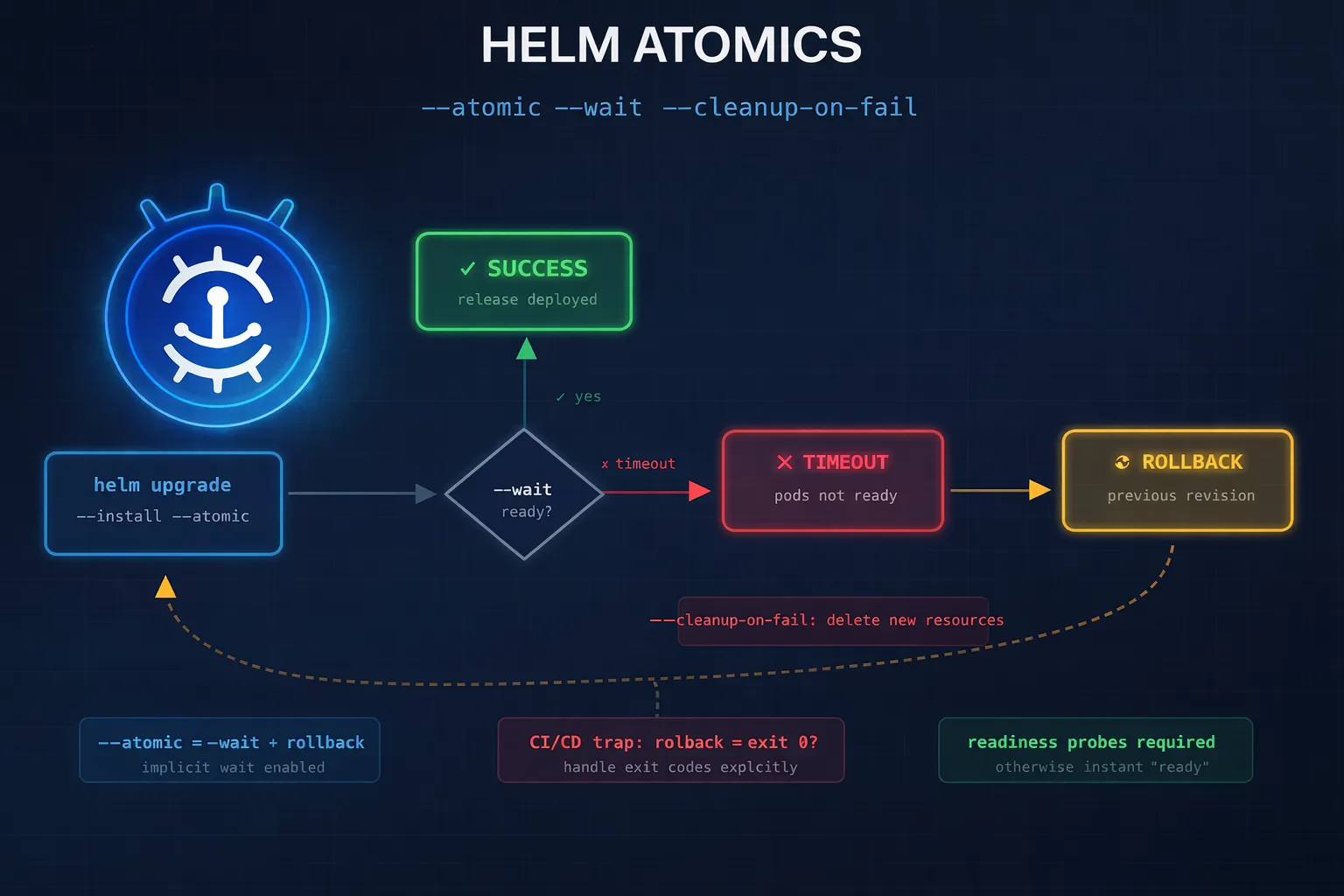
When you use --atomic, Helm implicitly enables --wait. Here’s what happens:
┌─────────────────────────────────────────────────────────────────┐
│                     helm upgrade --atomic                        │
├─────────────────────────────────────────────────────────────────┤
│  1. Apply manifests to cluster                                   │
│  2. Wait for resources to reach ready state (--wait implied)     │
│  3. If timeout exceeded OR readiness fails:                      │
│     ├─ On upgrade: rollback to previous revision                 │
│     └─ On install: delete/purge the release                      │
│  4. Return non-zero exit code on failure                         │
└─────────────────────────────────────────────────────────────────┘
The “ready state” check covers:
- Deployments: minimum replicas available, all pods passing readiness probes
- StatefulSets: all pods running and ready
- DaemonSets: desired number scheduled and ready
- Jobs: completed successfully
- PVCs: bound
- Services: endpoints populated
The Three Flags You Need to Understand
—wait
Waits for resources to become ready before marking the release as successful:
helm upgrade --install myapp ./chart --wait --timeout 5mIf the timeout is exceeded, the release is marked as failed, but no rollback occurs. You’re left with a broken deployment.
—atomic
Everything --wait does, plus automatic rollback on failure:
helm upgrade --install myapp ./chart --atomic --timeout 5mThis is almost always what you want. The implicit --wait is enabled automatically.
—cleanup-on-fail
Deletes new resources created during the upgrade if it fails:
helm upgrade --install myapp ./chart --atomic --cleanup-on-fail --timeout 5mThis is useful when your upgrade adds new resources (a new ConfigMap, a new Service) that shouldn’t persist if the upgrade fails. Without this flag, those orphaned resources remain in the cluster after rollback.
Important caveat: --cleanup-on-fail doesn’t automatically pass through to the rollback operation when used with --atomic. If the rollback itself fails, the cleanup won’t happen. This is a known edge case.
The CI/CD Pipeline Trap
Here’s the gotcha that catches everyone: --atomic can make your pipeline report success when it shouldn’t.
Consider this scenario:
- You run
helm upgrade --install --atomic - The deployment fails (pod crashloop)
- Helm automatically rolls back to the previous version
- The rollback succeeds
- Helm exits with exit code 0 (success)
Wait, what? The deployment failed, but Helm returned success?
Not quite – Helm does return a non-zero exit code when --atomic triggers a rollback. But many CI/CD systems don’t handle this correctly, or the error message gets buried in logs.
The real issue is visibility. Your pipeline log shows:
UPGRADE FAILED
Error: timed out waiting for the condition
ROLLING BACK
Rollback was a success.
Error: UPGRADE FAILED: timed out waiting for the condition
The final line has the error, but many engineers see “Rollback was a success” and assume everything is fine. It’s not – your new code never deployed.
The Fix: Explicit Rollback Handling
For critical pipelines, consider managing rollbacks explicitly rather than relying on --atomic:
#!/usr/bin/env bash
set -euo pipefail

RELEASE_NAME="${1:?Release name required}"
CHART_PATH="${2:?Chart path required}"
TIMEOUT="${3:-5m}"

# Upgrade with --wait but NOT --atomic
if helm upgrade --install "$RELEASE_NAME" "$CHART_PATH" \
    --wait \
    --timeout "$TIMEOUT" \
    --values values.yaml; then
  echo "✅ Deployment successful"
  exit 0
fi

# If we get here, deployment failed
echo "❌ Deployment failed. Initiating rollback..."

# Explicit rollback with visibility
if helm rollback "$RELEASE_NAME" 0 --wait --timeout "$TIMEOUT"; then
  echo "⚠️ Rollback completed. Deployment FAILED but cluster is stable."
  echo "ACTION REQUIRED: Investigate why deployment failed."
  exit 1  # Explicit failure – pipeline should show red
else
  echo "🚨 CRITICAL: Rollback also failed!"
  exit 2
fi
This script:
- Uses
--waitinstead of--atomicto detect failures - Handles rollback explicitly with clear messaging
- Always exits non-zero on deployment failure, even if rollback succeeds
- Distinguishes between “failed but rolled back” and “failed and rollback failed”
Production-Ready Helm Deployment Patterns
Pattern 1: Simple Atomic Deploy
For most use cases, this is sufficient:
helm upgrade --install myapp ./chart \
  --atomic \
  --timeout 10m \
  --namespace production \
  --values values-prod.yaml
Use this when:
- You trust your readiness probes
- Pipeline visibility isn’t critical
- You just want sensible defaults
Pattern 2: Atomic with Cleanup
Add --cleanup-on-fail when your chart might create new resources:
helm upgrade --install myapp ./chart \
  --atomic \
  --cleanup-on-fail \
  --timeout 10m \
  --namespace production \
  --values values-prod.yaml
Use this when:
- Your upgrade adds new CRDs, ConfigMaps, or Services
- You don’t want orphaned resources cluttering the cluster
- You’re doing significant chart changes, not just image bumps
Pattern 3: Controlled Rollback with Notification
For production systems where you need full visibility:
#!/usr/bin/env bash
set -uo pipefail

RELEASE="myapp"
NAMESPACE="production"
TIMEOUT="10m"

# Capture the pre-deploy revision for accurate rollback
PREVIOUS_REVISION=$(helm history "$RELEASE" -n "$NAMESPACE" -o json \
  | jq -r '[.[] | select(.status == "deployed")] | last | .revision // 0')

echo "Current revision: $PREVIOUS_REVISION"

# Deploy with wait (not atomic – we handle rollback ourselves)
if helm upgrade --install "$RELEASE" ./chart \
    --namespace "$NAMESPACE" \
    --wait \
    --timeout "$TIMEOUT" \
    --values values-prod.yaml 2>&1 | tee /tmp/helm-output.txt; then

  NEW_REVISION=$(helm history "$RELEASE" -n "$NAMESPACE" -o json \
    | jq -r '[.[] | select(.status == "deployed")] | last | .revision')

  echo "✅ Deployed revision $NEW_REVISION"

  # Notify success
  curl -X POST "$SLACK_WEBHOOK" -d "{
    \"text\": \"✅ $RELEASE deployed to $NAMESPACE (r$NEW_REVISION)\"
  }"
  exit 0
fi

# Deployment failed
echo "❌ Deployment failed"

# Capture error details before rollback cleans them up
FAILED_PODS=$(kubectl get pods -n "$NAMESPACE" -l "app.kubernetes.io/instance=$RELEASE" \
  --field-selector=status.phase!=Running -o name 2>/dev/null || true)

POD_EVENTS=""
for pod in $FAILED_PODS; do
  POD_EVENTS+=$(kubectl describe "$pod" -n "$NAMESPACE" 2>/dev/null | grep -A5 "Events:" || true)
done

# Rollback
if [[ "$PREVIOUS_REVISION" -gt 0 ]]; then
  echo "Rolling back to revision $PREVIOUS_REVISION..."
  helm rollback "$RELEASE" "$PREVIOUS_REVISION" \
    --namespace "$NAMESPACE" \
    --wait \
    --timeout "$TIMEOUT"
  ROLLBACK_STATUS=$?
else
  echo "No previous revision to rollback to. Uninstalling..."
  helm uninstall "$RELEASE" --namespace "$NAMESPACE"
  ROLLBACK_STATUS=$?
fi

# Notify failure with context
curl -X POST "$SLACK_WEBHOOK" -d "{
  \"text\": \"🚨 $RELEASE deployment FAILED in $NAMESPACE. Rolled back to r$PREVIOUS_REVISION.\n\nFailed pods: $FAILED_PODS\n\nEvents:\n\`\`\`$POD_EVENTS\`\`\`\"
}"

exit 1
This pattern:
- Captures the current revision before deploying
- Logs all output for debugging
- Captures pod events before rollback (critical – these get deleted otherwise)
- Sends rich Slack notifications with failure context
- Always exits non-zero on failure
Pattern 4: GitOps with Flux/ArgoCD
If you’re using GitOps, you configure atomic behaviour in the HelmRelease CRD:
# Flux HelmRelease
apiVersion: helm.toolkit.fluxcd.io/v2beta1
kind: HelmRelease
metadata:
  name: myapp
  namespace: production
spec:
  interval: 5m
  chart:
    spec:
      chart: ./chart
      sourceRef:
        kind: GitRepository
        name: myapp
  upgrade:
    remediation:
      retries: 3
      strategy: rollback
    cleanupOnFail: true
    timeout: 10m
  install:
    remediation:
      retries: 3
    timeout: 10m
Flux handles the rollback logic for you, with configurable retry strategies.
Timeout Calculation: The Maths Nobody Does
The --timeout flag is global across all resources in your chart. If you have:
- 3 Deployments with 2 replicas each
- 1 StatefulSet with 3 replicas
- 2 Jobs
All of these must become ready within the single timeout. This is different from Kubernetes’ progressDeadlineSeconds, which applies per-Deployment.
Rule of thumb: Set timeout to at least:
(max pods) × (readiness probe initialDelaySeconds + periodSeconds × failureThreshold) + bufferIf your readiness probe has:
readinessProbe:
  initialDelaySeconds: 10
  periodSeconds: 5
  failureThreshold: 3
And you’re deploying 6 pods, your minimum timeout should be:
6 × (10 + 5 × 3) + 60 = 6 × 25 + 60 = 210 seconds = ~4 minutesAdd more buffer for image pulls, scheduling delays, and slow startup. I typically use 10m for most production deploys.
Debugging —atomic Failures
When --atomic triggers a rollback, you lose visibility into what failed because the resources are cleaned up. Here’s how to debug:
1. Check Helm History
helm history myapp -n productionLook for failed status with the description:
REVISION  STATUS      DESCRIPTION
3         superseded  Upgrade complete
4         failed      Upgrade "myapp" failed: timed out waiting for the condition
5         deployed    Rollback to 3
2. Use —debug
Run the upgrade with --debug to see verbose output:
helm upgrade --install myapp ./chart --atomic --debug --timeout 5mThis shows exactly which resources Helm is waiting on.
3. Disable Atomic Temporarily
For debugging, remove --atomic and add --wait:
helm upgrade --install myapp ./chart --wait --timeout 5mThis leaves the failed resources in place so you can inspect them:
kubectl get pods -l app.kubernetes.io/instance=myapp
kubectl describe pod myapp-xxx-yyy
kubectl logs myapp-xxx-yyy
4. Pre-flight with —dry-run
Before deploying, validate your templates:
helm upgrade --install myapp ./chart --dry-run=server --debugThe --dry-run=server validates against the actual cluster (checking RBAC, quotas, etc.), while --dry-run=client only renders templates locally.
Common Mistakes
1. Forgetting —timeout
Without an explicit timeout, Helm uses the default of 5 minutes. This is often too short for:
- Large deployments
- Slow image pulls (especially first-time pulls)
- Applications with long startup times
Always set an explicit timeout.
2. Missing Readiness Probes
--atomic waits for pods to be “ready”. If your pods don’t have readiness probes, Kubernetes considers them ready as soon as the container starts – which defeats the purpose.
readinessProbe:
  httpGet:
    path: /healthz
    port: 8080
  initialDelaySeconds: 5
  periodSeconds: 5
  failureThreshold: 3
3. Using —force with —atomic
The --force flag deletes and recreates resources rather than updating them. This causes downtime and can interact badly with --atomic on StatefulSets:
# Don't do this in production
helm upgrade --install myapp ./chart --atomic --force
If you need to force recreation, do it deliberately with proper drainage and scheduling.
4. Ignoring CRD Timing
If your chart installs CRDs and resources that use those CRDs in the same release, --atomic can fail because the CRD isn’t registered before Helm tries to create the custom resource.
Solution: Use Helm hooks to control ordering, or split CRDs into a separate chart.
When NOT to Use —atomic
There are legitimate cases where --atomic isn’t appropriate:
- Development environments: You want to inspect failed states, not auto-rollback
- Initial CRD installation: CRDs might take time to register; let them fail and retry
- Canary deployments: You’re deliberately deploying a partial rollout
- Stateful migrations: Database migrations might fail transiently during scale-up
For these cases, use --wait without --atomic, or no wait flags at all.
TL;DR Recommendations
For production Helm deployments:
# Most deployments
helm upgrade --install myapp ./chart \
  --atomic \
  --cleanup-on-fail \
  --timeout 10m \
  --namespace production \
  --values values-prod.yaml
For critical systems, wrap in a script that:
- Captures the current revision
- Deploys with
--wait(not--atomic) - On failure, captures pod events before they’re deleted
- Rolls back explicitly
- Exits non-zero even if rollback succeeds
- Sends notifications with failure context
And always:
- Set readiness probes on all containers
- Calculate timeouts based on your actual startup times
- Test failure scenarios in staging before relying on
--atomicin production
Questions about Helm deployments? Drop a comment or find me on LinkedIn.