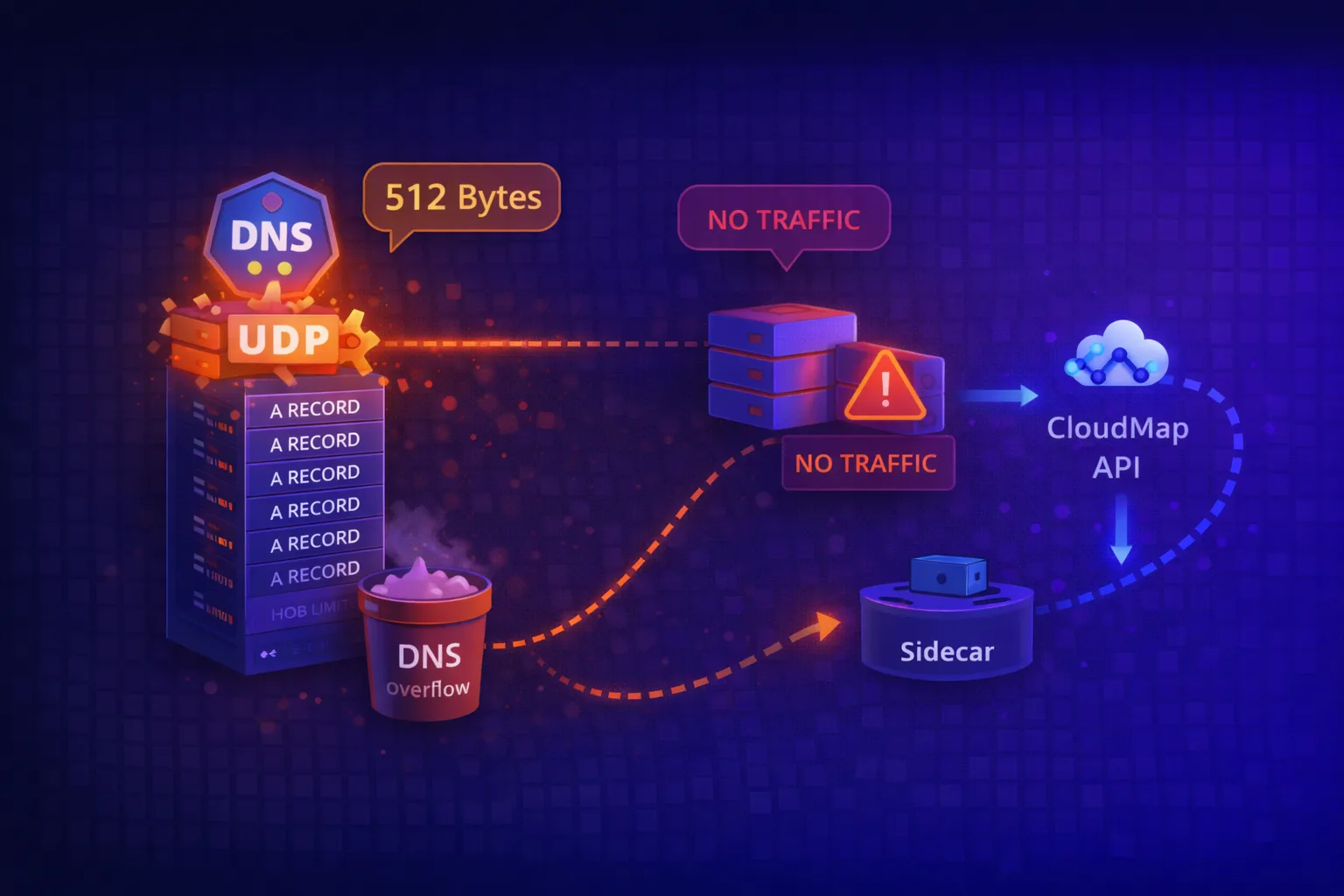
DNS UDP Truncation: Why Your ECS Tasks Aren’t Getting Traffic
When you scale horizontally – whether it’s ECS tasks, Kubernetes pods, or VMs behind a DNS-based load balancer – you assume all your instances are equally reachable. Traffic should distribute across them. That’s the point of scaling out.
Except sometimes it doesn’t. And the reason is a limitation baked into DNS itself that most engineers don’t hit until they’re debugging why 20% of their containers are sitting idle while the rest are overloaded.
I discovered this while working on a service mesh project using ECS and AWS CloudMap. We had services scaling to 10+ tasks, but only 8 were ever receiving traffic. The rest were ghosts – running, healthy, burning money, but completely invisible to clients.
The Problem: DNS Over UDP Has a Size Limit
By default, DNS uses UDP. It’s fast, stateless, and sufficient for most queries. But UDP has a hard constraint:
512 bytes maximum payload size (per RFC 1035).
For a DNS A-record response, that translates to roughly 8 IP addresses – depending on the domain name length and other metadata in the response.
If your DNS server has more records than fit in 512 bytes, it sets a TC (truncated) flag in the response, signalling that the full answer is available over TCP. The problem? Most DNS clients don’t retry over TCP. They just accept the truncated response.
This includes:
dig(by default)- Go’s
netresolver - Python’s
socket.gethostbyname - Most libc-based resolvers
- Kubernetes CoreDNS (in certain configurations)
Seeing It In Action
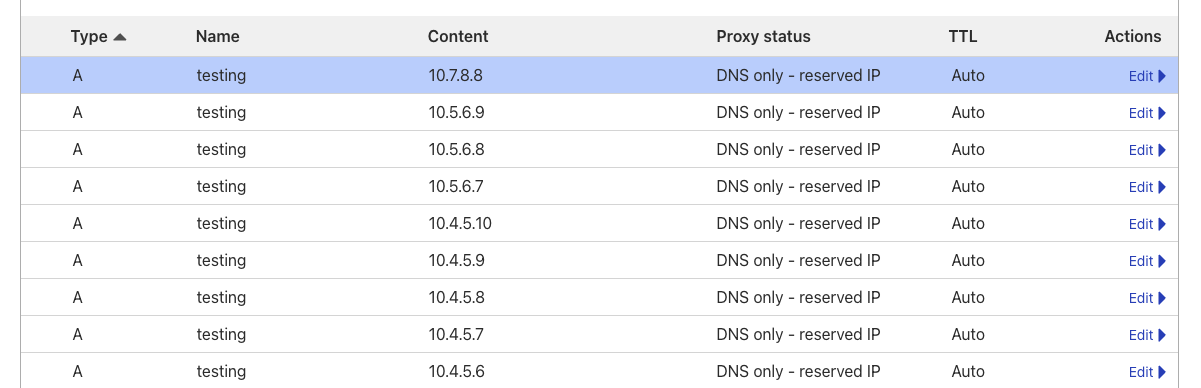
I’ve set up a test domain with 10 A records: testing.moabukar.co.uk
Looking at the DNS provider (Cloudflare), all 10 records are configured:
Now run a dig:
dig testing.moabukar.co.ukWe only get 8 IPs back:
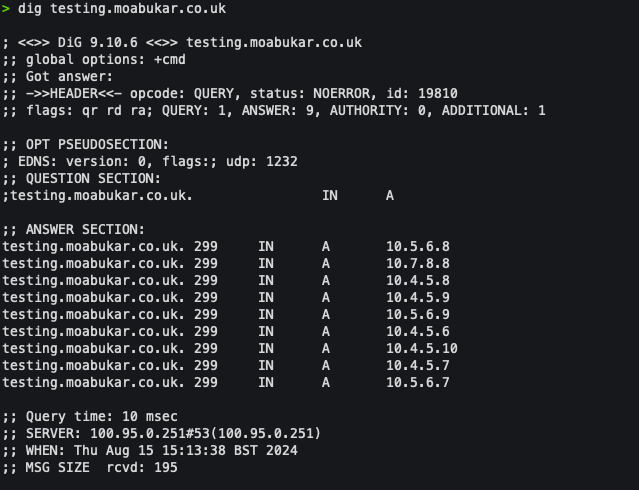
8 records. Not 10. Two IPs are missing entirely.
The DNS server rotates which 8 it returns (round-robin), so over time different IPs get excluded. But at any given moment, ~20% of your backends are unreachable via standard DNS resolution.
Why This Matters for ECS + CloudMap
AWS CloudMap provides service discovery for ECS. When you register a service, CloudMap creates DNS records in a private hosted zone (Route 53 under the hood). Your tasks register their IPs, and clients resolve the service name to get backend addresses.
The architecture looks clean on paper:
Client → DNS Query → CloudMap/Route53 → Returns task IPs → Client connectsBut CloudMap uses the same DNS protocol. Same UDP. Same 512-byte limit. Same 8-record ceiling.
If your ECS service scales beyond 8 tasks, some tasks will never appear in DNS responses. They’ll sit there, passing health checks, consuming Fargate capacity, but receiving zero traffic.
We discovered this when analysing traffic distribution across a service running 12 tasks. Metrics showed 8 tasks handling all requests while 4 were completely idle. The service was “scaled” but not actually distributing load.
The Fix: Bypass DNS Entirely
The fundamental issue is that DNS wasn’t designed for dynamic service discovery at scale. It’s a naming system, not a load balancer. Trying to use it for real-time instance discovery hits limitations quickly.
Our solution was to bypass DNS resolution and query CloudMap’s API directly.
CloudMap has a DiscoverInstances API that returns all registered instances – no UDP truncation, no 8-record limit. We built a sidecar container that:
- Polls CloudMap API periodically to get all registered IPs for services in the namespace
- Writes the complete IP list to a shared file or exposes it via a local endpoint
- Your application or proxy reads this instead of doing DNS lookups
The architecture:
┌─────────────────────────────────────────────────────┐
│ ECS Task                                            │
│  ┌──────────────┐    ┌──────────────────────────┐  │
│  │ Your App /   │◄───│  IP Discovery Sidecar    │  │
│  │ Proxy        │    │                          │  │
│  └──────┬───────┘    │  - Polls CloudMap API    │  │
│         │            │  - Writes IPs to file    │  │
│         ▼            │  - Updates on changes    │  │
│   Routes to ALL      └──────────────────────────┘  │
│   backend IPs                                       │
└─────────────────────────────────────────────────────┘
The Sidecar Implementation
The sidecar is straightforward – poll CloudMap, write results. Here’s a Node.js example, but this could be Go, Python, or a bash script with the AWS CLI:
const AWS = require('aws-sdk');
const fs = require('fs');
const path = require('path');

const servicediscovery = new AWS.ServiceDiscovery({ region: process.env.AWS_REGION });
const namespaceId = process.env.NAMESPACE_ID;
const outputPath = process.env.OUTPUT_PATH || '/shared/services.json';
const pollInterval = parseInt(process.env.POLL_INTERVAL_MS) || 10000;

async function discoverAllInstances() {
    // List all services in the namespace
    const servicesResponse = await servicediscovery.listServices({
        Filters: [{ Name: 'NAMESPACE_ID', Values: [namespaceId] }]
    }).promise();

    const result = {};

    for (const service of servicesResponse.Services) {
        // Get ALL instances for each service (no DNS truncation)
        const instances = await servicediscovery.discoverInstances({
            NamespaceName: process.env.NAMESPACE_NAME,
            ServiceName: service.Name,
            HealthStatus: 'HEALTHY'
        }).promise();

        result[service.Name] = instances.Instances.map(inst => ({
            ip: inst.Attributes.AWS_INSTANCE_IPV4,
            port: inst.Attributes.AWS_INSTANCE_PORT || '80'
        }));
    }

    return result;
}

async function updateServiceList() {
    try {
        const services = await discoverAllInstances();
        const content = JSON.stringify(services, null, 2);

        // Only write if changed
        const existing = fs.existsSync(outputPath) ? fs.readFileSync(outputPath, 'utf8') : '';
        if (content !== existing) {
            fs.writeFileSync(outputPath, content);
            console.log(`Updated: ${Object.keys(services).length} services, ${
                Object.values(services).flat().length
            } total instances`);
        }
    } catch (err) {
        console.error('Discovery failed:', err.message);
    }
}

// Initial run + polling
updateServiceList();
setInterval(updateServiceList, pollInterval);

console.log(`Polling CloudMap namespace ${namespaceId} every ${pollInterval}ms`);
The output file looks like:
{
  "api-service": [
    { "ip": "10.0.1.15", "port": "8080" },
    { "ip": "10.0.1.16", "port": "8080" },
    { "ip": "10.0.2.22", "port": "8080" },
    { "ip": "10.0.2.23", "port": "8080" },
    { "ip": "10.0.3.31", "port": "8080" },
    { "ip": "10.0.3.32", "port": "8080" },
    { "ip": "10.0.4.41", "port": "8080" },
    { "ip": "10.0.4.42", "port": "8080" },
    { "ip": "10.0.5.51", "port": "8080" },
    { "ip": "10.0.5.52", "port": "8080" }
  ]
}
All 10 IPs. No truncation.
ECS Task Definition
Both containers share a volume – the sidecar writes, your app reads:
{
  "family": "my-service",
  "containerDefinitions": [
    {
      "name": "app",
      "image": "your-app:latest",
      "portMappings": [{ "containerPort": 8080 }],
      "mountPoints": [
        { "sourceVolume": "shared-data", "containerPath": "/shared" }
      ],
      "dependsOn": [
        { "containerName": "ip-discovery", "condition": "START" }
      ]
    },
    {
      "name": "ip-discovery",
      "image": "your-registry/ip-discovery:latest",
      "essential": false,
      "environment": [
        { "name": "NAMESPACE_ID", "value": "ns-xxxxxxxxx" },
        { "name": "NAMESPACE_NAME", "value": "my-namespace" },
        { "name": "OUTPUT_PATH", "value": "/shared/services.json" },
        { "name": "POLL_INTERVAL_MS", "value": "10000" }
      ],
      "mountPoints": [
        { "sourceVolume": "shared-data", "containerPath": "/shared" }
      ]
    }
  ],
  "volumes": [
    { "name": "shared-data" }
  ]
}
How Your App Consumes This
Your application reads /shared/services.json instead of doing DNS lookups. Implementation depends on your stack:
Option 1: Direct file read (simple)
import json

def get_backends(service_name):
    with open('/shared/services.json') as f:
        services = json.load(f)
    return services.get(service_name, [])

# Returns all 10+ IPs, not just 8
backends = get_backends('api-service')
Option 2: File watcher with caching
import json
import time
from watchdog.observers import Observer
from watchdog.events import FileSystemEventHandler

class ServiceRegistry:
    def __init__(self, path='/shared/services.json'):
        self.path = path
        self.services = {}
        self._load()
        self._watch()

    def _load(self):
        try:
            with open(self.path) as f:
                self.services = json.load(f)
        except FileNotFoundError:
            self.services = {}

    def _watch(self):
        # Set up file watcher to reload on changes
        # ... watchdog implementation
        pass

    def get_backends(self, service_name):
        return self.services.get(service_name, [])
Option 3: Sidecar exposes HTTP endpoint
Instead of writing to a file, the sidecar can expose an HTTP endpoint:
const express = require('express');
const app = express();

let currentServices = {};

app.get('/services', (req, res) => res.json(currentServices));
app.get('/services/:name', (req, res) => {
    res.json(currentServices[req.params.name] || []);
});

app.listen(8081, () => console.log('Service registry on :8081'));

// Update currentServices from CloudMap polling...
Your app queries http://localhost:8081/services/api-service for the full backend list.
Option 4: Feed into your existing proxy
If you’re running NGINX, HAProxy, Envoy, or similar, the sidecar can write config files in the format your proxy expects, then trigger a reload. The proxy handles the actual load balancing.
Results
After deploying the sidecar solution:
- All tasks receive traffic – no more idle containers
- Scaling works as expected – add tasks, they’re discovered within seconds
- No DNS dependency – immune to UDP truncation, TTL caching issues, resolver quirks
- Cost savings – stopped paying for containers that weren’t doing anything
The polling interval is tuneable. 10 seconds works for most workloads. For faster task churn, drop it to 5 seconds. The CloudMap API can handle it.
Alternative Approaches
The sidecar pattern worked for our use case, but there are other ways to tackle this:
1. Use TCP DNS explicitly
dig +tcp testing.moabukar.co.ukReturns all records. But most application-level resolvers don’t support forcing TCP, and it adds latency.
2. EDNS0 (Extended DNS)
EDNS0 allows larger UDP payloads (up to 4096 bytes). Some resolvers support it:
dig +bufsize=4096 testing.moabukar.co.ukBut it requires both client and server support, and many corporate networks/firewalls strip EDNS0 options.
3. Use a proper load balancer
Put an ALB/NLB in front of your tasks and let AWS handle discovery. Works, but adds cost and another hop.
4. Service mesh (App Mesh, Consul Connect)
Full-featured solution but significant complexity overhead if you just need basic discovery.
5. Kubernetes with kube-proxy
If you’re on EKS, ClusterIP services avoid DNS-based discovery entirely – kube-proxy handles the routing. But for headless services or StatefulSets doing direct DNS lookups, the same 8-record limit applies.
Key Takeaways
- DNS over UDP caps responses at ~8 A records – this is a protocol limitation, not a misconfiguration
- CloudMap/Route53 inherits this limitation – even though the backend stores all your IPs
- Scaling beyond 8 tasks with DNS-based discovery means wasted resources – some containers will never receive traffic
- The fix is to bypass DNS – query the service registry API directly, use a service mesh, or put a load balancer in front
- Always verify traffic distribution after scaling – metrics don’t lie, even when DNS does
If you’re running containerised workloads at scale and relying on DNS for service discovery, audit your task counts. If you’re over 8, you’ve probably got idle containers burning money right now.
Hit this limitation yourself or found a different workaround? I’d like to hear about it – find me on LinkedIn.