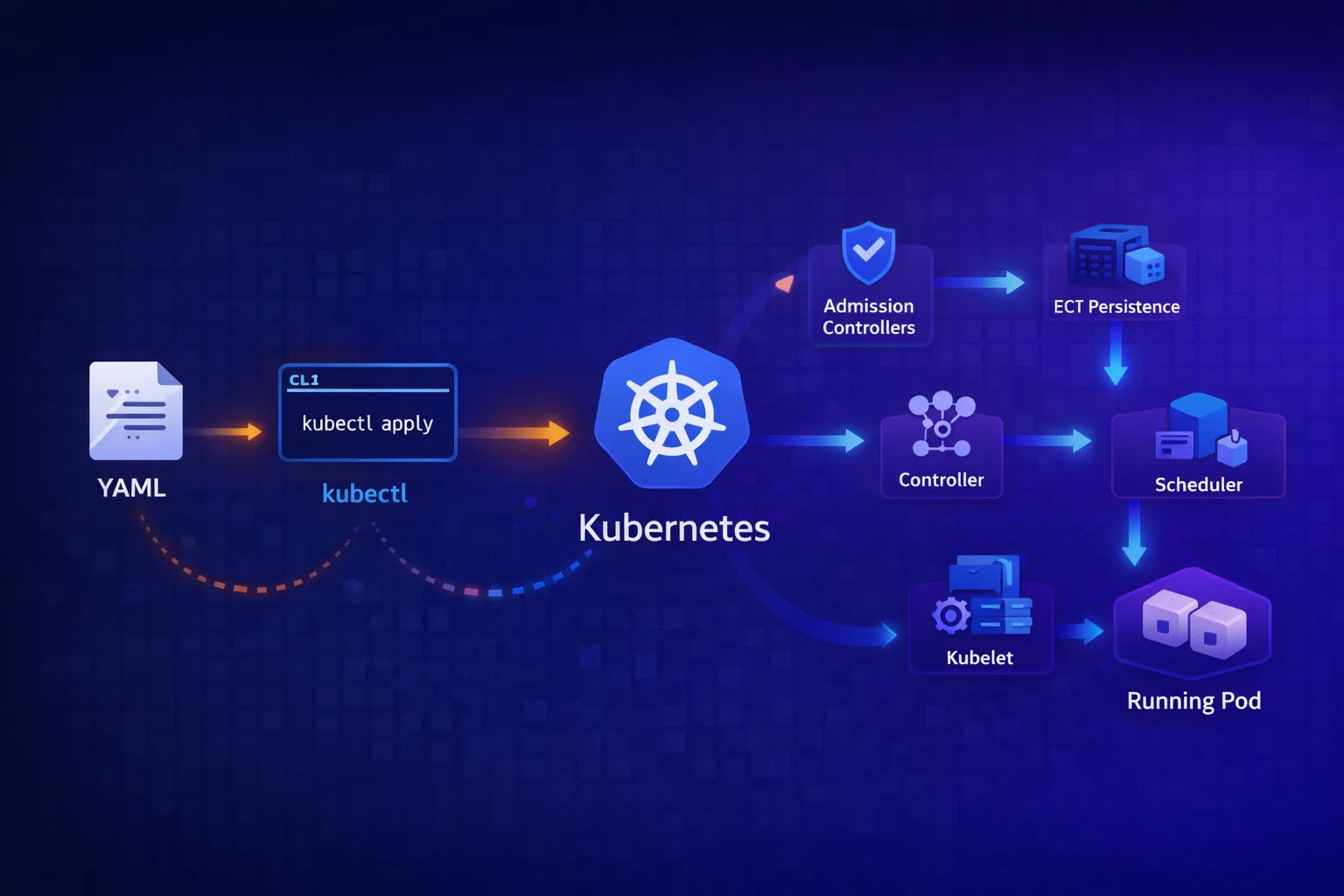
TL;DR
kubectl applysends a PATCH request to the API server, not a PUT – the merge strategy matters- Client-side apply uses a 3-way merge (local file, last-applied annotation, live state); server-side apply tracks field ownership per manager
- The API server validates, runs admission controllers, and persists to etcd – then returns success
- At this point, nothing is running yet – you’ve only declared intent
- Controllers watch etcd via the API server, detect drift, and create/modify resources
- The scheduler assigns pods to nodes; kubelet on that node actually starts containers
- The whole system is eventually consistent –
kubectl applysucceeding doesn’t mean your pod is running
The Mental Model
When you run kubectl apply -f deployment.yaml, you’re not “deploying” anything. You’re submitting a declaration of intent to a database. The Kubernetes control plane then works asynchronously to make reality match that intent.
This distinction matters because:
kubectl applycan succeed while your pod fails to start- The API server doesn’t know or care if your image exists
- Your deployment might take minutes to fully reconcile
- Errors can appear long after
kubectlhas exited
Let’s trace the full path.
Phase 1: Client-Side Processing
kubeconfig Resolution
Before anything hits the network, kubectl needs to know where to send the request:
# kubectl checks these in order:
# 1. --kubeconfig flag
# 2. $KUBECONFIG environment variable
# 3. ~/.kube/config

kubectl config view --minify  # Shows active context
The kubeconfig contains:
- Cluster: API server URL and CA certificate
- User: Authentication credentials (client cert, token, exec plugin)
- Context: Binds a user to a cluster and namespace
YAML Parsing and Validation
kubectl parses your YAML and performs client-side validation:
# See what kubectl will send (without sending it)
kubectl apply -f deployment.yaml --dry-run=client -o yaml
This catches:
- Malformed YAML
- Missing required fields (apiVersion, kind, metadata.name)
- Type mismatches (string where int expected)
But it doesn’t catch:
- Invalid image references
- Non-existent namespaces
- RBAC violations
- Admission controller rejections
Client-Side Apply: The 3-Way Merge
By default, kubectl apply uses client-side apply. Here’s what happens:
┌─────────────────────────────────────────────────────────────────────┐
│                     Client-Side Apply (Default)                      │
├─────────────────────────────────────────────────────────────────────┤
│  1. Fetch live resource from API server                              │
│  2. Read last-applied-configuration annotation from live resource    │
│  3. Compare: local file vs last-applied vs live state                │
│  4. Calculate strategic merge patch                                  │
│  5. Send PATCH request to API server                                 │
│  6. Update last-applied-configuration annotation                     │
└─────────────────────────────────────────────────────────────────────┘
The 3-way merge is crucial. It allows kubectl to distinguish between:
- Fields you’ve removed from your YAML (should be deleted)
- Fields that were added by controllers (should be preserved)
- Fields you’ve never managed (should be ignored)
# The annotation that makes this work
metadata:
  annotations:
    kubectl.kubernetes.io/last-applied-configuration: |
      {"apiVersion":"apps/v1","kind":"Deployment",...}
Server-Side Apply: The Modern Alternative
Since Kubernetes 1.22, you can use server-side apply:
kubectl apply -f deployment.yaml --server-sideThe key differences:
| Aspect | Client-Side Apply | Server-Side Apply |
|---|---|---|
| Merge location | kubectl binary | API server |
| Conflict detection | Last-applied annotation | Field managers |
| Multi-actor safety | Poor (silent overwrites) | Good (explicit conflicts) |
| Dry-run accuracy | Approximate | Exact (runs admission) |
Server-side apply tracks field ownership:
metadata:
  managedFields:
  - manager: kubectl
    operation: Apply
    apiVersion: apps/v1
    time: "2026-01-20T10:00:00Z"
    fieldsType: FieldsV1
    fieldsV1:
      f:spec:
        f:replicas: {}
        f:template:
          f:spec:
            f:containers: {}
If two managers try to modify the same field, server-side apply returns a conflict:
error: Apply failed with 1 conflict: conflict with "kubectl" using apps/v1:
  .spec.replicas
You can force the change with --force-conflicts, or fix the underlying issue (usually HPA fighting with your deployment manifest over replicas).
Phase 2: API Server Processing
The request leaves kubectl and hits the API server. Here’s the chain:
┌─────────────────────────────────────────────────────────────────────┐
│                        API Server Pipeline                           │
├─────────────────────────────────────────────────────────────────────┤
│                                                                      │
│  ┌──────────────┐                                                    │
│  │ TLS Termination │                                                 │
│  └───────┬──────┘                                                    │
│          ▼                                                           │
│  ┌──────────────┐                                                    │
│  │ Authentication │  ← Who are you? (certs, tokens, OIDC)            │
│  └───────┬──────┘                                                    │
│          ▼                                                           │
│  ┌──────────────┐                                                    │
│  │ Authorization │  ← Can you do this? (RBAC, ABAC, Webhook)         │
│  └───────┬──────┘                                                    │
│          ▼                                                           │
│  ┌──────────────────────┐                                            │
│  │ Mutating Admission   │  ← Modify the request (inject sidecars,    │
│  │ Controllers          │     set defaults, add labels)              │
│  └───────┬──────────────┘                                            │
│          ▼                                                           │
│  ┌──────────────────────┐                                            │
│  │ Schema Validation    │  ← Does this match the OpenAPI spec?       │
│  └───────┬──────────────┘                                            │
│          ▼                                                           │
│  ┌──────────────────────┐                                            │
│  │ Validating Admission │  ← Should we allow this? (policies,        │
│  │ Controllers          │     quotas, security checks)               │
│  └───────┬──────────────┘                                            │
│          ▼                                                           │
│  ┌──────────────┐                                                    │
│  │ etcd Write   │  ← Persist to distributed key-value store          │
│  └──────────────┘                                                    │
│                                                                      │
└─────────────────────────────────────────────────────────────────────┘
Authentication
The API server verifies identity using one or more methods:
# Client certificate (most common for kubectl)
--client-certificate=/path/to/cert.pem
--client-key=/path/to/key.pem

# Bearer token (common for service accounts)
Authorization: Bearer eyJhbGciOiJSUzI1NiIsInR5cCI6IkpXVCJ9...

# OIDC (common for human users)
--oidc-issuer-url=https://accounts.google.com
--oidc-client-id=kubernetes
Authentication determines who you are, not what you can do.
Authorization (RBAC)
RBAC checks if the authenticated user can perform this action:
# Can user "mo" create deployments in namespace "production"?
apiVersion: rbac.authorization.k8s.io/v1
kind: Role
metadata:
  namespace: production
  name: deployment-admin
rules:
- apiGroups: ["apps"]
  resources: ["deployments"]
  verbs: ["get", "list", "watch", "create", "update", "patch", "delete"]
---
apiVersion: rbac.authorization.k8s.io/v1
kind: RoleBinding
metadata:
  name: mo-deployment-admin
  namespace: production
subjects:
- kind: User
  name: mo
  apiGroup: rbac.authorization.k8s.io
roleRef:
  kind: Role
  name: deployment-admin
  apiGroup: rbac.authorization.k8s.io
If RBAC denies the request:
Error from server (Forbidden): deployments.apps is forbidden:
  User "mo" cannot create resource "deployments" in API group "apps"
  in the namespace "production"
Mutating Admission Controllers
These modify the request before validation. Common examples:
| Controller | What It Does |
|---|---|
DefaultStorageClass | Adds default storage class to PVCs |
DefaultTolerationSeconds | Adds default tolerations for taints |
LimitRanger | Applies default resource requests/limits |
ServiceAccount | Mounts service account token |
PodPreset (deprecated) | Injected env vars, volumes |
And webhook-based mutators:
# Istio sidecar injection – mutates your Pod to add envoy
apiVersion: admissionregistration.k8s.io/v1
kind: MutatingWebhookConfiguration
metadata:
  name: istio-sidecar-injector
webhooks:
- name: sidecar-injector.istio.io
  clientConfig:
    service:
      name: istiod
      namespace: istio-system
      path: /inject
  rules:
  - operations: ["CREATE"]
    apiGroups: [""]
    apiVersions: ["v1"]
    resources: ["pods"]
This is why a Pod you submitted with one container ends up with two – the mutating webhook added the sidecar.
Schema Validation
The API server validates your resource against the OpenAPI schema:
# See the schema for a resource
kubectl explain deployment.spec.replicas
# KIND:     Deployment
# VERSION:  apps/v1
# FIELD:    replicas <integer>
# DESCRIPTION:
#      Number of desired pods.
This catches type errors, unknown fields (with strict validation), and structural issues.
Validating Admission Controllers
These can reject requests but not modify them:
| Controller | What It Does |
|---|---|
NamespaceLifecycle | Prevents operations in terminating namespaces |
ResourceQuota | Enforces quota limits |
PodSecurity | Enforces pod security standards |
ValidatingAdmissionWebhook | Custom policy enforcement |
Example: Kyverno policy validation
apiVersion: kyverno.io/v1
kind: ClusterPolicy
metadata:
  name: require-labels
spec:
  validationFailureAction: Enforce
  rules:
  - name: check-team-label
    match:
      resources:
        kinds:
        - Deployment
    validate:
      message: "The label 'team' is required."
      pattern:
        metadata:
          labels:
            team: "?*"
If your deployment lacks the team label:
Error from server: error when creating "deployment.yaml":
  admission webhook "validate.kyverno.svc" denied the request:
  resource Deployment/default/nginx was blocked due to the following policies:
  require-labels:
    check-team-label: 'validation error: The label ''team'' is required.'
etcd Persistence
If all checks pass, the API server writes to etcd:
# Conceptual etcd key structure
/registry/deployments/default/nginx
/registry/pods/default/nginx-abc123
/registry/replicasets/default/nginx-5d4c6f7b8
etcd is:
- A distributed key-value store
- The single source of truth for cluster state
- Where your “declaration of intent” becomes durable
At this point, kubectl apply returns success. But nothing is running yet.
Phase 3: Controller Reconciliation
Controllers watch the API server for changes and reconcile state.
The Watch Mechanism
Controllers don’t poll. They use watch – a streaming connection that pushes changes:
// Simplified controller loop
func (c *DeploymentController) Run() {
    for {
        // 1. Watch for Deployment changes
        event := <-c.watchChannel

        // 2. Get desired state
        deployment := event.Object
        desiredReplicas := deployment.Spec.Replicas

        // 3. Get actual state
        replicaSets := c.listReplicaSets(deployment)
        actualReplicas := countReadyPods(replicaSets)

        // 4. Reconcile
        if actualReplicas < desiredReplicas {
            c.scaleUp(deployment, desiredReplicas - actualReplicas)
        } else if actualReplicas > desiredReplicas {
            c.scaleDown(deployment, actualReplicas - desiredReplicas)
        }
    }
}
The Deployment Controller Chain
When you apply a Deployment, multiple controllers react:
┌─────────────────────────────────────────────────────────────────────┐
│                     Controller Chain                                 │
├─────────────────────────────────────────────────────────────────────┤
│                                                                      │
│  You apply: Deployment                                               │
│       │                                                              │
│       ▼                                                              │
│  Deployment Controller                                               │
│       │ Creates/updates ReplicaSet                                   │
│       ▼                                                              │
│  ReplicaSet Controller                                               │
│       │ Creates Pod objects                                          │
│       ▼                                                              │
│  Scheduler                                                           │
│       │ Assigns Pods to Nodes (sets spec.nodeName)                   │
│       ▼                                                              │
│  Kubelet (on assigned node)                                          │
│       │ Creates actual containers                                    │
│       ▼                                                              │
│  Container Runtime (containerd/CRI-O)                                │
│       │ Pulls image, starts process                                  │
│       ▼                                                              │
│  Running container                                                   │
│                                                                      │
└─────────────────────────────────────────────────────────────────────┘
Each controller only cares about its level of abstraction:
- Deployment controller: “I need this ReplicaSet to exist”
- ReplicaSet controller: “I need this many Pod objects”
- Scheduler: “This Pod needs a node”
- Kubelet: “I need this container running on my node”
Phase 4: Scheduling
The scheduler watches for Pods with no spec.nodeName and assigns them to nodes.
Scheduling Algorithm
┌─────────────────────────────────────────────────────────────────────┐
│                     Scheduler Pipeline                               │
├─────────────────────────────────────────────────────────────────────┤
│                                                                      │
│  1. Filtering (which nodes CAN run this Pod?)                        │
│     ├─ NodeSelector matches?                                         │
│     ├─ Tolerations match taints?                                     │
│     ├─ Sufficient CPU/memory?                                        │
│     ├─ PV availability?                                              │
│     ├─ Node affinity rules?                                          │
│     └─ Pod anti-affinity satisfied?                                  │
│                                                                      │
│  2. Scoring (which node is BEST?)                                    │
│     ├─ LeastRequestedPriority (spread load)                          │
│     ├─ BalancedResourceAllocation                                    │
│     ├─ NodeAffinityPriority                                          │
│     ├─ PodAffinityPriority                                           │
│     └─ ImageLocalityPriority (image already cached)                  │
│                                                                      │
│  3. Binding (assign Pod to winning node)                             │
│     └─ PATCH pod with spec.nodeName = selected-node                  │
│                                                                      │
└─────────────────────────────────────────────────────────────────────┘
If no node passes filtering:
Warning  FailedScheduling  pod/nginx-abc123  0/3 nodes are available:
  1 node(s) had taint {node-role.kubernetes.io/control-plane: },
  that the pod didn't tolerate,
  2 node(s) didn't match pod anti-affinity rules.
The scheduler doesn’t create containers. It just updates the Pod object:
# Before scheduling
spec:
  nodeName: ""  # empty

# After scheduling
spec:
  nodeName: "worker-node-1"
Phase 5: Kubelet Execution
The kubelet on each node watches for Pods assigned to it.
Container Creation
┌─────────────────────────────────────────────────────────────────────┐
│                     Kubelet Processing                               │
├─────────────────────────────────────────────────────────────────────┤
│                                                                      │
│  1. Detect new Pod assigned to this node                             │
│  2. Pull image (if not cached)                                       │
│  3. Create sandbox (pause container for network namespace)           │
│  4. Configure CNI networking                                         │
│  5. Mount volumes                                                    │
│  6. Create application containers                                    │
│  7. Run startup/liveness/readiness probes                            │
│  8. Report status back to API server                                 │
│                                                                      │
└─────────────────────────────────────────────────────────────────────┘
The kubelet talks to the container runtime via CRI (Container Runtime Interface):
# Kubelet → containerd → containers
kubelet --container-runtime-endpoint=unix:///run/containerd/containerd.sock
Status Reporting
The kubelet continuously reports Pod status:
status:
  phase: Running
  conditions:
  - type: Ready
    status: "True"
  - type: ContainersReady
    status: "True"
  containerStatuses:
  - name: nginx
    state:
      running:
        startedAt: "2026-01-20T10:00:05Z"
    ready: true
    restartCount: 0
    image: nginx:1.25
    imageID: "docker.io/library/nginx@sha256:abc123..."
The Full Timeline
For a simple Deployment, here’s a realistic timeline:
| Time | Event |
|---|---|
| T+0ms | kubectl apply sends PATCH request |
| T+5ms | API server authenticates, authorizes |
| T+10ms | Mutating webhooks run (sidecar injection, etc.) |
| T+15ms | Validating webhooks run |
| T+20ms | Object written to etcd |
| T+25ms | kubectl returns “deployment.apps/nginx configured” |
| T+50ms | Deployment controller sees change, creates ReplicaSet |
| T+100ms | ReplicaSet controller creates Pod objects |
| T+150ms | Scheduler assigns Pods to nodes |
| T+200ms | Kubelet on node detects new Pod |
| T+500ms | Image pull starts (if not cached) |
| T+5000ms | Image pull completes (varies wildly) |
| T+5100ms | Container starts |
| T+5500ms | Readiness probe passes |
| T+5500ms | Pod marked Ready |
That’s a 5+ second gap between kubectl returning and your Pod being ready. On first deployment with cold image caches, it can be minutes.
Debugging the Chain
Check Each Phase
# 1. Did the API server accept it?
kubectl apply -f deployment.yaml
# deployment.apps/nginx configured ← Success at API level

# 2. What did admission controllers do?
kubectl get deployment nginx -o yaml | grep -A5 "annotations:"
# Check for injected sidecars, modified fields

# 3. Did the controller create child resources?
kubectl get replicaset -l app=nginx
kubectl get pods -l app=nginx

# 4. Is the pod scheduled?
kubectl get pod nginx-abc123 -o jsonpath='{.spec.nodeName}'
# Empty = not yet scheduled

# 5. What's the pod status?
kubectl describe pod nginx-abc123
# Events section shows the full history

# 6. Kubelet logs on the node
journalctl -u kubelet -f --grep="nginx"
Common Failure Points
| Symptom | Phase | Cause |
|---|---|---|
| ”Forbidden” error | Authorization | Missing RBAC |
| ”admission webhook denied” | Admission | Policy violation |
| Pod stuck in Pending | Scheduling | No suitable nodes |
| Pod stuck in ContainerCreating | Kubelet | Image pull, volume mount |
| Pod in CrashLoopBackOff | Runtime | Application crash |
| Pod Running but not Ready | Probes | Readiness probe failing |
What kubectl apply Doesn’t Tell You
The kubectl apply command returns success when etcd accepts the write. It doesn’t wait for:
- Controllers to reconcile
- Pods to be scheduled
- Containers to start
- Probes to pass
- Traffic to flow
For production deploys, use additional checks:
# Wait for rollout to complete
kubectl rollout status deployment/nginx --timeout=5m

# Watch pods come up
kubectl get pods -l app=nginx -w

# Check events for issues
kubectl get events --sort-by='.lastTimestamp' | tail -20
Or use Helm with --atomic --wait (as covered in my previous post).
Conclusion
When you kubectl apply:
- kubectl parses YAML, calculates a patch, sends to API server
- API server authenticates, authorizes, mutates, validates, persists to etcd
- etcd stores your declaration of intent –
kubectlreturns here - Controllers watch for changes, reconcile state, create child resources
- Scheduler assigns Pods to nodes
- Kubelet pulls images, creates containers, reports status
Understanding this chain helps you:
- Debug deployments that “succeed” but don’t work
- Know where to look when pods don’t start
- Appreciate why Kubernetes is eventually consistent
- Build proper CI/CD with appropriate wait conditions
The gap between “API server accepted it” and “it’s actually running” is where most production incidents hide.
References
- Kubernetes API Server
- Admission Controllers
- Server-Side Apply KEP-555
- Strategic Merge Patch
- Scheduler Framework
- Kubelet
Found this useful? Find me on LinkedIn or check out more deep dives on the CoderCo blog.